
Top 10 eLearning Content Development Companies for 2014. The Top 10 eLearning content development companies for 2014 were selected based on the following 7 criteria: eLearning Content Development QualityeLearning ExpertiseeLearning Industry InnovationeLearning Company’s Economical Growth PotentialCustomer RetentionEmployee TurnoverCompany’s Social Responsibility Nonetheless, it is important to highlight that you need to make further your own research in order to choose the company that will better serve your needs and preferences.

Hence, I suggest you to visit and review the official sites of each eLearning content development company to get the full picture of the Top 10 eLearning Content Development Companies’ services. 1. SweetRush SweetRush is about 100 people strong, been in business since 2001, and, similar to most companies in the industry, is comprised of instructional designers (of various flavors), creative multimedia developers, project and program managers, solution architects, and engineers. 2. 3. 4. 5. 20 years ago Michael W. 6. Scenari - Opale. 29 Free eLearning Tools. The world is awash in “free” these days.
“Free” consultations, “free” samples, “free” eBooks; they’re everywhere. Some of them are genuinely free, but many are just “free” and you don’t realize until it’s too late that they’re “free with the purchase of…” or “free for two weeks if you input a credit card first.” I’m a simple guy. I like my “free” things to be free, period. In the spirit of free, and not “free” I’ve put together a list of the best free tools you can use specifically for eLearning functions (for instance, I’m not a fan of saying Skype counts as a dedicated eLearning tool just because you can do face-to-face classes with it).
Speach.Me : Et si n’importe quel salarié pouvait créer son Mooc ? Using Consequence-based Learning in E-learning Courses. In life, everything we do or say will have consequences.
Sometimes, expericence is the best teacher and the most effective tool at her disposal is consequences. Each time we experience something, we learn from its consequences – whether good or bad, desirable or undesirable. Often, the lessons learnt through consequences are hard to forget and abide with us all through our lives. This profound truth set me thinking about its relevance to eLearning courses. SCORM vs Tin Can. SCORM is the most widely used e-learning standard.
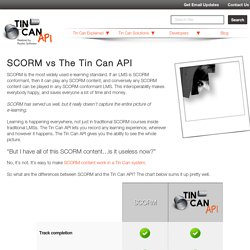
If an LMS is SCORM conformant, then it can play any SCORM content, and conversely any SCORM content can be played in any SCORM conformant LMS. This interoperability makes everybody happy, and saves everyone a lot of time and money. Théories de l'apprentissage - © DESTE. Crash course in learning theory. « If pets could design user experiences... | Main | Crash Course in Learning Summary » Crash course in learning theory One formula (of many) for a successful blog is to create a "learning blog".

Sign Up. Scenarios-Branching-Storytelling-Gaming. Appropriations Law A US Government Agency Policies and procedures training Learners must apply procurement law policies in various scenarios.
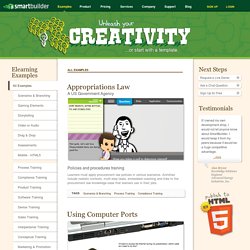
Activities include realistic contexts, multi-step tasks, embedded coaching and links to the procurement law knowledge base that learners use in their jobs. What-people-love-and-hate-about-elearning.php?utm_content=buffera8059&utm_medium=social&utm_source=twitter. Stop Creating Uninspiring eLearning – It’s Driving Your Learners Away! Presentation with SKyp or any Webinar S/w can be perfect by iStudio. OEB 2014.
David Anderson sur Twitter : "What can you build w/ 10 FREE #elearning game templates? 10 Free E-Learning Games Templates. Future of E-learning in Universities. 19 Free Text To Speech tools for Educators. Learning Management Systems Comparison Checklist of Features. Benoit Porlier - Animated Resume by benoit porlier on Prezi. 5 Awesome Authoring Tools - Video Maker Tips. Interactivity is at the heart of today’s best e-learning content; the days of passively reading plain text on a page are fading away.
Educators need to keep learners stimulated through deeper engagement, and requiring users to interact with material enriches the experience and reinforces the lessons at hand. Interactive training material can be created without much technical know-how thanks to authoring tools – software that enables the building and packaging of e-learning content. When it comes to selecting an authoring tool, consider what software is best suited to building a particular course, and how its features can be harnessed to get the job done and meet learning objectives. Ask yourself: Is it easy to use? For starters, here are five great authoring tools that don’t require a wealth of technical knowledge to use. Free and Open Source Authoring Tools for e-Learning. As an e-Learning consultant I was always a fan of open source software.
Why? The answer is simple. Because I could use them as I wish, for whatever I wish, without long-term commitments and with the extra bonus of a community of professionals that use, extend and support them. Damien Bruyndonckx – Adobe Certified Instructor. - 10 Tips and tricks to jump start your Captivate 6 experience. How To Get Your Learners to Remember More. Everyone wants to build good elearning courses, whether for sharing new information or changing workplace behaviors.

While not all elearning objectives are the same, there are things you can do in your course design that help your learners recall the information and use it in the real world. To do this, you need to understand how the learner’s brain processes the elearning course content. In this post, we’ll do a quick overview of cognitive learning theory and how it relates to your elearning courses. Articulate Storyline Review. Storyline is the new tool from Articulate, the company that brought you (and us) Articulate Studio ’09 – which bundles Presenter ’09, Quizmaker ’09, and Engage ’09.
These are tools that many of our clients use every day. So: Storyline. What is it? E-Learning...as Easy as Pie. E-Learning...as Easy as Pie Posted by Ethan Edwards on Wed, Nov 21, 2012 Ethan Edwards, chief instructional strategist Some of you may be surprised to learn that I am a pie maker. In fact, for a few years I had a small home-based pie baking business. In the Future, Who Will Need Teachers? Sign In. Modules e-Learning : comment obtenir un reporting utile ? Review: Adobe Captivate 6. The team over at Adobe has recently released the latest version of Adobe Captivate. With the recent release of Articulate Storyline, does Captivate come with enough new features to keep pace with the latest tool from the team over at Articulate?
Read on to find out. Overview Adobe Captivate has long been considered by many to be the industry standard for many ELearning projects. I personally have used it since it was RoboDemo; to create everything from brief tutorials, sales demos, interactive software training and complete ELearning modules. It is this versatility that has made Captivate one of the most popular rapid ELearning development tools (and a must have in most ELearning developer’s toolbox).
After launching Capitvate 6, the first thing you will notice is that the User Interface of Captivate 6 received a slight refresh. Themes Captivate 6 comes with 10 themes that are ready to use out of the box. Review: Articulate Storyline. A New Option for Rapid ELearning Development The team over at Articulate, the makers of Presenter, Quizmaker and Engage have recently released their newest offering, Articulate Storyline. I’ve been a big fan of the Articulate Suite of products (My favorite tools are Adobe Captivate combined with Articulate Presenter). After using it for a few weeks, I will have to say that Articulate has another winner to add to their stable of ELearning software. How to Choose Between Captivate and Storyline. A few months ago, Articulate released Storyline, and in my opinion, it is the first Rapid ELearning development tool that provides a worthy alternative to Captivate.
Both tools allow you to capture video, create demo/simulations, create quizzes/assessments and create scenario based content. The question that I have heard a lot lately is, “Which tool do I choose, Captivate or Storyline?!” My answer is, “It depends”. My goal in this post is not to tell you which tool I think you should use, but rather provide you with points you can take into consideration that might help you decide for yourself which tool is the best choice for your particular needs. If you have looked at the content of my site, it probably comes as no shock to you that my two tools of choice for ELearning development are Adobe Captivate and Articulate Storyline. SERVQUAL. Badri,Masood A. ;Abdulla,Mohamed;Al-Madani,Abdelwahab, “Information technology center service quality”, International Journal of Quality & Reliability Management, 2005, 22, 8, 819-848. Carr,Christopher L., “A Psychometric Evaluation of the Expectations, Perceptions, and Difference-Scores Generated by the IS-Adapted SERVQUAL Instrument", Decision Sciences, 2002, 33, 2, 281-296.
Devaraj,Sarv;Fan,Ming;Kohli,Rejiv, “Antecedents of B2C channel satisfaction and preference: Validation e-Commerce metrics", Information Systems Research, 2002, 13, 3, 316-333. Tips For Quality Control Of Online Learning. Sharebar Nothing is worse than having your client find an obvious error in a program that’s already been released. The troubleshooting, re-testing and scrambling to fix the problem can turn into a heart-pounding race against the clock. Not that this ever happened to me, of course, but a friend told me this can happen. Our best defense against these high-risk scenarios is to conduct thorough and systematic Quality Control (QC) reviews and testing before any deliverable is released. Although QC and testing are related terms, they refer to different procedures. Quality Control: refers to the processes that determine whether a completed deliverable or product meets a set of quality criteria or requirements.Testing: refers to the processes that ensure there are no technical issues and is based on a test plan designed ahead of time.
Benefits of Quality Control QC Steps to Follow. Crazy about Captivate - Tips and Tricks. À quoi tient la qualité perçue par les étudiants d’un dispositif e-learning ? Groupe Sanofi : le Blended-Learning comme levier de performance. Article publié le 03/08/2012 Le groupe Sanofi a vécu une transformation organisationnelle importante au cours des dernières années. Best Practice Report: 8 Key Areas for Measuring Quality Effectively by Travis Colton. E-Learning : l’exemple Coréen. L’Unesco a publié un rapport relatant l’expérience Coréenne en terme d’e-Learning, un véritable exemple de politique publique au service de l’éducation. Voici quelques faits remarquables relevés ça et là dans le rapport.
E-xcellence - Manual. Interactive Scenario. Gamification for formal and informal learning] Guide de l'e-learning à l'usage des PME (E-learning, formation, enseignement) How relevant is the ADDIE model in 2009? Interesting how we get hung up on acronyms. I don't see ADDIE as a process. I don't really see it as a framework either. It's a set of outcome variables that are common to design and problem solving disciplines. Why variables? Because they vary by the presentation of symptoms, the people that the problem impacts, and a slew of other stuff. Articulate Storyline vs. Adobe Cativate. You Want E-Learning Success, But Are You Prepared to Go All the Way? Many of us take a Field of Dreams approach to elearning.
Getting Started with Articulate Storyline with Tom Kuhlmann. Students as learning designers: Using social media to scaffold the experience. Why Harry Redknapp is the best instructional designer this industry never had. Cognitive Theory of Multimedia Learning. 7 Things To Avoid in Online Training Video Design. BiblioNT. Forum français pour la formation ouverte et à distance.
Over 2,000 tools for learning -C4LPT. 3d Learning. Twitter. Making Learning Fun! Outils 2.0 pour creer un site web pedagogique. Create Tutorials in One Click on Tildee ! Elearning. M-Learning.