
Learn Basic Photo Editing To Enhance Colours/Light/Contrast. Hi everyone!
Here is a tutorial I've been working on for anyone that is new to photo editing. I wanted to show you two very easy ways to dramatically enhance the colours, contrast and light balance in your photos. I work in Photoshop, but I think that the methods I show would be fairly similar in other photo editing software. So, if you look at the image above, you can see how much you can improve photos that come out a bit dull and dark, but this is also a great way to make good shots stand out even more!
I am going to use this photo to show you the technique. The first thing I always do with a new photo is to adjust the Levels. When you have opened the Levels window you'll see this black "mountain". Click OK. Now we are going to enhance the contrast further and make the colours really pop. Now you're gonna copy the Background layer, do that by grabbing hold of it and dragging it to the "Create a new layer" icon (bottom right of your layers panel). I hope you enjoyed this tutorial!
Over 100 Beautiful Vintage Brushes. Resources / Brushes , July 19th, 2010 Vintage style is a good way of going back in time.
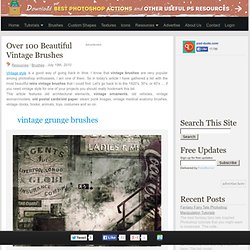
I know that vintage brushes are very popular among photoshop enthusiasts, I am one of them. So in today's article I have gathered a list with the most beautiful retro vintage brushes that I could find. Let's go back to to the 1920's, 30's, or 40's .... if you need vintage style for one of your projects you should really bookmark this list. This article features old architectural elements, vintage ornaments, old vehicles, vintage woman/models, old postal cards/old paper, steam punk images, vintage medical anatomy brushes, vintage clocks, books, animals, toys, costumes and so on.
Find more Photoshop resources... Recent Posts The best fantasy fairy tale inspired Photoshop tutorials that you might want to bookmark. This is a new collection of free textures for Photoshop that you might want to have. In this tutorial we are going to create an interesting animal leather inspired text effect, with ski... Mellowmint on deviantART. How To Create a Retro Apple Wallpaper in Photoshop. This post was originally published in 2009 The tips and techniques explained may be outdated.

Follow these simple steps in Photoshop to create a homage to Apple, combining the retro striped Apple logo with a range of soft grungy textures to produce a detailed design with subtle touches of colour and tone. Everyone loves the Apple logo, especially the retro striped version from 1977. What better way to tart up your screen than with a cool grungy wallpaper design complete with a wealth of textures and distressed effects. Creating an Awesome Retro Collage. Design an Awesome Watercolor Poster. Gigposter Design: The New Sex. Tutorial Introduction: A lot of people are making them. A lot of people suck. We don’t suck, and neither do you. This tutorial requires NO drawing talent… so don’t trip folks. You will however need Adobe Photoshop 7.0 or higher and Illustrator CS2 or higher. Those winged scrolls are new from Vector Set 16.
Let’s get to business. So what to make? We’re going to use this as the base of our initial illustration… but the hand, it lacks emotion. Istockphoto.com (a lifesaver for all stock photo needs) will be our resource. I found this chick holding a gun on istock. Next we have to cut out Ike and the girl’s gun so we can combine these different pieces into the same image. Once you have the shapes made to cut them out (and it’s ok if it took 3000 shapes and layers to make it) you’re going to merge them all to one layer.
Now take both shapes and tastefully combine them on a fresh canvas. You now have Ike pissed off and holding a gun. Now make sure each image is expanded. -Dave.