

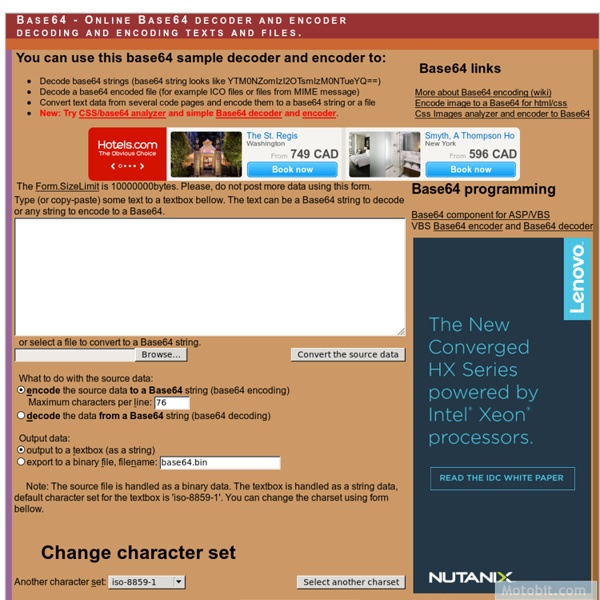
Testing SMTP AUTH connections - Iceweasel When setting up a mail server, one of the things you should do before you "go live" is to test it- not only to make sure things which should work, do work, but to make sure things which shouldn't work, don't. One of the things to test is whether or not your server correctly supports the AUTH command. This command is used when a remote client wishes to identify themself as an "authenticated" user, normally so that they can use your server as an outbound mail relay. Find your authentication information In order to use the AUTH command, you need to know the base64-encoded version of the userid and password you will be using to authenticate to the server. % perl -MMIME::Base64 -e 'print encode_base64("\000jms1\@jms1.net\000not.my.real.password")' AGptczFAam1zMS5uZXQAbm90Lm15LnJlYWwucGFzc3dvcmQ= Note: Make sure to use \0 both as the first character of what you're encoding, and as the separator between the userid and the password. Connecting to the server Make sure the server supports AUTH
Linux Commands for Beginning Server Administrators - www.reallylinux.com Allows you to change the timestamp on a file. Most common use: touch filename Using the basic touch command, as above, will simply force the current date and time upon the specified file. However, another option that I've used in the past when administering servers, is to force a specific timestamp on a set of files in a directory. For instance, to force a specific date and time upon all files in a directory, type: touch * You can also force a specific date/time stamp using the -t option like this: touch -t200103041200.00 * The command above will change all files in the current directory to take on the new date of March 4th, 2001 at noon. The syntax follows this pattern: YYYYMMDDhhmm.ss YYYY represents the four digit year, then the two digit month, day, hour and minutes.
Perfect multi-column CSS liquid layouts - iPhone compatible by Matthew James Taylor on 27 October 2007 This series of website layouts use percentage widths and relative positioning, and they work with all the common web browsers including Safari on the iPhone and iPod touch. They're also 'stackable' so you can use multiple column types on the one page. This makes the number of possible layouts endless! Follow the links below for the demos and more detailed info: The main features No CSS hacksiPhone & iPod Touch compatibleSEO friendlyFull length column background coloursNo ImagesNo JavaScriptResizable text compatibleStackable columnsFREE for anyone to use The layout demo pages 3 Column (Holy Grail) Liquid LayoutThe most common website layout is the three column design. Overcoming cross-browser CSS issues CSS can be tricky business particularly when you are trying to create complex liquid layouts for your websites (the hardest of all). CSS hacks are bad Only use cross-browser CSS
How to simulate mouse movements to prevent screen saver activation? - Windows XP Support Great job! I agree 100% - the bonehead administrators have no clue about the work life of average developers. I too work with at least 2 computers, sometimes 3 or 4. Besides which, a single call or meeting will activate all the screen savers. I needed to use this tool while working remotely for a client of mine who has this stupid policy (and refused to change it). I took the code and compiled it using .net 2.0 framework... works great. Here is the main Form1.Cs file if anyone wants to do the same using System; using System.Collections.Generic; using System.ComponentModel; using System.Data; using System.Drawing; using System.Text; using System.Windows.Forms; using System.Runtime.InteropServices; namespace KeepAlive { public partial class Form1 : Form { [DllImport("User32.dll")] private static extern int SetForegroundWindow(IntPtr hWnd); [DllImport("User32.dll")] private static extern IntPtr GetForegroundWindow(); public Form1() { InitializeComponent(); }
Access SMTP server with authentication : smtp, gmail, telnet, se (Trying again because not making much progress) Okay, I've got an older microsoft VC++ 6.0 program that works great, it's a home automation program that sends me an email at work at certain times. However, I'd like to switch smtp servers to my gmail account, but smtp.gmail.com requires some sort of encryption (I think it's TLS, because when I telnet in to send an email I get a "must issue a STARTTLS command first z52ss97610"). I am sending my email using sockets with this server, so I have to figure out what commands to send the server (I think I'm supposed to process that z52ss976 into a hashed value, with my password probably, and send it back?). Does anyone have a specific blow-by-blow about how to negotiate with these email servers? Or some sample code that handles this? Previously I was using the popular FastSMTP class, which works great but isn't built to handle this type of authentication. I've been working three angles, none easy: a)
Download Free Windows 2000 Resource Kit Tools by Daniel Petri - January 8, 2009 Where can I download the Windows 2000 Resource Kit tools? You can download the Windows 2000 Resource Kit software tools listed on this page for free and install them on your computer. These utilities can help you streamline administrative tasks such as managing Active Directory, administering security features, working with Group Policy and Terminal Services, automating application deployment, and other important jobs. Nearly 300 such tools are included on the Windows 2000 Server Resource Kit companion CD. These tools are designed to be installed and run only on Microsoft Windows 2000. Note: Microsoft only lets you download a subset of the original Resource Kit Tools. Note: Please note that these are NOT the entire Reskit tools set. Note: Links may change or break. Note: If any of you are willing to provide hosting space for these tools please let me know Available Tools Apimon: API Monitor - Monitors the API calls made by a process.
SSI Commands These commands should be written in a .shtml file that is indexed as a FileResource associated with a SSIFrame. The commands are separated in two parts: A complete example. Commands ConfigCommand Used to set the sizefmt and datefmt variables, which control the output of file sizes and dates. Parameters: datefmt = the date format sizefmt = the size format Example: CookieCommand Cookies access from server side includes. get = name of the cookie to get alt = alternative value if = name of the cookie (just to test if the cookie exists) then = value Examples: <! CountCommand This command inserts the number of recorded accesses to this resource, as reported by CounterFilter. Parameters: none EchoCommand The echo SSI command. var = a SSI variable reqstate = a Jigsaw request state reqheader = a request header here = a flag <! ExecCommand the SSI exec command. cmd = the command to execute <! FLastModCommand The standard lastmod SSI command. FSizeCommand The SSI fsize command. IncludeCommand The SSI include command. <!
Untitled Page Time Zones And Daylight Savings Time This page describes code for working with Time Zones and Daylight Savings Time. Neither VBA nor VB6 provides any native functions for working with Time Zones, Greenwich Mean Time (GMT, also called UTC), or Daylight Savings Time. To work with these values, you must use some Windows Application Programmatic Interface (API) functions. This page describes these API functions and how to use them in your VBA code. A NOTE OF CAUTION: Windows API functions are unforgiving. Names And Abbreviations: Although the name for the time of a official atomic clock is Universal Coordinated Time (UTC), we will use on this page and in the sample code, the term 'Greenwich Mean Time' or 'GMT'. You can download a bas module file containing all the code discussed on this page. The core of all the functions presented on this pages is the API function GetTimeZoneInformation and the structure named TIME_ZONE_INFORMATION that the API function populates with data.
Cygnus X1. - Page 4 - Overclockers Australia Forums - Iceweasel Tracked down a diagram of an SSD and the supports for that will be made from two pieces of 25x25 angle but I won't cut or drill them till I get the drive. The finished drive supports were fixed to the case, so that's basically it for the drive side. Now it's time to make some feet for the chassis to sit on. I had a reasonably good picture in my mind of what the feet would look like but just couldn't get my head around how to bend the support that the pads attach to. So a crude cardboard model was made up. No this is not something my daughter threw together, but it gives me a rough idea how it will look and how to do the bends. The support will be made from 3mm plate and bent with the help of a mallet and piece of wood. I've thought about whether I could make the pads myself, and if they are just discs then I think it will be possible.
Sharing files with wdfs and FUSE Keeping one set of files means never worrying about synchronization and merging. Changes never get unknowingly overwritten, and I have a single, simple backup strategy. WebDAV is the Distributed Authoring and Versioning extension to HTTP. On Apache systems it is usually implemented with mod_dav, and many Web hosting companies provide it as an option, giving you a simple "flip a switch" path to run your own WebDAV server. WebDAV can run over HTTPS, providing a layer of security, and it requires setting up its own username/password combo for each user -- distinct from any other server accounts or .htaccess -- so you can even set up different WebDAV accounts for each machine you use and meticulously track changes. But I'll skip explaining the WebDAV server setup; first of all, plenty of excellent information is out there already, and second, the beauty of wdfs is that the FUSE module abstracts the details away. Insert your own "light the fuse" joke here wdfs compared