

Top 8 Tools for Sending Large Files July 22, 2014 A few weeks ago Digital Inspiration posted a very informative article outlining the different web tools that can be used to send large files online. He also created this handy chart where he compared between the different services that you can use to send large files. As you can see from this chart, Dropbox is the top of them in terms of file limit size. There is also another great tool that allows you to send files up to 2GB right from your browser. File Stroge tools
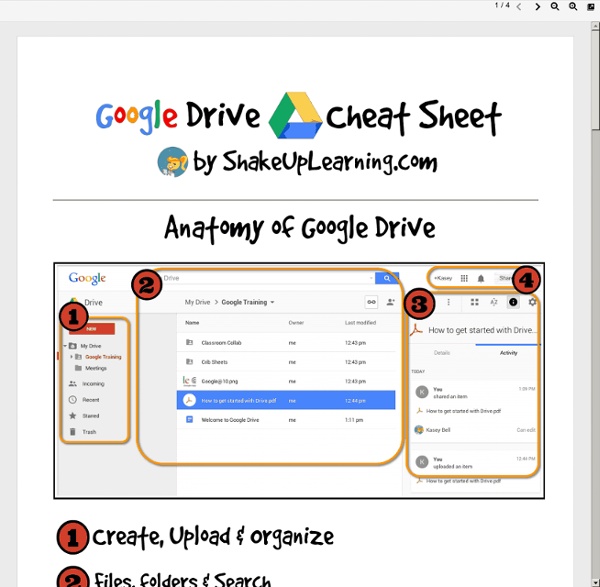
7 Wonderful Google Docs Tutorials for Teachers Google Drive has all the features that make it a very powerful productivity suite for teachers. Besides being able to create documents, slides, drawings and spreadsheets , users can also upload their own PDFs and files and sync them with their Google Drive accounts across different devices. Another good thing about Google Drive which I mentioned yesterday in " File Sharing Tools I recommend for Teachers" is that it is web based and can also work offline. This is probably what distinguished this service from other powerful tools like Dropbox and Evernote. With Google Drive installed on your computer or tablet, you can access your downloaded docs and work on them the way you want and once connected to internet you can then sync them to the cloud. Needless to mention the recent upgrade Google releases and which increased the free storage capacity to 15 GB . To help you better tap the usefulness of Google Drive I am sharing with you these wonderful video tutorials created by Anson Alexander.
PowToon, free business presentation software animated video maker and PowerPoint alternative 5 Great Ways to Use Google Forms One of my favorite features of Google Drive is Google Forms. If you’re unfamiliar with this, think of it as a way to create quick surveys that can be used for a number of applications. Google automatically aggregates this data into a Google Spreadsheet, making forms a great way to quickly collect and share information. Collect Contact Information At the beginning of the year, I find that a great ice-breaker with my students is to share a Google Form that asks their name, contact information, and something unique and interesting about themselves. Similarly, it is often necessary to collect information from parents for special events. Bell Ringer & Exit Ticket Activities Google Forms are a great medium to engage students in bell ringer and exit ticket activities (a means to gauge what a student has learned at the end of a lesson). Collect Homework Collecting homework is often an onerous task. Survey & Check-In with Students Creating Rubrics
Google Forms in Education | Edcentric Google Forms in Education Though Google Docs has permeated through education over the last five years, Google Forms is still relatively new to most educators. Forms can be used by students, teachers, administrators, and other staff members. Google Forms is essentially a survey tool; however, it can be used for assessment. Teachers There are many ways that teachers can use Google Forms, from assessments to polling student interest on certain topics (Google Moderator will do something similar). An example form: Teachers could then evaluate the general feelings with the specific answers students gave to decide on the next step in instruction. Over the next week I will create multiple posts concerning Google Forms. -edcentric- Like this: Like Loading... About afichter Husband, Father, and Educator.