

Creating an auto-caching Data Store in Sencha Touch and Ext JS 4 | Druck-I.T. Ext.define('<span class="skimlinks-unlinked">MyApp.store.LocalCache</span>', { extend: '<span class="skimlinks-unlinked">Ext.data.Store</span>', requires: [ 'Ext.device.Connection', '<span class="skimlinks-unlinked">Ext.data.proxy.LocalStorage</span>', 'Ext.DateExtras' config: { remoteProxy: { }, localStorageProxy: { }, lastUpdated: '2013-04-02 06:36:00 -8:00', storeId: 'MyStore' constructor: function(config) { this.callParent(arguments); this.expireField = <span class="skimlinks-unlinked">Ext.app.Application.appInstance.getName</span>() + "-" + this.getLocalStorageProxy().id + '-lastupdated'; if (Ext.Object.getSize(this.getRemoteProxy()) == 0) this.setRemoteProxy(this.getProxy().getInitialConfig()); load: function(options, scope) { var online = Ext.device.Connection.isOnline(); var me = this; if (online && this.isCacheMiss()) { this.setProxy(this.getLocalStorageProxy()); this.callParent([{ scope: this, callback: function() { this.removeAll(); <span class="skimlinks-unlinked">this.sync</span>(); options = {
CloudFront CORS with Custom Origin | unsharpTech Modern browsers respect Cross Origin Resource Sharing which means they won’t load web fonts (.woff, .ttf, etc.) from a CloudFront distribution. If you are using a custom origin (AKA your website) for CloudFront you need to do the following: 1. Example for Apache (in .htaccess): 2. 3. Cross-Origin Resource Sharing Abstract This document defines a mechanism to enable client-side cross-origin requests. Specifications that enable an API to make cross-origin requests to resources can use the algorithms defined by this specification. If such an API is used on resources, a resource on can opt in using the mechanism described by this specification (e.g., specifying Access-Control-Allow-Origin: as response header), which would allow that resource to be fetched cross-origin from Status of this Document This section describes the status of this document at the time of its publication. This document has been reviewed by W3C Members, by software developers, and by other W3C groups and interested parties, and is endorsed by the Director as a W3C Recommendation. If you wish to make comments regarding this document, please send them to public-webappsec@w3.org (subscribe, archives). Table of Contents 1 Introduction 2 Conformance The .
Sinon.JS - Documentation This page contains the entire Sinon.JS API documentation along with brief introductions to the concepts Sinon implements. Please ask questions on the mailing list if you're stuck. I also really appreciate suggestions to improve the documentation so Sinon.JS is easier to work with. Test spies API reference What is a test spy? A test spy is a function that records arguments, return value, the value of this and exception thrown (if any) for all its calls. When to use spies? Test spies are useful to test both callbacks and how certain functions/methods are used throughout the system under test. "test should call subscribers on publish": function () { var callback = sinon.spy(); PubSub.subscribe("message", callback); PubSub.publishSync("message"); assertTrue(callback.called);} Spying on existing methods sinon.spy can also spy on existing functions. Creating spies: sinon.spy() var spy = sinon.spy(); var spy = sinon.spy(myFunc); Spies on the provided function var spy = sinon.spy(object, "method");
JSONP JSONP or "JSON with padding" is a communication technique used in JavaScript programs running in web browsers to request data from a server in a different domain, something prohibited by typical web browsers because of the same-origin policy. JSONP takes advantage of the fact that browsers do not enforce the same-origin policy on <script> tags. Note that for JSONP to work, a server must know how to reply with JSONP-formatted results. JSONP does not work with JSON-formatted results. <! How it works[edit] To see how this technique works, first consider a URL request that returns JSON data. This JSON data could be dynamically generated, according to the query parameters passed in the URL. Here, a HTML <script> element specifies for its src attribute a URL that returns JSON: The browser will, in order, download the script file, evaluate its contents, interpret the raw JSON data as a block, and throw a syntax error. In this example, the received payload would be: Padding[edit] Rosetta Flash[edit]
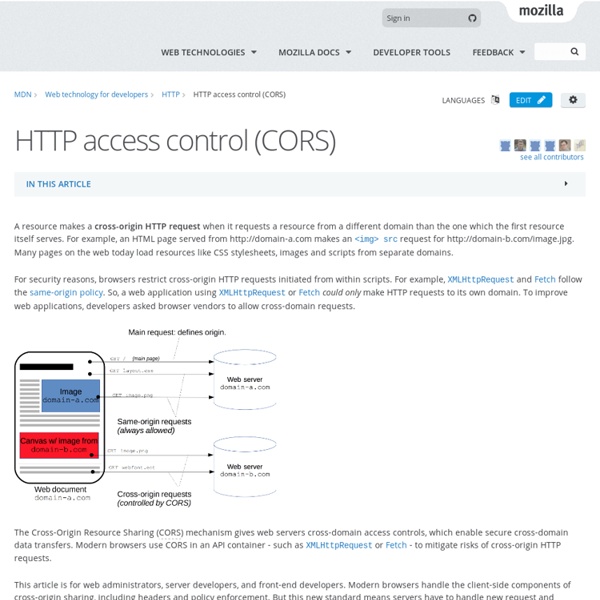
Using CORS Introduction APIs are the threads that let you stitch together a rich web experience. But this experience has a hard time translating to the browser, where the options for cross-domain requests are limited to techniques like JSON-P (which has limited use due to security concerns) or setting up a custom proxy (which can be a pain to set up and maintain). Cross-Origin Resource Sharing (CORS) is a W3C spec that allows cross-domain communication from the browser. The use-case for CORS is simple. As you can see from this example, CORS support requires coordination between both the server and client. Making a CORS Request This section shows how to make a cross-domain request in JavaScript. Creating the XMLHttpRequest object CORS is supported in the following browsers: Chrome 3+Firefox 3.5+Opera 12+Safari 4+Internet Explorer 8+ (see the complete list of supported browsers at Chrome, Firefox, Opera and Safari all use the XMLHttpRequest2 object. Event handlers Resources
Simplifying Grunt Jasmine tests for Ext.js | Matt Goldspink Are you wanting to unit test you Ext.js code but not sure where to start? Do you feel frustrated that everytime you get a bug raised you don’t know how to apply TDD techniques to your JavaScript because it’s just “not the same kind of code” as your Java, Ruby, .Net? Since I’ve worked with Ext.js and Sencha Touch, testing has long been an issue that I’ve fought with. Initially I did no testing other than opening the browser hitting refresh and retracing my steps. However last year I went to Full Frontal and attended Rebecca Murphy’s talk (video & slides) and workshop on how to write testable JavaScript. However it did take me a while to understand how to setup Jasmine for an Ext.js project, so I thought something could be done about this to make life simpler. grunt-sencha-jasmine To help show it and other ways to use Grunt on Ext.js projects I’ve setup an example Git project for people to clone and play with: Like this: Like Loading...
Same-origin policy This mechanism bears a particular significance for modern web applications that extensively depend on HTTP cookies to maintain authenticated user sessions, as servers act based on the HTTP cookie information to reveal sensitive information or take state-changing actions. A strict separation between content provided by unrelated sites must be maintained on the client side to prevent the loss of data confidentiality or integrity. History[edit] The concept of same-origin policy dates back to Netscape Navigator 2 in 1995. All modern browsers implement some form of the Same-Origin Policy as it is an important security cornerstone.[2] The policies are not required to match an exact specification [3] but are often extended to define roughly compatible security boundaries for other web technologies, such as Microsoft Silverlight, Adobe Flash, or Adobe Acrobat, or for mechanisms other than direct DOM manipulation, such as XMLHttpRequest. Origin determination rules[edit] JSONP[edit] Workarounds[edit]
Cross-Domain Requests with CORS Cross-Origin Resource Sharing (CORS) is a powerful technology for static web apps. To understand what it is and why it's important, you first need to understand a bit about how browsers work. The Same-Origin Policy The Same-Origin Policy restricts the browser from performing certain actions by scripts or documents based on the origin. The origin is everything in the URL before the path (for example, For certain actions, the browser will compare origins and, if they don't match, won't allow things to proceed. A parent document can't access the contents of an <iframe> that comes from a different origin. The Same-Origin Policy is a vital piece of web security architecture, but it also poses a problem. Enter Cross-Origin Resource Sharing CORS allows you to more cleanly separate your front-end from your back-end. If you are building an application using a third-party data provider or an API that already supports CORS, there isn't much else you need to know!
CS98SI Introduction to JavaScript Announcements Homework 2 Homework 2 is here! AJAX demo In the AJAX lecture, we build a small web application, which you can download here. HTML Template You can get a blank HTML template here. Piazza This quarter we will be using Piazza for class discussion. Course information Course information can be found here. Previous labs In-class labs can be found here. Homework Homework 1 (released April 22, due May 8) Homework 2 (TBD) Syllabus
Cross-Origin Resource Sharing Abstract This document defines a mechanism to enable client-side cross-origin requests. Specifications that enable an API to make cross-origin requests to resources can use the algorithms defined by this specification. If such an API is used on resources, a resource on can opt in using the mechanism described by this specification (e.g., specifying Access-Control-Allow-Origin: as response header), which would allow that resource to be fetched cross-origin from Status of this Document This section describes the status of this document at the time of its publication. This document has been reviewed by W3C Members, by software developers, and by other W3C groups and interested parties, and is endorsed by the Director as a W3C Recommendation. If you wish to make comments regarding this document, please send them to public-webappsec@w3.org (subscribe, archives). Table of Contents 1 Introduction 2 Conformance The
CORS Enabled - W3C Wiki What is CORS about? CORS is a specification that enables truly open access across domain boundaries. Why is CORS important? Currently, client-side scripts (e.g., JavaScript) are prevented from accessing much of the Web of Linked Data due to "same origin" restrictions implemented in all major Web browsers. While enabling such access is important for all data, it is especially important for Linked Open Data and related services; without this, our data simply is not open to all clients. If you have public data which doesn't use require cookie or session based authentication to see, then please consider opening it up for universal JavaScript/browser access. For CORS access to anything other than simple, non auth protected resources please see this full write up on Cross Origin Request Security. How can I participate? Granting JavaScript clients basic access to your resources simply requires adding one HTTP Response Header, namely: At the HTTP Server level... For Apache a2enmod headers For nginx In PHP
#267 CoffeeScript Basics CoffeeScript allows you to write JavaScript in a concise, elegant fashion. Here I convert JavaScript code to CoffeeScript in a Rails 3.1 app. Download: source codeProject Files in Zip (84 KB)mp4Full Size H.264 Video (21 MB)m4vSmaller H.264 Video (12.2 MB)webmFull Size VP8 Video (14.2 MB)ogvFull Size Theora Video (33.9 MB) Making Cross-Domain Requests with CORS One thing I ask interview candidates is how to make cross-domain requests with Javascript. All too often, interviewees only come up with JSON-P and proxying as a solution. This is insufficient for JS devs in 2012. Johnny Wey has a great write up on JSON-P and why you might not want to use it. Libraries like jQuery will handle all of the complexities of this and gracefully degrade to other technologies as much as possible, but it is important for JSers to know what is going on under the covers. Background HTTP requests from Javascript are traditionally bound by the Same Origin Policy, which means that your ajax requests must have the same domain and port. CORS stands for Cross-Origin Resource Sharing. Why you should use CORS Compared to proxying, the significant advantage of CORS is not having another system component, possibly complicating the app. It has a few big advantages over JSON-P as well: It supports HTTP verbs other than GETError handling with JSON-P is tricky or impossible.