

Inflated Tech Valuations? Blame Uncle Sam : Tech News « Are technology startup valuations in the middle of another bubble? The New York Times stoked the debate last month when it quoted famed venture capitalists John Doerr and Fred Wilson, who were seemingly agreeing that it is. One area of tech investing that seems especially “bubble-icious” is the secondary market where investors trade shares of private companies. Last week, Bloomberg reported on a study by Nyppex LLC, a broker for secondary transactions, which found that valuations of private, VC-backed tech companies on the secondary market have risen a whopping 54 percent since June. Light volume is part of the reason for the run-up in prices; the market simply isn’t liquid. I’m quoted in the Bloomberg article noting that the likes of Yelp, Zynga, and LinkedIn are great companies, so it’s natural there would be strong demand on the secondary market for their shares. The weak stock market remains a challenge. Eric M. Image provided courtesy of Flickr user Tinou Bao.
How to enable Windows 8 Metro style apps on an older netbook Update: The guide below was written for Windows 8 Developer Preview and will not work with the Windows 8 Consumer Preview released on February 29th, 2012. But you can still enable Metro style apps on Windows 8 Consumer Preview — you just need to download a graphics driver that lets you adjust your screen resolution from the Intel download center. If you have a netbook with an Intel Atom N270 or N280 processor, after installing Windows 8 Consumer Preview, search for the download center for the latest graphics driver for GMA 950. If you’re using a netbook with an Intel Atom N450, N455, N550, or N570 chip then you’ll need a driver for GMA 3150 graphics. Original article: Windows 8 features a new user interface designed for touch-friendly devices such as tablets. Unfortunately that rules out almost every netbook ever made, since most netbooks have 1024 x 600 pixel or lower resolution displays. 1. From the Windows 8 Start Screen, just start typing “regedit” without the quotes. 2. 3. 4.
A Snapshot Of Zynga’s Financials: Revenues Grew 392 Percent Last Year To $600 Million Zynga finally filed for its IPO today, and we now we get to take a look at its financials. At a high level, the company made nearly $600 million in revenues last year, and $90 million in profits. It grew at an incredible pace, with revenues growing 392 percent in 2010, up from $121.5 million in 2009 (and up from $19 million in 2008). In just the first quarter of 2011 alone, the company’s revenues reached $235 million (or a $940 million revenue run-rate), and that was up 134 percent from the first quarter of 2010. What is particularly amazing about all of these revenue growth numbers is that Zynga started paying Facebook 30 percent of all Facebook Credits-related revenues starting in July, 2010, and only barely skipped a beat. Sequential revenue growth slowed from 32 percent in Q3 2010 to 15 percent in Q4 2010, but then accelerated again to 20 percent growth in Q1 2011. The good news for investors is that Zynga actually makes a profit. Here is how Zynga explains Bookings in the S-1:
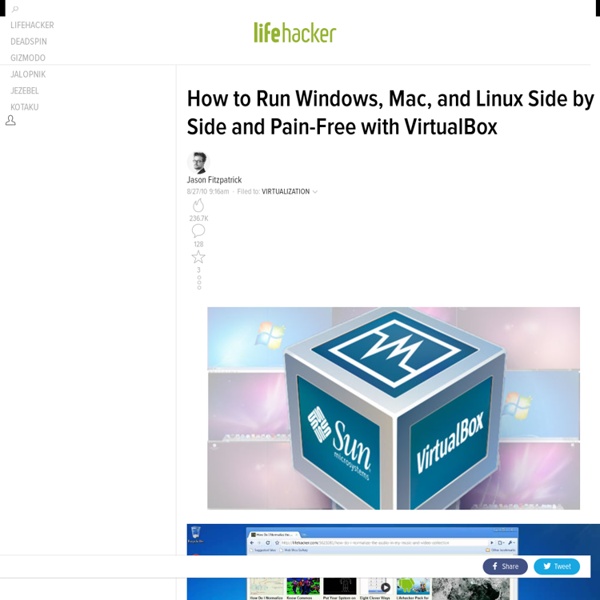
How to Install Windows 8 Consumer Preview 8250 Download Instructions Here are tips on how to install the Windows 8 RTM (Release to Manufacturer), or regular version. How to Get Started with Microsoft Windows 8 Traps When Installing Windows 8 Although installing any version of Windows is straightforward, there are three tiny traps to avoid: Trap 1: Get the product key! Confession: This was a case of more haste less speed, a combination of tiredness and over-excitement caused me to type the Sha-1 hash numbers instead of the product key! Trap 2: Be patient during first 4 minutes. Trap 3: Go for a clean install. Plan How to Install Your Windows 8 Operating System Research a URL to download the Windows 8 .iso file. Alternative install method: Try the web based installer which incorporates the Upgrade adviser and Easy transfer wizard. System Requirements for Windows 8 Recommendations: Install Windows 8 in a Virtual Machine, or alternatively, use an old laptop as a test machine. Good News: These Virtual Machines Are Supported Windows 8 Downloads Post-installation
The Declaration of Insurance Independence Dave Chase is the founder and CEO of Avado, a TechCrunch Disrupt NYC finalist. Previously he was a management consultant for Accenture’s healthcare practice and was the founder of Microsoft’s Health business. This is Part I of a two-part post. You can follow him on Twitter @chasedave. The scale of the Do-it-Yourself (DIY) Health Reform movement is dramatically bigger than I realized when writing about how that movement could affect the Talent Wars taking place in the tech community. Neither of the first two waves dramatically altered the landscape for healthcare. Protesting Healthcare Taxation With Bureaucratization The summary of the Declaration of Insurance Independence is as follows: Healthcare’s perverse incentives and an accompanying stifling bureaucracy driven by encumbering day-to-day healthcare with insurance has caused hyperinflation that is crushing family, employer and government budgets and holding back job growth. New Care & Payment Models Spurring New Health IT Categories
Bodhi Linux The following are instructions for installing Bodhi Linux on to your computer from a working Linux system via a USB stick (also known as a thumb-drive). This is the recommended method. Installation using another operating system or via CD/DVD is also possible, but not covered here. Bodhi Linux utilizes a Live Environment which you lets you “try before you buy” - that is, you can use Bodhi Linux without actually installing it. A: Materials needed Before beginning, you will need the following things: - A computer (imagine that! B: Get Bodhi Linux 2) Click on the version you wish to download (32 bit works on most computers) 3) Click the Direct Download link. C: Verify File Integrity (optional) 2) Save the file to the same location that you saved the Bodhi Linux .iso file. 3) Open a terminal emulator (xterm for example) 4) Switch to the directory where you downloaded the files (/storage/ISOs in this example - adjust the location to where you downloaded to): cd /storage/ISOs bodhi_1.4.0.iso: ok
Microsoft, Intel, Cisco (MIC) – Can The Troika Grow Again? (Part 2) Having discussed Microsoft in part 1 of this article , we will now examine its main hardware partner, Intel. Intel The Wintel combination has dominated the PC era since its beginning, and continues until today. Hence, no wonder when Microsoft (NASDAQ: MSFT [FREE Stock Trend Analysis] ) stalls, so does Intel (NASDAQ: INTC ). In essence, both companies were attacked by Apple (NASDAQ: AAPL ) and Google (NASDAQ: GOOG ), who tried to make the PC obsolete. However, Microsoft is a software company, while Intel is a semiconductor company, so their businesses are very different, and the challenges for them are quite different. Some of the notable differences are: On a PC, Intel can sell only 1 set of CPU, or chipset for each PC (or more specifically, a Wintel platform), but Microsoft can sell multiple set of programs, such as its operating system, its Office Suite, PC games, etc. (c) 2013 Benzinga.com.
Useful Bookmarklets for your iPad, iPhone and iPod Touch Browser 18 Mar 2013 The most useful iOS bookmarklets for your iPhone, iPad and iPod Touch with instructions on how to install them in your mobile Safari browser. couch mode print story The Safari browser of your iOS device (iPad, iPhone, iPod Touch) doesn’t support extensions (or add-ons) but you can still add extra functionality to the mobile browser with the help of bookmarklets. Bookmarklets, if you are new, are like regular bookmarks but instead of opening new websites, bookmarklets are often used to perform actions. In the case of a desktop browsers like Chrome or Firefox, you can simply drag the bookmarklet to the bookmarks toolbar but unfortunately, the Safari browser of your iOS device doesn’t support this style of installation. Just pick any iOS bookmarklet from the drop-down menu below and a bookmark the page in your iOS Safari browser. Next, edit the saved bookmark and remove everything from the URL that’s before the # symbol. Safari Bookmarklets for iPhone, iPad & iPod Touch
How To Build An Audience On The Internet: The Kevin Rose School Vs. The Fred Wilson School Editor’s note: This guest post is written by Tom Anderson, the former President, founder and first friend on MySpace. You can now find Tom on Facebook, Twitter, and Google+ What kind of content creator are you? Kevin Rose or Fred Wilson? Blogging or “self-publishing” in any form was supposed to democratize and revolutionize the media industry. Three days ago, Kevin Rose posted this on Google+: “Decided to forward to my Google+. Kevin’s decision was made rapidly, and may well be reversed when it suits his needs. Where to host your content is a tricky issue. And again, this is not just an issue for bloggers. Phrasing the issue in a new way, and perhaps a better way is: Should a content creator go to his audience, or should he expect his audience to come to him? In the offline world, most writers would never think to publish their own magazine or newspaper. That model of posting everything on your own domain might have worked in the earlier days of the Internet.
WebPlatform.org — Your Web, documented