

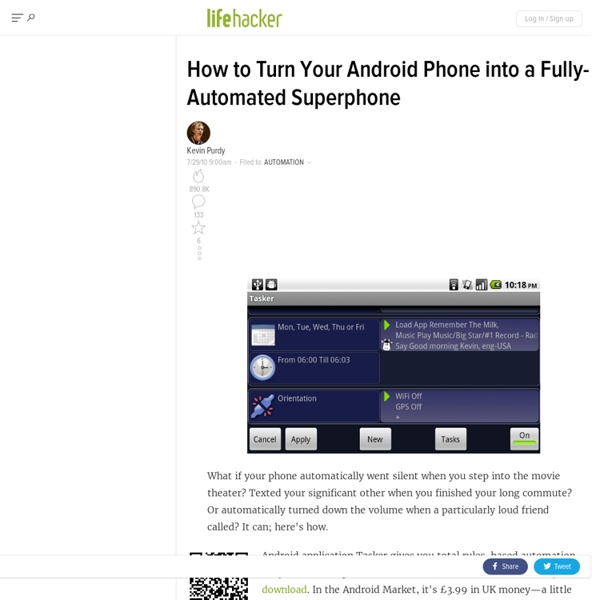
9 Ways to Make Android automatic with Tasker Tasker is the ultimate Android app. It creates profiles to automatically change settings, delivers shortcuts, helps manage daily activities, and automates many of the mundane tasks that you attempt to perform each day. All without much effort (other than set-up process). Tasker uses “contexts” to trigger tasks or setting changes. Once a context takes place, it triggers an action like turning off auto-sync, loading Pandora, or sending a text message to your girlfriend to let her know you’re 5 minutes away. Locale was the first automated app that Android users embraced, but many turned sour once the app began charging money for add-ons and actually became less useful. Set Periodic AutoSyncs AutoSync is great for keeping you up to date, but not for conserving battery. Tip: you can also create a time-based Context to go into Airplane mode at n1ight. Open Media apps list when headset plugged in People usually want to open media apps when they plug in their headset. Create settings widgets
Mozilla Webmaker: make the web Today, we’re proud to launch “Mozilla Webmaker,” a new program to help people everywhere make, learn and play using the open building blocks of the web. The goal: help millions of people move from using the web to making the web. With new tools to use, projects to create, and events to join, we want to help the world increase their understanding of the web and take greater control of their online lives. And we’d like you to join us. Building a generation of webmakers Concretely, Mozilla Webmaker will offer: 1) Tools. A global invitation to make and learn this summer We’re kicking off Mozilla Webmaker with something special: a massive summer learning campaign. We’re inviting everyone to join or volunteer at free local events and teach-ins around the world. We’re not doing this alone. What types of programs can participate? Creating a web literate planet The new Mozilla Webmaker web site launches June 6. Get involved:
Top 10 News, Videos, Reviews and Gossip - Lifehacker The first spot on this list should be the notification bar! Notifications really set Android and iOS apart. 1. 2. 3. 4. 5. 6. 7. 8. 9. 10. 15+ Awesome Android Tasker Profiles & Tutorials Tasker is one of the best applications ever built for android and is among the important reasons why I chose an android as my companion. From automating phone profiles to acting as a location reminder tool, it does everything that I can think of and pushes the limit of the phone to a new height. I’m not really a tasker guru but I’ve played with it for long and have collected a bunch of profiles that make my (already awesome) phone even awesome. Basic Things to be known Adding a new Profile Click on New –> Give it a name –> Add a Context. New Task Tap on the + icon and then, select an action category. I suppose you’ve got the basic ideas. 1. An anti-theft application is among the most essential app for your multi-hundred bucks phone. a) Tracking with GPSLifehacker has written a very detailed tutorial on getting your phone’s location with GPS. 2. 3. Context: State –> USB Plugged Action: Net –> USB Tether 4. Context: State –> Calendar Entry (Available – No) Action: Audio –> Silent Mode 5. 6. 7.
How to Find the Right Android Keyboard for You Introducing Android Scripting Environment The Android Scripting Environment (ASE) brings scripting languages to Android by allowing you to edit and execute scripts and interactive interpreters directly on the Android device. These scripts have access to many of the APIs available to full-fledged Android applications, but with a greatly simplified interface that makes it easy to:Handle intentsStart activitiesMake phone callsSend text messagesScan bar codesPoll location and sensor dataUse text-to-speech (TTS)And moreScripts can be run interactively in a terminal, started as a long running service, or started via Locale. Python, Lua and BeanShell are currently supported, and we're planning to add Ruby and JavaScript support, as well. Scripts can be edited directly on the phone. The script manager displays available scripts. Scripts can be launched interactively or as background services. Interactive terminals can be started for interpreters that support it. Scripts can use the Android UI to get user input. import android, xmpp
How to Choose the Right Android ROM for You How to Speed Up, Clean Up, and Revive Your Android Phone The conclusion over at XDA is that JuiceDefender uses more juice than it defends. Another common juice offender is Beautiful Widgets. Turn off Latitude in Google Maps. This is the worst battery drain. Remove auto-updating widgets (e.g., Facebook). Turn off polling within apps. Turn off GPS when not using. Exit from apps when not using. Cyanogen lets you fine tune app permissions. Rom Toolbox let's you prevent apps from starting at boot, uninstall or freeze apps, and improve SD card performance. Rooting and using a custom kernel not only lets you overclock but also lets you undervolt, saving battery.