Apache Thrift
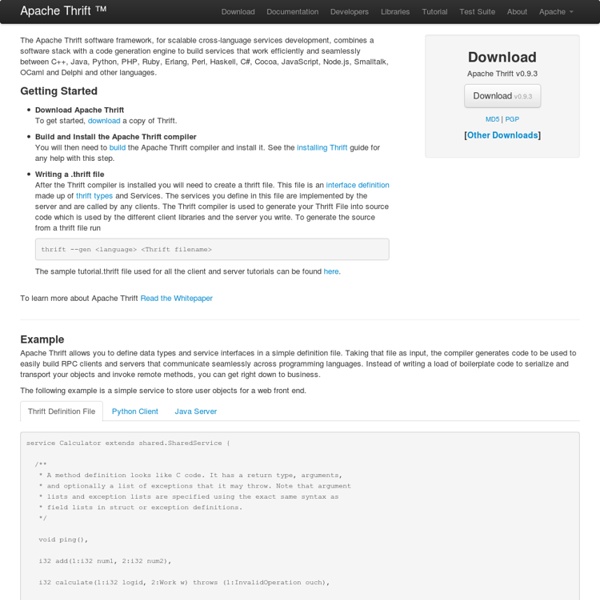
The Apache Thrift software framework, for scalable cross-language services development, combines a software stack with a code generation engine to build services that work efficiently and seamlessly between C++, Java, Python, PHP, Ruby, Erlang, Perl, Haskell, C#, Cocoa, JavaScript, Node.js, Smalltalk, OCaml and Delphi and other languages. Getting Started Download Apache Thrift To get started, download a copy of Thrift. Build and Install the Apache Thrift compiler You will then need to build the Apache Thrift compiler and install it. See the installing Thrift guide for any help with this step. Writing a .thrift file After the Thrift compiler is installed you will need to create a thrift file.
http://thrift.apache.org/
22 free tools for data visualization and analysis
You may not think you've got much in common with an investigative journalist or an academic medical researcher. But if you're trying to extract useful information from an ever-increasing inflow of data, you'll likely find visualization useful -- whether it's to show patterns or trends with graphics instead of mountains of text, or to try to explain complex issues to a nontechnical audience. There are many tools around to help turn data into graphics, but they can carry hefty price tags. The cost can make sense for professionals whose primary job is to find meaning in mountains of information, but you might not be able to justify such an expense if you or your users only need a graphics application from time to time, or if your budget for new tools is somewhat limited. If one of the higher-priced options is out of your reach, there are a surprising number of highly robust tools for data visualization and analysis that are available at no charge.
Cordova - Apache Cordova (Incubating)
iTerm Tab and Unix Shell Customizations for zsh, bash and tcsh
Although iTerm works quite nicely out of the box, there are a few unix shell-specific tweaks you can implement that help to take advantage of some of the many nice features. In what follows, I describe and give some examples of a few customizations. iTerm Tab, Title Bar and $DISPLAY Customizations
15 Beautiful Text Effects Created with CSS
Beautiful text or typography will make your design look attractive. In web design, CSS helps to give style to design including various effects in text or typography. With CSS, you can use clipping and add animation to text to spice things up a little. And to illustrate this, we have collected 15 stunning and cool text effects that are made possible with CSS (some with a little help from Javascript codes).
Big Data Is As Misunderstood As Twitter Was Back In 2008
Boonsri Dickinson, Business Insider In 2008, when Howard Lindzon started StockTwits, no one knew what Twitter was. Obviously, that has changed. Now that Twitter is more of a mainstream communication channel, Lindzon has figured out the secret to getting past all the noise on Twitter. By using human curation, StockTwits can serve up relevant social media content to major players like MSN Money. Lindzon said there are three key aspects that have helped solve the spammy nature of Twitter:
reactphp/react
The scrypt key derivation function and encryption utility
A simple password-based encryption utility is available as a demonstration of the scrypt key derivation function. On modern hardware and with default parameters, the cost of cracking the password on a file encrypted by scrypt enc is approximately 100 billion times more than the cost of cracking the same password on a file encrypted by openssl enc; this means that a five-character password using scrypt is stronger than a ten-character password using openssl. The scrypt utility can be invoked as scrypt enc infile [outfile] to encrypt data (if outfile is not specified, the encrypted data is written to the standard output), or as scrypt dec infile [outfile] to decrypt data (if outfile is not specified, the decrypted data is written to the standard output). scrypt also supports three command-line options: If the encrypted data is corrupt, scrypt dec will exit with a non-zero status.
altJS compile-to-JavaScript language list
Semantic Bits
What Machine Learning Can Do And What Machine Learning Cannot Do Posted by Stacy on 24-08-2018
Deep learning based Object Detection and Instance Segmentation using Mask R-CNN in OpenCV (Python / C++)
A few weeks back we wrote a post on Object detection using YOLOv3. The output of an object detector is an array of bounding boxes around objects detected in the image or video frame, but we do not get any clue about the shape of the object inside the bounding box. Wouldn’t it be cool if we could find a binary mask containing the object instead of just the bounding box? In this post, we will learn how to do just that. We will show how to use a Convolutional Neural Network (CNN) model called Mask-RCNN (Region based Convolutional Neural Network) for object detection and segmentation. Using Mask-RCNN we not only detect the object, we also obtain a greyscale or binary mask containing the object.
Related: