

iPad in Education Innovative ideas for using iPads in education Inside Thinglink EDU Examples pinterest.com Photo: pinterest.com Also Thinglink EDU Examples pinterest.com The unexpected success of failure sophia.org How to Use Green Screen Effects on iPads jonathanwylie.hubpages.com How to Use Green Screen Effects on iPads jonathanwylie.hubpages.com / Jonathan Wylie It is easy to use green screen effects on an iPad to produce professional looking videos. STILL One of the Best Kept Secrets: Pinterest! teacherswithapps.com / Teachers With Apps One of the best kept secrets about social media for educators and students is Pinterest!
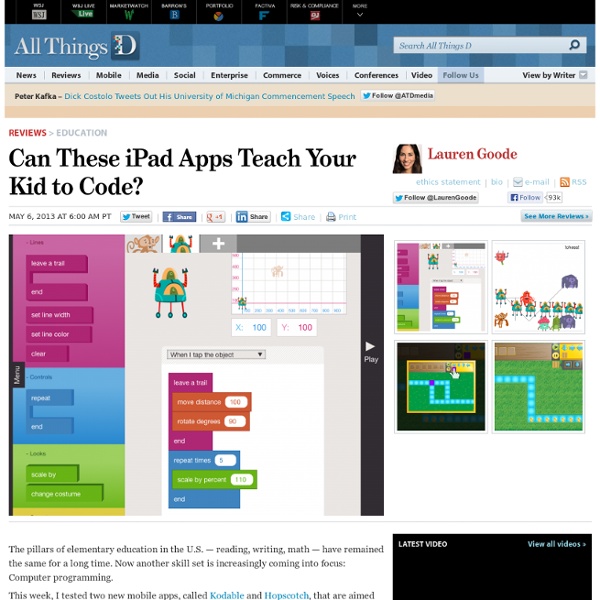
Kodable Teaches Kids To Code Before They Learn To Read Preschool and kindergarten are recommended times for kids to learn a new language, while they’re still in the process of learning their first one. So Grechen Huebner and her cofounder, Jon Mattingly, created an app that teaches kids to program - before they’ve even learned how to read. The idea behind the iPad app, Kodable, is just that simple: create an app to make programming a child’s second language as early as possible in the child’s life. “One of my favorite moments was when this three-year-old boy was playing it and literally screaming, he was so excited,” she said. “I had gone to a baby shower where the mother got this software called ‘Your Baby Can Read,’ so it started as a joke - oh, what if we created, ‘Your Baby Can Code’? Kodable has no written instructions. Each level, designed by Huebner and programmed by Mattingly, aims to teach kids something about thinking like a programmer to solve problems.
How and Why to Teach Your Kids to Code A Day in the Life of an iPad Teacher 6.30 am: Woken by the dulcet tones of Lana Del Rey and a new ‘Wake up Light‘. Contemplate staying in bed then notice the email icon flashing with a number of new messages – check twitter. 7.00 am: Access news app whilst devouring breakfast. 7.20 am: Plug iPad into car stereo and load ‘Driving’ playlist. 8.00 am: Deal with overflowing inbox on iPad whilst waiting for school computer to load. 8.25 am: Contemplate handing in resignation as only free period of the day has become a history cover with year 10. 8.45 am: Take staff briefing notes on iPad and share with form group on Edmodo before walking to classroom. 9.10 am: Lesson one with year 7 and they are all excited to share their completed projects. 10.10 am: Lesson two starts with a mild panic as projector isn’t working. 11.10 am: Break-time and the slow walk around the playground begins. 11.30 am: The dreaded cover period is made easier by the history students engaging in research on their iPads. 11.15 pm: Fall asleep. Like this:
Coding for technophobes: how to teach the new computing curriculum | Teacher Network The ICT curriculum is changing. For a start, it has a new name: computing. The hope is that the new curriculum will equip children with the skills they need to become active participants of this fast-paced digital world. Some teachers are understandably apprehensive about teaching skills such as computer programming, which will become increasingly important for pupils. Teaching my Year 4 class how to program by creating computer games has actually been a lot easier than I first anticipated. So, here is my advice on how to get a group of eight-year-olds to unleash their inner Steve Wozniak or Bill Gates. Step 1: HistoryFirst, I give some historical context to help the children understand the origins of computer programming and its purpose. Step 2: Share expertiseI find it is best to break the class into small groups of two or three, getting them to share a PC when they are using programming software. We often download programming tools, such as Scratch, to create games.
Teaching kids how to write computer programs, by Marshall Brain by Marshall Brain Quick Intro - If you are looking for a quick and easy way to teach your kid a real programming language, without downloading anything or buying anything, try these Python tutorials. Your kid will be writing and modifying code in just a few minutes. Marshall Brain's quick and easy Python tutorials Let's say that you have children, and you would like to help them learn computer programming at a youngish age. Let's start with a something important: Every kid is different. The second thing to realize is that real analytical skills often don't start appearing until age 11 or 12 or 13 in many kids, so expecting huge breakthroughs prior to that may be unrealistic. That being said, there are lots of fun things you can try as early as five or six... Games Let's start with a few games. Magic Pen (wait a few seconds to see the word "play", then click the word "Play") Fantastic Contraption Auditorium (Drag the circle-with-arrow-in-it around. I love Light Bot. Python for Kids RoboMind
iPad in Education Innovative ideas for using iPads in education Inside Thinglink EDU Examples pinterest.com Photo: pinterest.com Also Thinglink EDU Examples pinterest.com The unexpected success of failure sophia.org How to Use Green Screen Effects on iPads jonathanwylie.hubpages.com How to Use Green Screen Effects on iPads jonathanwylie.hubpages.com / Jonathan Wylie It is easy to use green screen effects on an iPad to produce professional looking videos. STILL One of the Best Kept Secrets: Pinterest! teacherswithapps.com / Teachers With Apps One of the best kept secrets about social media for educators and students is Pinterest!
MonoGame - Write Once, Play Everywhere - Home iPad Microscopy Being a science teacher, I have been experimenting with my iPad, trying to find a way of taking photos through the lens of an ordinary student microscope. Science teachers whose students own iPads, will immediately see the benefit of this. Rather than drawing what they see, students can take a photograph, and then import that into another app on the iPad to incorporate into a project. The difficulty lies in (a) holding the iPad still enough to avoid motion blur, (b) lining the camera lens up with the microscope’s subjective lens (an alignment that must be exact) and (c), holding the iPad the right distance (about 4 mm) away from the microscope lens for the image to be in focus. It’s not hard to glimpse a fleeting clear image, but holding that precise pose long enough to press the shutter button is frustratingly challenging! The first time I tried to do this I did manage to get a good photo – but it took me ten minutes of trying! The solution I found is really simple. Pretty cool, huh?
Simon Haughton's website: LOGO Programming I'm going to admit that the fourth lesson I do on LOGO is complicated - the understanding of the programming commands that is required is of a high level and any mistake made (even the tiniest one) will result in either commands not being executed properly or error messages popping up on screen. It is, however, a lesson which the children rose to the challenge of today and which they were extremely impressed with when they saw what on-screen patterns they had managed to produce by its end. The age-old saying "you only get out what you put in" was certainly true today! Last time, I showed the children how to use the REPEAT command to draw regular polygons and stars so the natural progression was therefore to teach them how to create procedures this time. I explained a procedure as simply being a set of commands which are given a name, which when typed are run (done/executed). The next procedure I asked the children to create was one which drew a square shape.
Reaching Different Learning Styles With The iPad We learn to do something by doing it.-John Holt I’ve been teaching myself Spanish. I’ve used a variety of methods, including Rosetta Stone. All have taught me some good basic Spanish; however, nothing has helped me more than having actual conversation in Spanish. Well, conversation may be a bit overstated…I’m ok as long as the other person speaks very slowly and we only use the present tense. How do you learn best? Our students are no different. We have spent some time learning about the rainforest. One child chose to use Doodle Buddy and Pic Collage and the other chose to make a Popplet and import it into a Pages document. My students, even in kindergarten, like the ability and the responsibility of making these choices about their school day. Motivating students to achieve can be difficult in this hyper-paced world. Today we will do exciting new things. Like this: Like Loading...