

Tizag Tutorials Design web, applications, jQuery, Wordpress | Webinventif SCRIPTR » jQuery, MooTools, Protoype, YUI, Scriptaculous… Cartoons, Strips en Webdesign :: JorisO.nl Bien valider ses formulaires avec Javascript Petit rappel sur les formulaires Rappelons-nous d'abord de quoi est composé un formulaire : de champs de saisie, matérialisés par des balises input, select et textarea ; de boutons pour valider ou annuler / effacer le formulaire, respectivement <input type="submit" /> et <input type="reset" /> ; une balise form qui encadre le tout ; et éventuellement ce fameux script en Javascript qui va vérifier le contenu avant son envoi vers le serveur Web. Cet ensemble peut être complété par des balises label, fieldset, legend, etc. pour améliorer l'accessibilité et la structure d'un formulaire. Je vous renvoie à l'article Utilisation des formulaires pour en savoir plus à ce sujet. Voila ce que cela pourrait donner : <form action="url_page_suivante" method="get" name="formSaisie"><p><label for="prenom">Saisissez votre prénom :</label><input type="text" name="prenom" id="prenom" /><input type="submit" value="Ok" /></p></form> Les erreurs les plus courantes <script type="text/javascript"> //<! Ou encore
Webdesign und Webentwicklung im Webstandard-Blog - Best of jQuer JavaScript - 12 Sep, 2008 Anwendungen zum JavaScript-Framework jQuery gibt es zahlreiche, aber nicht alle erfüllen unbedingt die Prädikate "nützlich & praktikabel". Aus diesem Grund wurden für Euch ein paar jQuery-Plugins & jQuery-Tutorials aus den verschiedensten Einsatzgebieten zusammengetragen. Von verschiedensten Navigationsvarianten, über Zoom-Funktionen, bis hin zur dekorativen Bilder-Galerie. Mehr jQuery-Tutorials und Plugins gibt es in Teil 2 und Teil 3 der Serie "Best of jQuery-Tutorials". jQuery-Plugin - Tab-Navigation jQuery-Plugin - Moving Navigation jQuery-Plugin - Sliding Navigation jQuery-Plugin - jParallax jQuery-Plugin - Fancy-Zoom jQuery-Plugin - jQZoom jQuery-Plugin - Text-Zoom jQuery-Plugin - Context-Highlighting jQuery-Plugin - jQuery-Charts jQuery-Plugin - Decorative Gallery jQuery-Plugin - Ajax Zoom Buch-Tipp: jQuery: Das Praxisbuch Mit jQuery kann man zaubern. * Amazon-Partnerlink Ähnliche Artikel zum Thema jQuery:
Voorbeelden en handleidingen van css, html en xhtml - Home 20 Top Script.aculo.us Scripts you can’t live without-Speckyboy Design Magazine | Speckyboy Design Magazine 20 Top Script.aculo.us Scripts you can’t live without. 1. Sexy Sliding Menu for script.aculo.us URL: Description: There is also a MooTools variation with this menu, this truelly is a sexy sidebar. 2. URL: 3. URL: 4. URL: 5. URL: 6. URL: 7. URL: 8. URL: 9. URL: 10. URL: and the rest… 11. 12. 13. 14. 15. script.aculo.us Reflector. 16. 17. 18. 19.
30 Essential Controls By Theresa Neil As Bill mentioned in an earlier post, we don’t want to limit this blog to just the principles and patterns found in the book. For that you can check out our Explore the Book section. This is the second article in a three part series on patterns and principles for RIA design. Standard Screen Patterns: 12 patterns w/100 examplesEssential Controls: 30 controls for RIA design and developmentComponents for Commonly Requested Features: 15 patterns and examples Every designer has a set of controls they rely on to communicate an effective UI. Unfortunately, no single RIA framework offers all 30 of these. The frameworks reviewed include: Flex, Laszlo, Silverlight and 12 Ajax frameworks and toolkits: ExtJS, Dojo, YUI, Google Web Toolkit, Prototype/script.aculo.us, JQuery, MooTools, MochaUI, SproutCore, LivePipeUI,IT Mill, Backbase. 01. Google’s Auto-Complete 02. Carousel Prototype carousel widget Supported by: YUI, Prototype/script.aculo.us, JQuery, ITMill, Backbase, iCarousel 03. 04.
Gratis een eigen website maken - Rob's Domein Javascript Mistakes You Must Avoid If you are new to JavaScript and you write raw JavaScript or use any framework (jQuery, Mootools, Dojo, YUI) with it, you must avoid few mistakes. Actually these are my experiences when I was learning JavaScript. Equality Operator You may know that in js, two operators are used for comparing values. First is == (two equal signs). This operator compare the values but it doesn’t compare the data type of operands. Here are more examples. Some of the results are unexpected specially for those who don’t know how JavaScript evaluates == operator. Consider the first example (1 == “1″). In the second example (“true” == true) is false because if the string contain characters other than digits, convertion to number will return NaN which means Not a Number. You can check what value will be returned after conversion to number using the Number constructor. Now you maybe wondering how === operator works. Not Assigning null to Reference Types Reference Variable Initialization Don’t Forget Keyword var
A Simple jQuery Slideshow | Jon Raasch’s Blog In the interest of following jQuery’s motto of “writing less and doing more,” let’s write a simple slideshow using jQuery, JavaScript and a bit of CSS. Download the complete slideshow hereRead the FAQs For starters, our main goal should be keeping the markup as clean as possible: Now let’s use CSS to position the images on top of each other and bring the active image to the top level with z-index: Due to absolute positioning, we need to define the height of the slideshow DIV. Also, notice that we defined three different z-indexes—we will manipulate these soon using jQuery. For the slideshow animation we are going to switch between each photo at a set rate. function slideSwitch() { var $active = $('#slideshow IMG.active'); var $next = $active.next(); $next.addClass('active'); $active.removeClass('active'); } $(function() { setInterval( "slideSwitch()", 5000 ); }); Here we set a JavaScript interval to call slideSwitch() every 5 seconds. Next we should incorporate a fade animation.
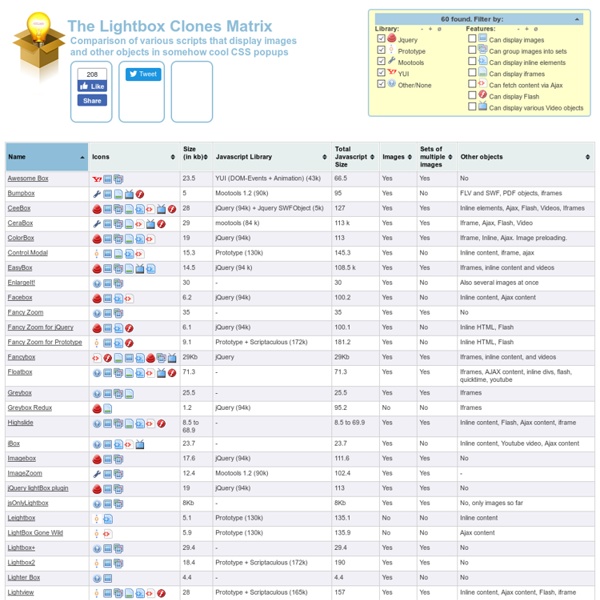
Javascript : 10 plugins que vous devez connaître - ressource-javascript Pour vous aujourd'hui, 10 ressources javascript pour vous aider dans vos projets. Chosen est un plugin javascript ajoutant de nombreuses fonctionnalités aux selects, tout en les rendant beaucoup plus jolis. Disponible pour jQuery et prototype. TypedJS est un outil de test pour javascript. Fancybox est un très bon plugin de lightbox, peut être le meilleur sur le marché. Turnjs est un clone de l'effet de page tournée de ibook sur ios. Jcrop est un plugin jQuery permettant de cropper une image en JS. Comment faire une timeline simplement en JS? Ce plugin permet de transformer simplement des données json un joli diagramme de Gantt Vos clients trouvent wordpress trop complexe? Codemirror est un éditeur de texte en ligne avec coloration syntaxique.