background preloader

MATERIALS

MATERIALS
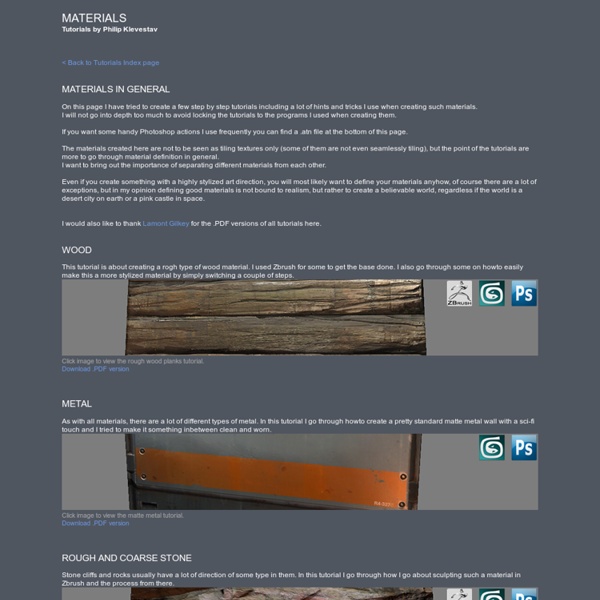
Tutorials by Philip Klevestav < Back to Tutorials Index page On this page I have tried to create a few step by step tutorials including a lot of hints and tricks I use when creating such materials. I will not go into depth too much to avoid locking the tutorials to the programs I used when creating them. If you want some handy Photoshop actions I use frequently you can find a .atn file at the bottom of this page. The materials created here are not to be seen as tiling textures only (some of them are not even seamlessly tiling), but the point of the tutorials are more to go through material definition in general. Even if you create something with a highly stylized art direction, you will most likely want to define your materials anyhow, of course there are a lot of exceptions, but in my opinion defining good materials is not bound to realism, but rather to create a believable world, regardless if the world is a desert city on earth or a pink castle in space. » Download: PT Actions

The Top Ten Tips of Texturing One way to create dirt has already been covered, and that's photo overlays. Those are great for general wear and tear on your texture. If you want small specific details, you'll need to use other techniques. Dust and dirt can be done very quickly with a solid brownish layer and a layer mask. Rust is a bit more tricky. I used to handpaint rust, but it always had a bit of a cartoony look, and I was never able to get crispy rust that looks convincing and real. That was until DennisPls shared his technique with me, which I've been using ever since. Good damage placement only requires one thing: logical thinking. That can be chipped paint, scratches, rust, etc. There is a sure chance that you'll find dust and dirt in such an area. This doesn't only work for small borders. The front of the forklift (1) is the area that will suffer the most, and will therefore have more damage than other parts.

Chapter 12. Tile-Based Texture Mapping GPU Gems 2 is now available, right here, online. You can purchase a beautifully printed version of this book, and others in the series, at a 30% discount courtesy of InformIT and Addison-Wesley. Please visit our Recent Documents page to see all the latest whitepapers and conference presentations that can help you with your projects. Li-Yi Wei NVIDIA Corporation Many graphics applications such as games and simulations frequently use large textures for walls, floors, or terrain. There are several issues with large textures. One possible solution to address these problems is texture compression. An alternative approach is texture tiling, as shown in Figure 12-1. Figure 12-1 A Tile-Based Texture Map Our goal is to present a tile-based texture-mapping scheme that is transparent to the application. 12.1 Our Approach We represent a large texture as a small set of tiles and assemble the tiles into a large virtual texture on the fly for answering texture requests. 12.2 Texture Tile Construction . .

Pixologic :: ZBrush :: 下載中心 :: MatCapt材質庫 欢迎进入Pixologic的MatCap素材库!Pixologic 建立了精美的MatCap材质库,它们来源于ZBrush社区上愿与大家分享其工作成果的艺术家们。这个库为您提供了一个独特的区域来查看、下载并开始雕刻,只有ZBrush可以给您这一独特的MatCap外观。 了解如何创建自己的MatCap材质 请点击此处了解更多关于ZBrush的材料 请点击此处 如果您想向这个材质库中添加一种MatCap材质,可向Pixologic团队提交并进行评估,请通过电子邮件发送文件至 library@pixologic.com ,并标明以下信息。 1. 请参照以下方式命名所有文件: (艺术家的缩写)_(MatCap材质的名字)_(2位数序号) 例如: ph_daisies_01 请不要使用空格、大写或特殊字符 *如果材质是用ZBrush的MAC 3.12版制作的 ,请附加一个链接标签“立即下载”。

60 Useful Texturing Tutorials | NetrinoMedia Marketplace's Blog Details Techniques:3ds max, cinema4d, lightwave, maya, softimage, Texturing, Tutorials, UsefulAds: Hello dear readers =) We’ve already done roundups on Car Tutorials, so this time I’ve gathered together a list of Texturing Tutorials. Please, post your comment as for this article, links to your texturing tutorials. Hard Surface Textures Read this interesting tutorial about how Stefan paints hard surface … Read this tutorial >> Texturing 101 Okay this is a really simplistic makign of, it’s really more of a texturing tutorial cause I get quite a few questions on texturing so, I’ve just take a simple Coke Can and decided to show you how I textured it since most of my texturing follows these principles. Read this tutorial >> Texturing of The Aquarium – Image Breakdown The following example is a scene that has been textured using the Total Textures Collection as a resource. Read this tutorial >> Texturing of the Old Hospital Read this tutorial >> Texturing of Urban Scene Read this tutorial >> The Corridor

game · level · character | KatsBits Tutorials, training and educational resources for game making and development. Who needs school for game design when it can be done online!. Learn content creation, game art production, models, texturing, level design and more using Blender 3D. Using the Blender tutorials and training available below, learn how to use Blender 3D for content creation, game making, design and development. Blender modeling tutorials ^ Social & Virtual World tutorials ^ Texturing related tutorials ^ idTech editing tutorials ^ Modelling tutorials for gmax ^ VIDEO Tutorials ^ RtCW editing & miscellaneous tutorials ^ Trackmania Nation tutorials ^ Blogs :: The tree - Creating surface textures tip. By default Asset Tracking will not show the status for files on network drives. Read More >> Subscribe to RSS feed The UV editing improvements in Maya 2015 are the most substantial that we seen in many years. In part 1 of my Maya 2015 UV editing overview I'll cover the new Unfold 3D algorithm along with the companion BonusTools called AutoUnwrapUVs. I'll also show how the related Checker and Distortion Shading options can be used to evaluate the results. Read More >> A collection of tips for speeding up 3ds Max /3ds-Max Design Read More >> Catch the GDC 2014 Aussie wrap-up by David Zwierzchaczewski | ANZ Animation Specialist at Autodesk Read More >> This is what it looks like inside the booth. Read More >> A very thorough tutorial from Jud Pratt showing how to set up an Amazon EC2 render farm for 3ds Max or Maya with Backburner Read More >> Dev and Tips and Tricks sessions for 3ds Max, Maya and Mudbox Read More >>

Announcements - Dev Diary: Creating Tile-Based Texture Maps for Games Step 3: Getting Uniform Luminosity In this step I want to get rid of any large differences in luminosity within the texture to help it repeat better. To the left below you can see the big differences in luminosity if the texture is repeated next to itself. This is something you can do quite late on a "normal" repeating texture, but here I need to do it before I fix the large number of seams, as a blurred layer above would affect the seams if it's done afterwards instead of before. The steps taken for this in Photoshop are: merging all to a single layer, duplicating that layer, invert, desaturate, blur and then set to overlay. On the right is the texture tiling with itself after this process.

Vray的全局照明(Global Illumination)演算法原理與比較 引言 即使沒有經過實際統計但毫無疑問地Vray是國內最多人使用的渲染器。有些人會說那是因為Vray是最容易學、最簡單的渲染。其實根本不是,Vray是在MentalRay、FinalRender、Brazil、Maxwell…等眾多渲染器中最複雜的渲染器,原因很簡單,因為它除了一般常見的渲染引擎Qusi Monte-Carlo、Photon Mapping、Irrandiance cache (或稱Final gathering)外,Vray又多了Choas Group專利的Light Cache演算法。Vray渲染器明確地把光線反彈分為第一次反彈(Bounce)與第二次反彈,第一次反彈有4種渲染引擎可供選擇,第二次反彈有3中渲染引擎可供選擇,在不考慮原理之下,就有4x3=12中排列組合可供選擇。雖然Vray預設有第一次渲染是用輻照映射(Irrandiance cache),第二次反彈是用準蒙特卡羅演算法(Qusi Monte-Carlo),但當要調整渲染引擎時,若不是實際了解這些演算法背後的原理,真的要調整使還是會使人一頭霧水。 站長為台灣首位獲得V-Ray專業認證的專家,如您對此認證有興趣,可參考這篇認證考試懶人包。 一、渲染器的歷史: 幾乎所有現代全局照明渲染器都是基於Jim T. 這個渲染方程式只是一個“計算電磁學的麥斯威爾(James Clerk Maxwell )方程式的逼近版本"。 更哲學一點來說,這個渲染方程式是是一個數學模型用來描述光的行為。 因為渲染方程是基於幾何光學的,光跡追蹤(raytracing)是一個用來求解渲染方程非常方便的方法。 雖然渲染方程式可能會有不同寫法,但Kajiya提出的方程式看起來像這樣: 這個方程式的意思是:場景中, 光線由x點移動到另外一個點x1等於光線自x2移動到x1並且反射到x點的所有光線總合 除了一些簡單的狀況之下,要無限長的計算時間電腦才有可能把這個方程式解出來。 渲染方程式只有一個。 二、渲染引擎特性分類:A. 如上所述,我們計算不完每條算式---始終會存在著一些計算誤差,雖然這些物非常小。 其他方法,是用漸進式(progressively)的方式進行渲染,這種方法在剛開始計算時誤差很大,但在每次新的演算後會把誤差縮小。 表一、完全計算法與估計值計算法比較表 B. 發射法: 自燈光開始發射光子到場景中。 收集法: 混合計算法: C. 混合法 A.

Maya Tutorials -- Rigging for Animation Maya Tutorials -- Rigging for Animation Page 1 of 7 Nothing is more frustrating to an animator than a slow rig. This tutorial will show you some simple tricks and techniques that will help you speed up your characters for animation. The ultimate goal is real-time playback. If you feel like all your rigs are just a garbled mess, or just need a little guidance to get you moving in the right direction, then this tutorial will help you get the ball rolling. I’ll try to keep the “boring” stuff to a minimum, and get right to the point with what you need. Using Different Resolutions: Having different resolutions of the character you are working with can dramatically increase the speed of your rig. Low Resolution: Your low-resolution rig should be more accurately modeled to fit your character. High Resolution: This is your final rig, with the high-res model bound to the joints. Using different resolutions for rigging can create problems, too. I’d like to make a quick note about referencing.

Texture Creation using nDo2 About : Creating textures using photosources for Diffuse, and nDo2 for the Normal map. Target Audience : Photoshop and nDo2 users – Intermediate Platform : Photoshop/nDo2 Latest Update :October 2011 Introduction I never really got into zBrush and Mudbox, I have always stuck to the oldschool approach of pure Photoshop for 2D work. That pure Photoshop approach regained a lot of its credibility again with the recent release of nDo2. nDo2 is a new program that hooks into Photoshop, and allows you paint, sculpt, convert, and draw normal maps directly from within PS. In this tutorial I am going to show you how I usually create my diffuse textures, and how to then take a diffuse texture into nDo2 and use it to create a normal map for it. The tutorial requires at least basic Photoshop knowledge. Diffuse I almost always start off from photos. On CGTextures.com, you can find the following photo in Metal – Containers 1.) 2.) 3.) 4.) 5.) Cut out three pieces and place them in the three middle spaces.

Related:
