

Beginner’s Guide to CSS3 Ever since the announcement of in 2005, the development of the level 3 of Cascading Style Sheet or better known as CSS3 has been closely watched and monitored by many designers and developers. All of us excited to get our hands on the new features of CSS3 – the text shadows, borders with images, opacity, multiple backgrounds, etc, just to name a few. As of today, not all selectors of CSS3 are fully supported yet. It’s a compilation of useful CSS3 reads, sample codes, tips, tutorials, cheat-sheets and more. Getting Started with CSS3 Introduction to CSS3An (roadmap) official introduction to CSS and CSS3. CSS3: Take design to next levelAdvantages of CSS3, with explanations and examples of CSS3 properties and selectors. Several tricks with CSS3Webmonkey brings you through several basic tricks in CSS3, including rounded borders, borders, drop shadows, image tricks and more. CSS3: Background and Borders CSS3: Text Letterpress EffectCreate simple letterpress effect with CSS3. CSS3: Menu CSS3: Buttons
Les dégradés de couleurs en CSS3 avec gradient Bonjour à tous ! Aujourd’hui nous allons parler des dégradés en CSS3. Vous en avez probablement déjà rencontré, et peut-être même déjà utilisé via des générateurs. Ce tutoriel très complet va vous permettre d’aller plus loin et de comprendre en détail comment les utiliser, ce qui améliorera les performances d’affichage de votre site en évitant d’avoir à utiliser des images ! Ce tutoriel a été rédigé par Bastien Uranga, étudiant en informatique à Bordeaux et passionné par les technologies web. Pour commencer … Nous allons tout d’abord créer une div : Puis dans notre feuille de style CSS, nous ajoutons les propriétés suivantes : Précision et rappel Tout d’abord, j’aimerais casser une idée préconçue : gradient n’est pas une propriété CSS, mais une valeur de background-image. Oubliez de suite les 4 lignes ci-dessus, et enregistrez bien la phrase suivante : « Gradient est une valeur de la propriété background-image. » Les différentes formes de gradient Attends, attends ! Linear-gradient en détail
CSS Grid Builder - ZURB Playground - ZURB.com CSS Code Product Design Training from the Experts at ZURB This is a default modal in all its glory, but any of the styles here can easily be changed in the CSS. This is just a simple modal with the default styles, but any type of content can live in here. Lorem ipsum dolor sit amet, consectetur adipiscing elit. Your ZURB ID explained You’ll use your ZURB ID to log in to all of ZURB’s properties — University, Products and Foundation. University Product design resources, courses and training. Design Apps Prototype, iterate and collect feedback on your products. Foundation The most advanced front-end framework in the world.
Ultimate CSS Gradient Generator - ColorZilla.com /* Permalink - use to edit and share this gradient: */ background: #1e5799; /* Old browsers */ background: -moz-linear-gradient(top, #1e5799 0%, #2989d8 50%, #207cca 51%, #7db9e8 100%); /* FF3.6-15 */ background: -webkit-linear-gradient(top, #1e5799 0%,#2989d8 50%,#207cca 51%,#7db9e8 100%); /* Chrome10-25,Safari5.1-6 */ background: linear-gradient(to bottom, #1e5799 0%,#2989d8 50%,#207cca 51%,#7db9e8 100%); /* W3C, IE10+, FF16+, Chrome26+, Opera12+, Safari7+ */ filter: progid:DXImageTransform.Microsoft.gradient( startColorstr='#1e5799', endColorstr='#7db9e8',GradientType=0 ); /* IE6-9 */ /* Permalink - use to edit and share this gradient: */ background: #1e5799; /* Old browsers */ background: -moz-linear-gradient(top, #1e5799 0%, #2989d8 50%, #207cca 51%, #7db9e8 100%); /* FF3.6-15 */
CSS3 properties exposed | css3files.com Display inline-block, une valeur trop peu utilisée Cet article a 3 années. Il commence à dater, lisez-le donc en gardant son âge en tête ! Merci publié le Lu 40 417 fois. Floatera, floatera pas… mais pourquoi ne pas utiliser la valeur inline-block de la propriété display ? Exemples de l’article Utiliser display: inline-block Il s’agit de la valeur par défaut des éléments input. Le formulaire Quelle transition ! Dans cette mise en page les label passent d’un display à valeur inline à un display: inline-block; Un élément en inline-block peut recevoir une valeur de vertical-align qui, par défaut, ne semble pas être la même sur IE et sur les autres navigateurs. Notre code CSS va donc nous permettre d’avoir un comportement homogène. Le CSS : Aperçu du formulaire Une navigation horizontale (éléments de liste) Le deuxième cas où l’on peut remplacer aisément le float par du inline-block c’est celui d’une liste dont on souhaite dimensionner les liens placés sur une seule ligne. Le code HTML : Le code CSS : Quelques soucis… Le cas Internet Explorer Aperçu
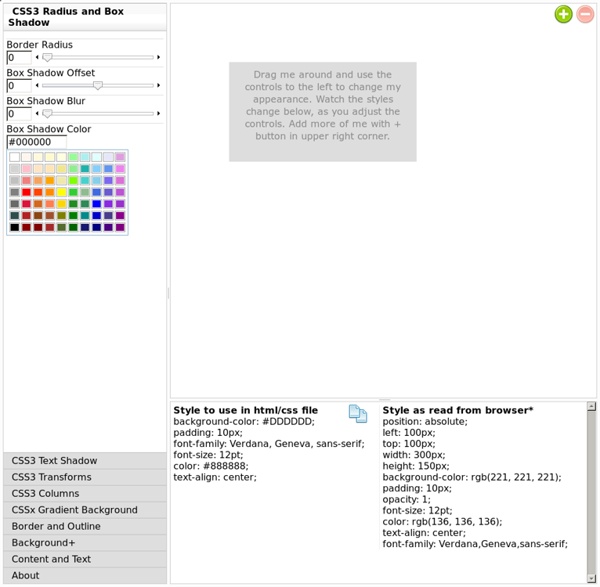
css Zen Garden: The Beauty in CSS Design Style Master CSS Editor for Windows and Mac OS X Cool Tools and Toys for Web Developers John, the lead developer (ok, pretty much the only developer) of Style Master is an avowed hacker. He loves exploring and experimenting with the latest features in browsers. XRAY works in Safari, Firefox and Internet Explorer. XRAY uses lots of cool CSS3 features like border-radius, opacity, box and text shadow, as well as the HTML5 canvas. MRI helps you create the best possible selectors for your CSS. MRI also uses lots of cool CSS3 features like border-radius, opacity, box and text shadow, as well as the HTML5 canvas. CSS3 Sandbox Gradients Explore CSS gradients (both linear and radial) (an experimental feature in Safari 4, and a proposed addition to CSS3). Shadows CSS now lets you create drop shadows on text, and on the box of an element. CSS Transforms You can rotate, scale, skew, and otherwise transform HTML elements with CSS 3. Coming soon