

Why (And How) Teachers Should Start Using iTunes U Courtesy: maconstate.edu With so many schools adopting the use of iPads I find it strange that we aren’t hearing more about the incredible opportunities available in iTunes U . Well I suppose it isn’t that strange given that schools in the early stages of transitioning to an iPad platform are extremely busy and learning one more thing can seem overwhelming. Trust me, I understand that, but I believe if you were to learn one more thing it should be about the power of iTunes U. The possibilities of this incredible tool are endless. The first and likely most exciting benefit of iTunes U is the multitude of incredible classroom resources at your disposal. When I think of the potential of iTunes U, the first thing that comes to my mind are the incredible communities that developed around SMART board users. An important consideration to think about is that the individuals creating these courses are cutting edge classroom teachers. Solar System Ecosystems Underground Railroad Presidents IT Weekly
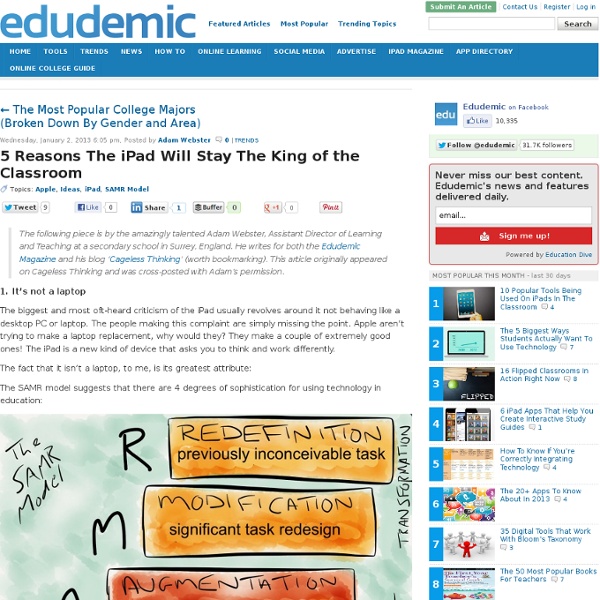
Edtech theory….why bother? I am currently studying my Masters in Education, specialising in Information Technologies and over the weekend completed an assignment. One part of the assignment was to look at some of the theories, models and frameworks behind using technology in the classroom, that enable teachers to do this effectively. I thought I would share some of that information here as a little reminder as sometimes I feel many teachers get so caught up in the tools and forget about the pedagogy. The theory behind effective technology integration: If you want to embrace technology effectively and in a meaningful manner in the classroom, you first need to identify your strengths and weaknesses. TechnologyPedagogyContent Imagine you are teaching a fractions lesson in mathematics, do you know the content? The TPACK framework is a great place to start to identify your professional development needs. My explanation of the SAMR model, from substitution to redefinition! SAMR Model from Rebecca Spink on Vimeo.
9 iPad Tutorials Teachers should not Miss This is the last post on iPad for this year. I have recently published several guides on the use of iPad in education starting with the best educational iPad apps for teachers and concluding with these tutorials and a soon to be released eBook that will be comprehensive enough to include everything we have covered about iPad so far. If you are an Android user and wondering why I don't talk about Android as much as I do about iPad , I recommend that you subscribe to my second blog Teacher's Mobile Technology to stay updated about educational Android tips and apps. Below is a set of great tutorials on the use of iPad. I have personally handpicked these resources from several online blogs, websites, and e-magazines.
Déploiement et gestion des iPads/iPods dans nos institutions avec Apple Configurator | Tablettes tactiles – 9 novembre 2012Publié dans : Colloque 3 oct 2012, Conférences Christophe Barrois Technicien en informatique – Édouard-Montpetit Grâce aux nouvelles technologies, plusieurs possibilités s’offrent aux enseignants et aux étudiants. Outils de manipulation d'images Quick Picture Tools réunit sur une même page une série d’outils à utiliser en ligne pour manipuler images et photos. Pour le moment, le site offre 12 outils avec de nombreuses options utilisables sans inscription. Liste des outils disponibles : Embossed Text : ajout de texte en relief sur une imageWallpaper Caldendar : fabrication de calendriers personnelsMultiple Picture Wallpaper : collage photo pour réaliser un fond d’écranRounded corners : outil pour arrondir les coins d’une photoStripe Frame : ajout de bordures sur les photosPrinted Photo : ajout d’un texte sur une photoCombine images : outil pour combiner des photosEmbossed Line Frame : outil pour ajouter un cadre en relief à une photoLine Frame : ajout d’une bordure simpleBlur Edge : outil pour user les coins et les bords d’une photoAdd Text : ajout d’une zone de texte sur une photoCrop : outil pour recadrer une image Les différents modules acceptent les photos au format JPEG, GIF ou PNG. Source : Quick Picture Tools
How To Use Siri In The Classroom 5 Useful iPhone Apps For Student Bloggers 9.27K Views 0 Likes Student blogging is a wonderful way to get into the world of online writing and learning. SAMR In The Upper Secondary School SAMR In The Upper Secondary School The slides from my keynote presentation and sessions in Kiruna are now online: SAMR In The Upper Secondary School SAMR, In Practice Top 7 Guides on how to Use iPad in your Classroom iPad is definitely a gadget of huge potential in education. Many schools in the States and Canada are adopting it as a learning tool within their curriculum. Developers have already started creating e-textbooks with enhanced mobile compatibility. Given this growing important of iPad in education, Educational Technology and Mobile Learning deemed it crucial to provide its readers with some of its best guides and posts we have published here during this year. 1- 12 Questions to Ask before Using iPad with your Students 2- 62 Ways to Use iPad with your Students 3- 100+ Tips on how to Integrate iPad into your Classroom 4- Excellent Slides on The Use of iPad in Education 5- iPad in The Classroom A Great Free eBook 6- 29 iPad Resources, Tutorials, and Guides Every Teacher should Know about 7- 8 Free Resources on The Use of iPad in Education
Compte rendu du iPad Summit de Boston Par manque de temps et surtout par manque d’espace où le publier en ligne, voici mon compte rendu du iPad Summit de Boston. Celui-ci s’est déroulé les 7 et 8 novembre 2012. Cet article ne couvre pas l’ensemble des conférences, mais celles qui ont eu le plus grand impact sur ma vision de l’implantation technologique en éducation. Cet évènement a été organisé par le EdTechTeacher. Voici le fil de nouvelle pour le mot clé utilisé pendant la conférence: #ettipad Conférence d’ouverture Présentation d’ouverture par Tony Wagner Très bonne présentation sur l’importance d’innover et de préparer nos jeunes pour le futur. Les 7 techniques de survie: 1) Pensé critique et résolution de problème 2) Collaborer et influencer positivement 3) Adaptation et flexibilité 4) Entrepreneuriat et initiative 5) Bonne communication orale et écrite 6) Capacité d’organisation et d’analyse de l’information 7) Imagination et curiosité Il a expliqué deux défis importants auxquels les écoles vont être de plus en plus confrontées.
Apple iPad for Learning & Teaching Workshop I Teach Above The Line At an Apple ShowCase Event in Chicago yesterday I had the pleasure of listening to the advice of many talented educators who have successfully launched and implemented 1-1 Mac learning environments. As I listened to their stories I found myself writing down many quotes for use as I begin this journey. Upon reflection, I realize that I can do the most with the quote from Shannon Soger, 1-1 coordinator and instructional coach from D100, Chicagoland. "I teach above the line." The quote is in reference to the SAMR model of tech integration and I have been very happy about Apple's consistent use of this model as a framework for 1-1 implementation. Shannon told us she made t-shirts for staff with the slogan.
10 Awesome iPad Accessories for Teachers I received a couple of emails from some of you asking about the type of accessories to get for iPad. I am not really an expert in these kinds of things and because I can not recommend things I have not tried myself I checked with our colleague in iPadstorm and got this list below. Of course not everything is mentioned but only the most important things you might consider getting for your new iPad. Check out the list of accessories below and share with us your suggestions or additions . 1- Jambox " Apart from sounding great and looking good, they are extremely portable and play music via Bluetooth connections, so that all your devices (iPad or otherwise) can wirelessly connect..." 2- Apple TV " Any iOS device on the same Wi-Fi network can stream music, video or mirror the display entirely onto a television to share whatever content is on your iPad with friends and family.........." 3- Smartr Stand 5- Compass for iPad 6- Hover Bar 7- Mophie Power Stand 8- Lightning to SD Card Camera Reader