

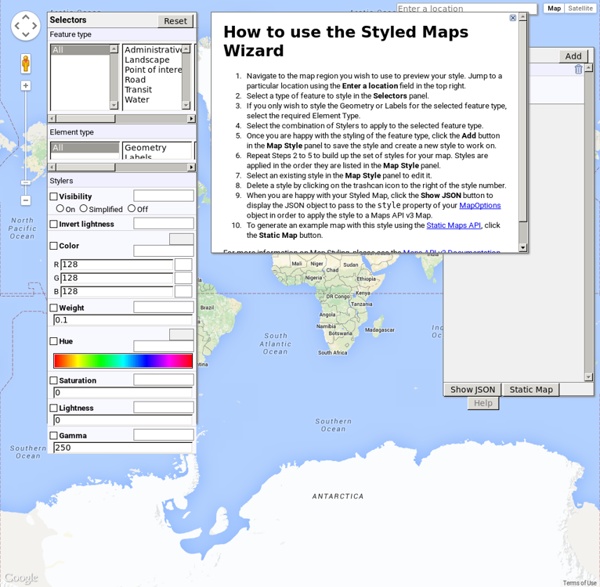
Mobile GMaps - View maps from various sources on your mobile phone! Google Maps Mania Set map styles - Google Fusion Tables Help Locations in Fusion Tables can be points, lines or polygons. The appearance of each of these features on the map can be set with a map style. To change the appearance of map features: Style types There are four ways to specify a style: Fixed Specify a single style to be used for all elements on the map. Column Provide a specification for each row's display in one of your table's data columns. Buckets Specify two or more number ranges, and give each range a style. Gradient Polygons and lines are styled based on the numbers in your data. Legends For some styles you can automatically generate a legend explaining the map's appearance: Point marker styles using buckets Polygon fill color styles using buckets or gradients Use the Automatic legend panel to specify the legend to show (marker, polygon fill, or both) and where on the map to place the legend box. Try it yourself! Open a public table like the Caterpillar data. Need even more power?
Best Fonts For Flat UI Design "What is the best font to use with FLAT UI Design?" This seems to be a big question when it comes to Flat design. That FLAT UI Style focuses on colors, typography, simple shapes to feature usability and clarity works well with simple but unique fonts.While common typefaces work well in flat ui design, opt for something more unique and attractive appears. If you do want to make your website stand out, does an outstanding typeface will help create an identity for your project.It is very important, in Flat UI Design, to have sharp, flair and flat fonts in a manner that it is bold, simple and straight-forward. Open Sans is a clean and modern sans-serif typeface. Rale way is an elegant also a display sans-serif typeface which has been expanded into 9 weights family such as: thin, extralight, light, regular, bold... Lato font is a sans serif typeface family. Montserrat is a new libre sans text typeface for the web, inspired by the signage found in a historical neighborhood of Buenos Aires.
[APPMOD][07.11.10] Brut Google Maps 4.6.0.4686-brut17 [APPMOD][07.11.10] Brut Google Maps 4.6.0.4686-brut17 Features:worldwide navigation using Google Maps Directionsmap tiles caching on SD cardforce-enable MT. If you're on Eclair or some custom Donut and don't have multitouch zooming, then maybe this will enable it.force-enable Buzz featurefix for map shift issue in Chinaoption to hide zoom buttonsinstallable on non-rooted devicescould be installed beside original appCredits:canadiancow for starting a brainstorm; an idea to use maps directions as backend for navigation; great Nav Launcher app; helping and supportTAPP for enabling "Navigate" button; first version for non-rootersacamar for his research on map shift issue in Chinamany, many people for testing it, complaining ;), helping others, etc.Google for making this great app and service and for not sending C&D to me so far ;)Download: maps4.6.0.4686-brut.apk md5sum: 456b3fe71f74bb8b76a443be4075473c Variants: There are 3 packs of changes: Installation: Package name changing:
Tool for Google Maps v3 (version 3) This application is also available with Large map. This is a drawing tool for polyline, polygon, polygon with holes, rectangle, circle, marker(icon), direction(route, path). This application uses the Google Maps API Version 3 (V3). It has all the features of Google Maps MyMaps and has direct access to the code for the shapes (overlays) you create. It should be a full-fledged alternative. You draw and create a map with the shapes you want. Code will be presented in the textarea. The OpenStreetMap map type has been added to the Google Maps map types. The feature 'polygon with hole' ('donut') is built-in in V3. The V2 feature enableEditing now exists for V3. And for editing - if you have a kml file uploaded on a server, and you want to edit its coordinates, you may use my edit tool Edit tool for Google maps polyline and polygon You will need a PC or laptop with a large amount of computer memory if your kml file has 1000 coordinate pairs or more. Other useful links:
Google Maps API Receives Transit, Symbols, Heatmap Layers Google has made several modifications to its Google Maps strategy over the past few weeks that will encourage developers to continue to use the service. The new additions were outlined in a recent blog post made by the Google Geo-Developers team. (Photo: flickr.com / Johan Larsson) Google Maps, the satellite imaging service provided by Google, has become one of the most popular map services for a number of activities: whether it's mapping crimes in a city, available apartments or just finding a route from one location to the next, Google Maps has become the go-to service for many users. Follow Us Recently, though, Google Maps has come under fire by one of the search giant's biggest rivals, Apple Inc. Not to be outdone, Google has made several modifications to its Google Maps strategy over the past few weeks that will encourage developers to continue to use the service. "To support the launch of routing by public transit we're also adding the Transit Layer to the Maps API.
Le top des ressources gratuites en Web design pour 2012 Magazine du Webdesign C'est à cette période de l'année que l'on voit apparaître des centaines d'articles sur le Web du type : Les 10 meilleurs [...] de 2012. 20% des ressources gratuites pour Web designers listées dans ces articles peuvent susciter un certain intérêt, les 80% restantes sont à jeter. En voici quelques-unes qui ne finiront pas à la corbeille. Web Interface Lab Une collection d’éléments d’interfaces utilisateur gratuits codés en HTML5 et CSS3. Pixabay : plus de 40,000 photos et illustrations gratuites En tant que Web designers, vous êtes constamment à la recherche d’illustrations et de photos. The Entypo Pictogram Suite Une collection gratuite de pictogrammes . Gemicon Encore une ressource gratuite d’icônes, cette fois-ci c’est 600 icônes gratuites à utiliser pour tous vos designs. Other Icons On continue avec les icônes. Wireframe.CC L’outil incontournable pour du wireframing rapide et facile. Google Web Fonts Font Fabric Un showcase de fonts gratuites. Subtle Patterns Premium Pixels Agile Designers
GeoTagging photos with FOSS - Linfiniti Geo Blog Since I got a crackberry cellphone that geotags images when I take them using its built in GPS, I have become a photo snapping lunatic. Of course one's lunacy needs some way to manifest itself using FOSSGIS so I am going to decribe here a workflow to enable you to enjoy the thrills of geotagged imagery in QGIS even if you aren't the proud owner of a completely proprietary crackberry phone! The process I describe below will allow you to geotag a directory full of images using a gpx track that you collect using your gps when you are out in the field. If your camera / phonecam already geotags your images, you can do step 1 and then skip straight down to step 10 below! Step 1: Install dependencies: sudo apt-get install gpscorrelate exiv2 python-pyexiv2 Step 2: Clean up your gpx file. Be careful of using the QGIS editing tools to cut away any ropey looking or unneeded features - QGIS will delete the vertex attributes in the track! Step 4: Find the timestamp of your first image: Another example:
Online KML converter – batch geocoder | MapsData Our free online converters let you batch geocode ZIP codes and UK postcodes, and we also offer a range of individual converters. We developed the technologies behind these converters for our own products and decided to share them for others to use freely. Converter limits The Batch Converter is limited to 50,000 rows, and the KML converter approximately 32Mb. Batch Geocoder & Converter Geocode and Convert Spatial Data Convert to lat-lon by dragging and dropping your file. Convert US ZIP codes, British postal codes, as well as degrees minutes and seconds, UTM, MGRS and BNG into decimal latitude & longitude. KML Converter Convert your files to KML Convert Excel to KML, CSV to KML, SHP to KML, GPX to KML, KMZ to KML or DXF to KML by dragging and dropping your file. Drag and drop your file for quick KML conversion. Individual converters You can also use the drag and drop boxes below to geocode or convert your data. To geocode or convert a single entry click here. Convert ZIP codes to lat-lon
Public transit routing and layer now available in the Google Maps API Google Maps API now enables developers to add Transit data, including public transit directions, to their maps and apps. Whether you're planning a trip from your computer or on the spur of the moment from your mobile device, Google Maps helps you find directions in more than 475 regions around the world. Today we're pleased to announce that public transit directions are now available in the Google Maps API. Public transit has been one of the most requested features by Maps API developers, and you can now use it in both the Google Maps Javascript v3 and the Directions Web Service. To support the launch of routing by public transit we're also adding the Transit Layer to the Maps API. If you're using a Google Map, you can now use the Directions API web service to add this useful and helpful transit data to your map.
Linkedin, social icon | Icon search engine SVG - Base64 PNG - Base64 Help License: Creative Commons (Attribution-Share Alike 3.0 Unported) (help for licenses) Additional sizes Typicons - 308 vector (SVG) icons View all icons in icon set 1 comment By Stephen Hutchings Visit website SVG PNG AI CSH More Please wait SVG PNG AI CSH More SVG PNG AI CSH More SVG PNG AI CSH More SVG PNG AI CSH More SVG PNG AI CSH More SVG PNG AI CSH More SVG PNG AI CSH More SVG PNG AI CSH More SVG PNG AI CSH More SVG PNG AI CSH More SVG PNG AI CSH More SVG PNG AI CSH More SVG PNG AI CSH More SVG PNG AI CSH More SVG PNG AI CSH More SVG PNG AI CSH More SVG PNG AI CSH More SVG PNG AI CSH More SVG PNG AI CSH More View all icons in icon set Related icons SVG PNG AI More SVG PNG AI CSH More SVG PNG AI More SVG PNG AI CSH More SVG PNG AI More SVG PNG AI CSH More SVG PNG AI CSH More SVG PNG AI More SVG PNG AI CSH More SVG PNG AI CSH More SVG PNG AI CSH More SVG PNG AI More SVG PNG AI More SVG PNG AI More PNG More SVG PNG AI More PNG More SVG PNG AI More SVG PNG AI More SVG PNG AI More
UsingArcGISServerLayersWith900913 - geoportal - How to use ArcGI ESRI's ArcGIS Server and ArcIMS products use a different EPSG code for web mercator than most open source projects do. While projects like OpenLayers use 900913 for web mercator, ESRI uses 102113. This causes an error message from AGS indicating the projection is not supported, as well as no map image. I put in this bit of code in map.js before initializeMap() to get around this problem (big thanks to somebody in the OpenLayers forums). What it's doing is catching the WMS request for WMS layers and checking to see if a projection is specified for that layer. So if I create a layer referencing AGS and specify a projection like this: OpenLayers will pass 102113 to AGS, and the image will appear correctly.