

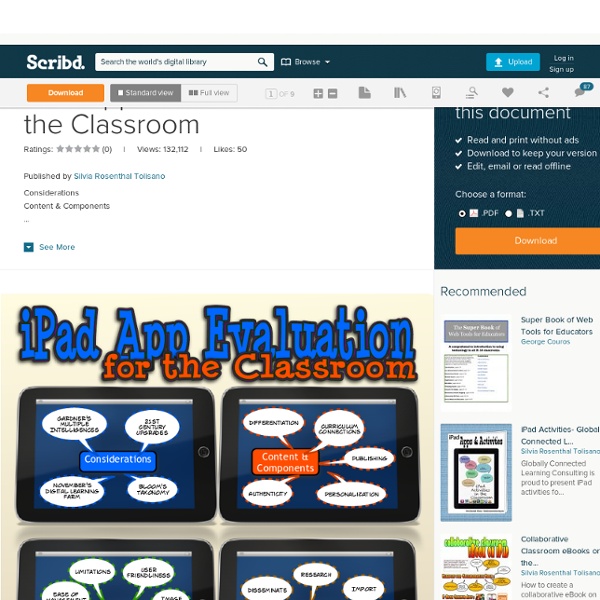
Quick List Of iPad Resources For The Classroom One question that comes into my inbox or on Twitter a lot lately is one dealing with iPads. Many schools and classrooms all over are investing in these devices and educators want to know how to use them effectively, apps to consider and more. In keeping with the "My Favorite Resources" theme (last week I listed my favorite resources for talking about Twitter) here are my go-to resources when people ask me about iPads in the Classroom. ISTE iPad In Education Webinar Resources-A while back ISTE ran a great webinar with some fabulous educators on using iPads in the classroom. This site has loads of information, a collection of articles, lists of apps and information on Apple's Volume Purchasing Program. iPads For Education- While this site comes courtesy of the Department Of Education in Victoria Australia, there is lots of information that can cross the Pacific that you can use in your classroom. Sample Lessons-iPads In Education-5 Quick Lessons using various iPad apps.
6 iPad Apps That Help You Create Interactive Study Guides With the end of the semester drawing near, so are the plans of preparing students for final exams and standardized tests. Check out these six iPad apps to create fun, engaging, interactive study guides for your students. 1. 2. 3. 4. 5. Students love to use engaging activities to review and prepare for exams. 60 Ways To Use Twitter In The Classroom By Category Social media offers some great opportunities for learning in the classroom, bringing together the ability to collaborate, access worldwide resources, and find new and interesting ways to communicate in one easily accessible place. Teachers around the world have found innovative ways to use Twitter as a teaching tool (including TeachThought’s favorite), and we’ve shared many of these great ideas here with you. Read on, and we’ll explore 60 inspiring ways that teachers and students can put Twitter to work in the classroom. Communication Twitter makes staying in touch and sharing announcements super simple and even fun. Organization Twitter’s hashtags and other tools share a great way to organize information for your classroom. Resources Use these ideas to take advantage of the vast resources that Twitter has to offer. Writing Skills
iPad Apps that work with Smartboards The iPad looks amazing when projected onto a large screen. The students in a 1 to 1 iPad classroom gets to see the apps at work. Have a look at the list below to see if any of these might be useful in your classroom. If you have others that should be added to this list please leave a comment with the name of the app and we will add it to the list. Doceri: FREE Turn your iPad and classroom computer into an Interactive Whiteboard with Doceri. SplashTop: $5.49 AU This is the ONLY remote desktop app that streams video and audio from your PC or Mac, allowing you to interact with your PowerPoint, Keynote, Word, Excel, Outlook, Quicken, IE, Firefox, Safari, World of Warcraft, and other PC / MAC applications. Edistorm: FREE Edistorm is an online brainstorming tool that uses the metaphor of sticky notes to allow you to brainstorm.
Bloom’s Taxonomy and iPad Apps LearningToday shares with everyone two beautiful posters, that help us remember Bloom’s Taxonomy: the Blooming Butterfly and the Blooming Orange. How do we connect the Bloom’s Taxonomy with the iPad? Following inDave Mileham and Kelly Tenkeley’s footsteps of assigning iPad apps to the different levels of the Bloom’s Taxonomy, I created the following table with apps that I have tested out and am recommending. In order to make the cut, the app had to fulfill the criteria (from Wikipedia and according to the Blooming Orange’s verbs) set out for each level. I want to encourage/challenge you, to take a look at the iPad apps on YOUR iPad and to categorize these apps with the different thinking levels and THEN take the next step to SHARE your list with other educators. Remember: Exhibit memory of previously-learned materials by recalling facts, terms, basic concepts and answers. describenamefindnamelisttell Suggested apps: explaincomparediscusspredicttranslateoutlinerestate Suggested Apps: Create:
Ipadschools - home The iPad Comes Alive with Augmented Reality Using Twitter to provide some quick and interesting lesson starters I am a big fan of using multimedia as a way of stimulating children in discussions and writing. As the saying goes, 'a picture is worth a thousand words,' and using pictures and videos can really help children develop ideas and give them a purpose and focus for their writing. One website which is great for providing videos, pictures and other media that can be used in Literacy is the Literacy Shed. Started by @Redgierob, this amazing resource provides so many amazing resources to cover every aspect of the Literacy curriculum.Click here to read more about using videos and pictures in Literacy. Many teachers are now starting to realise the massive benefits of using twitter as a way of building a learning network, sharing ideas, connecting with other great teachers and learning how to improve as a teacher to enhance the learning in their classroom. A helping hand... twitter.com/fabulousanimal… — Animal Life (@fabulousanimals) March 31, 2013 Write a description of this picture in 100 words.
1,000 Education Apps Organized By Subject & Price How Students Benefit From Using Social Media 13.56K Views 0 Likes A lot of criticism has been leveled at social media and the effect it has on the way students process and retain information, as well as how distracting it can be. 10 African-American History Month Teaching Resources 1.27K Views 0 Likes This week’s Featured Ten Learnist boards are dedicated to African-American history month. 3 Tech Tips Your Grandma Could Teach You 2.06K Views 0 Likes Those who have been using technology, in some form, have a few tech tips you should know about.
I Education Apps Review - I Education Apps Review iPad As.... iPads have exploded throughout schools and classrooms. Their flexibility, versatility, and mobility make them a phenomenal learning tool. As teachers seek ways to integrate these devices, we recommend focusing on specific learning goals that promote critical-thinking, creativity, collaboration, and the creation of student-centric learning environments. In other words, begin with..... 2013 iPad App Lists – v1.0 | iPads 4 Learning @ Manor Lakes P-12 College Finally. After weeks of deliberation. After weeks of deleting, adding, changing, swapping, etc… We’re done! Below you will find our 3 Application Lists for our iPad Programs in 2013. The lists have been designed with student learning in mind with focuses being placed on creativity, collaboration, modification and redefinition. If you have any suggestions to these app lists, we’d love to hear from you. In the mean time… happy viewing! MLP12C EY iPad App List 2013 MLP12C MY iPad App List 2013 MLP12C SCMY iPad App List 2013
Ask3 – An iPad App for Creating Flipped Video Lessons Your Students Can Actually Respond To Ask3 is a free iPad app from TechSmith. TechSmith is probably best known as being the company that produces Jing and Camtasia screen capture software. Ask3 is a tool that teachers can use to create short instructional videos that are shared directly to their students’ iPads. You share Ask3 videos to your students through a virtual workspace room. Ask3 could be a great app to use to develop and share short tutorials with your students. 17 iPad Apps We Explored Using With High School Post-Graduates Last week I spent a day working with teachers at Bridgton Academy in Bridgton, Maine. May 22, 2013 In "College" Three iPad Apps for Creating Talking Pictures A couple of weeks ago at the Future Schools Expo in Sydney I facilitated a workshop about making media with mobile apps.
Apps for Grading Assessments Using rubrics and providing student's feedback via the iPad has not been an area that has received a great deal of attention. This is, however, starting to change. I have recently spoken to a number of teachers who have developed apps that will allows teachers to use the iPad as a viable way of assessing student work. Some of these apps actually do more than just mark work. Easy Assessment: $1.99 Easy Assessment is the app teachers have been waiting for. Formative Feedback: $1.99 AU This is another great app design by an Australian teacher - Paul Hamilton. Stick Pick: $2.99 AU Stick Pick is the first app of its kind to uniquely link question stems to the cognitive or linguistic needs of each individual learner. Essay Grader: $6.49 AU Provide your students with exceptional feedback, and reduce your grading time with Essay Grader for iPad. ASSIST: FREE Assist lets you administer and collect student results from common, summative, formative and rubrics-based assessments.