

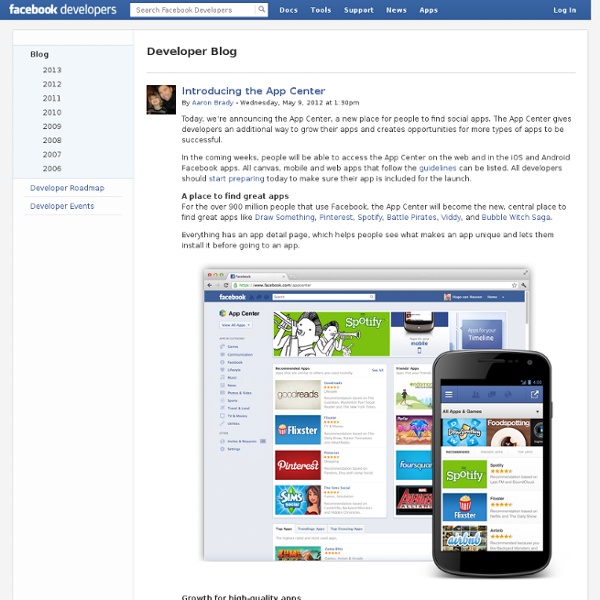
App Discovery By Quality, Not Popularity: Facebook Announces App Center For Web, iOS, Android, HTML5, Pre-Paid Today, Facebook app discovery too heavily favors the loudest apps with the most users, so Facebook today announces it will soon launch the App Center, a single, personalized hub for discovering the highest quality Facebook-integrated games and utilities from across the web and mobile. And for the first time, Facebook is beta testing the option for developers to sell pre-paid web and HTML5 apps. You’ll be able to access App Center via the web or mobile, and you can send apps you discover on a the web to your littler devices. App Center could be a huge boon to app growth on Facebook, especially for those that are beloved but not inherently viral. With any luck, App Center will usher in an age where your news feed is filled with apps you actually want use, not just the spammiest ones or those with the biggest marketing budgets. Here’s a few more details on the App Center: Facebook is finalizing the App Center’s design.
A Face in the Crowd | Interview For some people Facebook is a collection of 500 million people, all shouting about what they've done today and trying to get you to harvest their zucchinis for you. For others it's the thoughts and interests of all of your closest friends and family, a place to share experiences and keep abreast of the lives of loved ones you're not lucky enough to see very often. But for Facebook, it's all business. Whichever side of the divide you're on, it's hard to deny Facebook's massive impact on the development and future of the games industry. The driving force behind the social and casual gaming revolution, Facebook has birthed Zynga, given new life to Bejewelled and made farmers out of millions of us. So what's next? Q: Looking back at some of your comments at the Game Developers Conference earlier this year, one of your main points was that Facebook games have now grown their audience to include almost every demographic. Gareth Davis: I think that there are a few things going on there.
Facebook's New App Center Promises Quality Over Quantity Last September, during the f8 Developers’ Conference, Facebook CTO Bret Taylor said that the company had no plans for a “central app repository” – an app store. Today, Facebook is changing its tune. The social giant has announced App Center, a section of Facebook dedicated to discovering and deploying high-quality apps on the company’s platform. The App Center will push apps to iPhone, Android and the mobile Web, giving Facebook its first true store for mobile app discovery. The departure from Facebook’s previous company line comes as the social platform ramps up its mobile offerings to make money from its hundreds of millions of mobile users. Let’s start with the requirements. Whether or not an app is a potential Facebook App Center candidate hinges on several factors. • have a canvas page (a page that sets the app’s permissions on Facebook’s platform) • be built for iOS, Android or the mobile Web • use a Facebook Login or be a website that uses a Facebook Login.
Are consumers falling out of love with Facebook games? Engagement with Facebook Games Has fallen 25% since December 2010 I’ve been doing some analysis of Facebook games over the past year. In particular, I’ve been looking at the engagement rate (DAU/MAU) for Facebook games. Between December 2010 and September 2011, engagement has fallen by around 25% for some of the most popular games on Facebook. Across the board, engagements have fallen (with the exception of Mafia Wars). Even the Sims Social, one of EA’s successes, has lower engagement rate than many games back in December. Why are Facebook engagement rates in decline? I haven’t done an exhaustive analysis, so it’s hard to be sure of underlying trends. Increased choice: there are a lot of games on Facebook now. Is the Facebook gaming era over? In my experience, forecasters, analysts and companies always underestimate seasonal factors in their calculations. I am hopeful that we will see some recovery in engagement rates in the final quarter of this year. The summer may end, but there is a lot more choice out there than there was.
Facebook is getting its own app store for all devices, all platforms, all prices Facebook is launching a new App Center, “a place to find social web, desktop, and mobile apps” — and not just Facebook apps. The App Center will bring Facebook’s 900 million users all the best in iOS apps, Android apps, web apps, mobile web apps, and even desktop apps. “The goal is to solve the app discovery problem… based on what you and your friends enjoy,” a Facebook rep told VentureBeat in a phone chat today. You won’t just find free apps here, either. Facebook is also introducing paid apps. The company stated it expects in-app purchases to be developers’ primary money-makers for the time being; however, making paid apps available through the Facebook platform is the beginning of a very interesting business opportunity, both for devs and for Facebook. Not only will Facebook’s App Center apps be personalized (as only Facebook, with its huge social graph, can personalize); it will also feature an iTunes App Store-like focus on quality. So what does Facebook get out of the deal?
Facebook’s Cutesy Annual Report To Partners Reveals First Country-By-Country Mobile Stats TechCrunch has obtained never before published metrics showing Facebook’s international growth. Facebook sent some partners a playfully illustrated eMagazine called The Annual, but I’ve acquired a copy from a source and the stats inside are serious business. The report divulges user counts for some key international markets like Germany, which now has 25 million users, and 18 million mobile users. Previously, Facebook had only shared combined web and mobile user counts by multi-country region, and its mobile user counts as global totals. The problem is that hides what parts of the world are driving its mobile growth, which has brought it to a total of 874 million monthly mobile users and 507 million daily mobile users as of September 2013, out of a total 1.19 billion month user across all devices. So for several quarters I called for Facebook to release more detailed international mobile stats.
Facebook’s App Center aims to make discovering third-party apps easier Facebook has built a new application discovery tool to help its users find third-party mobile and Web applications that integrate with the popular social network. The Facebook App Center, which launched this evening with approximately 600 application listings, is accessible through Facebook’s website and mobile applications. The main App Center landing page on the Facebook website displays personalized app recommendations and a list of the apps that are popular among the user’s friends. A list of application categories in the sidebar can be used to navigate into different sections of the App Center. There is also a toggle button that can be used to filter for Web or mobile applications. Although the Facebook App Center looks like a conventional application storefront, it doesn’t directly sell any software. Clicking on an application in the App Center on the Facebook website will take the user to its profile page, which displays a rating, screenshots, and other relevant information.
Facebook’s Dilemma With Native iOS Apps: Relevance or Revenues Facebook revealed some healthy new stats about how it drives traffic to Apple’s iOS ecosystem at an event today in San Francisco. The platform drove people to Apple’s App Store 83 million times last month. On top of that, it sent people back to iOS apps they had already downloaded 134 million times. Facebook was also integrated into seven of the top 10 grossing iOS apps and six of the top 10 Android apps. The company’s emerging power on mobile platforms has been very visible in the surprising rise of apps like SocialCam and Viddy. But the thing to keep in mind is how huge a strategic turnaround this is for the company. However, over the last several months, Facebook has backtracked away from HTML5 because the technology just isn’t ready yet for many popular kinds of apps. What this means is that Facebook is forgoing short-term revenue opportunities in exchange for reach and relevance right now.