

Q10 Key features Full-screen. Focus on your work. Even if Mark Pilgrim doesn't like full-screen editors, some of us do. Live text statistics. Word, page and character counts are updated live as you type. Programmable page count formula. Specify what formula to use for page count calculation. Customizable look and paragraph format. Change the colors, line spacing, first line indent, paragraph spacing, font... Perfectly portable. A single self-contained executable file. Easy to use timer alarm. Perfect for timed writing sessions and word wars. Spell checker. You don't make mistakes. Notes. Any paragraph starting with ".." is considered a note. Target count. Displays completed percentage. Partial counts. Keep track of the extension of current chapter or see how much content you've produced in the current writing session. Autocorrections and quick text. Unlimited autocorrection entries to fix on the fly those persistent typing errors. Standard and clean text format. Encoding and line endings agnostic. Free.
Time management Time management is the act or process of planning and exercising conscious control over the amount of time spent on specific activities, especially to increase effectiveness, efficiency or productivity. It is a meta-activity with the goal to maximize the overall benefit of a set of other activities within the boundary condition of a limited amount of time. Time management may be aided by a range of skills, tools, and techniques used to manage time when accomplishing specific tasks, projects, and goals complying with a due date. Initially, time management referred to just business or work activities, but eventually the term broadened to include personal activities as well. A time management system is a designed combination of processes, tools, techniques, and methods. Time management is usually a necessity in any project development as it determines the project completion time and scope. The major themes arising from the literature on time management include the following: Some[which?]
Literature and Latte • Index page It is currently Mon Oct 30, 2017 4:19 pm AnnouncementsAnnouncements about new releases and the ongoing progress of Scrivener. Topics: 121 Topics: 121 Posts: 3616 Last post How we redesigned Compile for… by KB View the latest post Thu Sep 14, 2017 3:04 pm Topics: 14584 Posts: 79327 Last post Re: Disappearing Folder by Kyrce View the latest post Mon Oct 30, 2017 3:34 pm Topics: 11253 Posts: 49762 Last post Re: Upload Failed by lunk View the latest post Mon Oct 30, 2017 2:43 pm Topics: 800 Posts: 5921 Last post Re: Dropbox and Scrivener by Theshooglypeg View the latest post Tue Oct 24, 2017 8:16 pm Scrivener on Linux (Unofficial)Meeting area for those running the unofficial Linux version of Scrivener (please note that there is no official Linux version and further development has been discontinued, so Linux versions are community-supported only). Writer's BlockDiscuss the writing craft here. Who is online Birthdays No birthdays today Statistics
WriteMonkey - Home Getting Things Done Personal productivity system and 2001 book The GTD method rests on the idea of moving all items of interest, relevant information, issues, tasks and projects out of one's mind by recording them externally and then breaking them into actionable work items with known time limits.[b][c] This allows one's attention to focus on taking action on each task listed in an external record, instead of recalling them intuitively.[5] First published in 2001,[4] a revised edition of the book was released in 2015 to reflect the changes in information technology during the preceding decade.[1] Themes[edit] Allen first demonstrates stress reduction from the method with the following exercise, centered on a task that has an unclear outcome or whose next action is not defined. The most annoying, distracting, or interesting task is chosen, and defined as an "incomplete". An inboxA trash canA filing system for reference materialSeveral lists (detailed below)A calendar (either a paper-based or digital calendar)
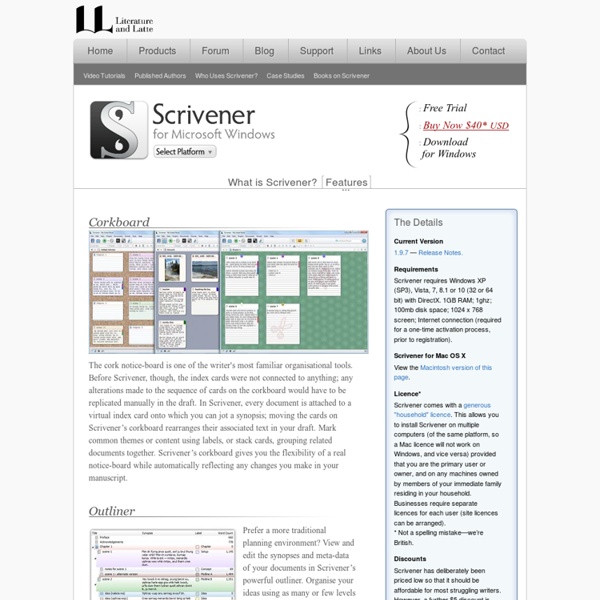
Scrivener Corkboard The cork notice-board is one of the writer's most familiar organisational tools. Before Scrivener, though, the index cards were not connected to anything; any alterations made to the sequence of cards on the corkboard would have to be replicated manually in the draft. In Scrivener, every document is attached to a virtual index card onto which you can jot a synopsis; moving the cards on Scrivener’s corkboard rearranges their associated text in your draft. Mark common themes or content using labels, or stack cards, grouping related documents together. Outliner Prefer a more traditional planning environment? Scrivenings Scrivener’s innovative “Scrivenings” mode allows you to move smoothly between editing your document one piece at a time or together as a whole. Text Editing Who said WYSIWYG is always best? Tools for Writing Non-Fiction Scrivener isn’t just for writing novels and other forms of fiction. Scriptwriting Draft the next blockbuster Statistics and Targets Snapshots Collections
WriteRoom — Distraction free writing software for Mac & iOS "But if, when it comes right down to it, full screen is your holy grail, and the ultimate antidote to the bric-a-brac of Word, then you must enter the WriteRoom, the ultimate spartan writing utopia."— Virginia Heffernan, New York Times "Unlike practically everything else in our digital lives, WriteRoom's minimalist interface implies a truly flattering proposition: It's you, not the software, that matters. "Green text on a blank, black screen, with a square, blinking cursor. "WriteRoom’s minimalist interface also frees you from the nagging urge to fiddle with margins, fonts, and other settings, leaving you with nothing to do but write "It’s a primitive application, to be sure — I suspect completely by design — but it may be just what the doctor ordered if you need to get your head out of your butt and put some words on the page. "A perfectly balanced, indispensable part of any Mac writer’s toolkit "A Great App for Easily-Distracted Writers… Like Me"— James Floyd Kelly, Wired.com
Tracks Testimonials ““If there was a list of the top five greatest apps of all time in the Mac App Store, it would start with Scrivener and then there would be four other things.” — Andy Ihnatko, technology columnist and general good guy. ““Scrivener gives you the freedom to make a mess, the confidence to know you’ll clean it up, and the semantic relationships to tie it all together in whatever way makes the most sense to you.” — Merlin Mann, indie writer, speaker, and broadcaster. “The last few years have seen the appearance of several OS X applications designed for the use of writers. Many of these applications are very good — but every one is in some way lacking. — Neil Cross, long-listed for the 2004 Booker Prize for his novel Always the Sun and screenwriter for the acclaimed BBC1 show Spooks. “Today I finished the first draft of my 32nd book — and the eighth I’ve written entirely in Scrivener. Then I discovered Scrivener — software created especially for writers. “I’m in love! And now it’s love.
Scrivener Why Use Our Novel Writing Software? Our novel writing software is designed to help writers organise their thoughts, structure their narratives, and keep track of character and plot development. It simplifies the writing process, allowing writers to focus on their creativity without getting bogged down by technical details. Here’s why you should consider using our book writing software: Organisation: Keep all your notes, research, and chapters in one place. Productivity: Use tools that help you stay on track with word counts and deadlines. Top Novel Writing Software and Book Writing Apps There are numerous writing softwares available, each offering unique features tailored to different writing needs. Scrivener: Scrivener is widely regarded as one of the best software for book writing. Grammarly: While not a traditional novel writing software, Grammarly is an essential app for writers. Features to Look for in Book Writing Software Free Novel Writing Software Options
Scrivener and the short story - JW Nelson Recently I was asked by fellow writers at the Triggerstreet.com writing site to contribute a short story for inclusion in an e-published collection. In the past, I occasionally posted short stories for review on that site and also enjoyed the opportunity to read submissions by other writers. It’s where I worked out the stories that became “L.A. Limo Tales” (available on Amazon.com) and the comments I received at Triggerstreet were very helpful. The dozen or so chosen contributors had all been recognized for their own Triggerstreet submissions, so I wanted to offer something worthy of the compliment I’d been given. I opened it in Word and got to work. Well, it wasn’t long before I lost what I like to call the “thread” of a tale. After copying the work-in-progress into Scrivener, it was a quick and simple task to “Split at Selection” and break the story’s sections down into individual notes. If you are a Stephen King who eschews outlining a story (but Mr.