Webcams.travel
ITU Gaze Tracker
The ITU Gaze Tracker is an open-source eye tracker that aims to provide a low-cost alternative to commercial gaze tracking systems and to make this technology more accessible. It is developed by the Gaze Group at the IT University of Copenhagen and other contributors from the community, with the support of the Communication by Gaze Interaction Association (COGAIN). The eye tracking software is video-based, and any camera equipped with infrared nightvision can be used, such as a videocamera or a webcam. The cameras that have been tested with the system can be found in our forum. We encourage users and developers to test our software with their cameras and provide feedback so we can continue development. The ITU Gaze Tracker is hosted in SourceForge. In order to run the software, uncompress the zip file and double click on GazeTrackerUI.exe. The user's guide to run and configure the ITU Gaze Tracker can be downloaded from here (PDF document) The requirements to run the ITU Gaze Tracker are:
Take a Tour of Open Source Eye-Tracking Software
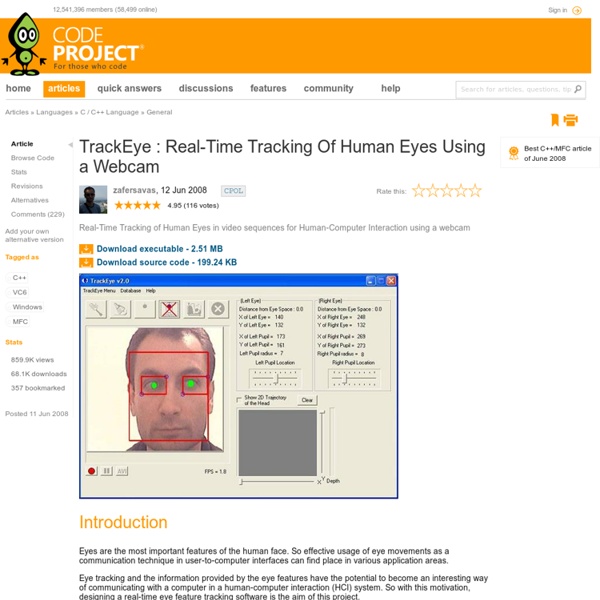
Right this very second, you are looking at a Web browser. At least, those are the odds. But while that's mildly interesting to me, detailed data on where users look (and for how long) is mission-critical. Web designers want to know if visitors are distracted from the contents of the page. Application developers want to know if users have trouble finding the important tools and functions on screen. Plus, for the accessibility community, being able to track eye motion lets you provide text input and cursor control to people who can't operate standard IO devices. The categories mentioned above do a fairly clean job of dividing up the eye-tracking projects. For example, there are eye-tracking projects designed to work with standard, run-of-the-mill Web cams (like those that come conveniently attached to the top edge of so many laptops), and those meant to be used with a specialty, head-mounted apparatus. Tracking Eye Movement With a Webcam Tracking Eye Movement with Specialty Equipment
Tjoon - Split screen jam sessions
What Customers Want > Chapter 2: What Customers Want
In this chapter, author Jodie Dalgleish explains that what customers want from a web site depends on what they want to do, and then shows you how to deliver it to them. As I've stood behind customers, in the moment before they experience a business' Web site for the first time, I've been poignantly aware of all the expectations they have poised in their fingertips as they anticipate swinging into action once the home page downloads. I have found that, basically, customers expect a Web site to improve the service they receive from the business in question. And what does it mean to get things done? Sound familiar? They will want to seek out pertinent information and ask questions, evaluate alternatives, make choices, and make things happen as quickly as they can once they've made up their minds. The Graphics, Visualization and Usability (GVU) Center of Georgia Technology Institute have made some inroads into finding out about why people use the Web and the experiences they have. 1. 2. 3.
Resources | Extreme Reality (XTR3D)
Extreme Motion Studio Extreme Motion Studio demonstrates dynamic and static gestures. These are examples only, you can build your own gestures. This version is for Windows OS onlyDownload UI Concepts The UI Concepts tool demonstrates various samples for motion interface such as menus, viewers etc. To help your users understand the initiating process, here is a short MP4Download
Craig Cecil--Tools to Check Your Web Site against Section 508, WCAG 1.0, WCAG 2.0
Use these tools to quickly check the pages of your site for valid markup, accessibility, usability, browser compatibility, spell checking, etc. You may also want to review the Top Ten Web Design Mistakes and check out the Sherlock tool. Xenocode Browser Sandbox Test your site in the most popular browsers, running directly from the web. Now you can test your pages in all versions of Internet Explorer, Firefox, Opera, Safari, and Chrome without installing them. Total Validator An all-in-one validator comprising a HTML validator, an accessibility validator, a spelling validator, a broken links validator, and the ability to take screenshots with different browsers to see what your web pages look like. Electrum SortSite Scans the first 10 pages of a web site, testing for quality checkpoints, including accessibility, browser compatibility, broken links, and standards compliance. UITest.com ZDNet's NetMechanic Toolbox Truwex Online Tool Web Page Performance & Speed Analyzer W3C HTML/XHTML Validator
Download
Detect human faces and recognize facial features in your applications with Luxand FaceSDK. Facial feature recognition allows automating post-processing such as red-eye removal and skin tone adjustment, creating 3D head models and morphing tools. Luxand FaceSDK 5.0 (.exe, 125 MB). Released on 08/27/2013. Luxand FaceSDK 5.0 (.tar.bz2 archive, 610 MB). To evaluate Luxand FaceSDK, you need to request an evaluation key. Making face avatars out of digital snapshots is easy.
SimplyTom.com
Advanced Common Sense (Web Usability Consulting - Steve Krug)
Don't say "click here"; not everyone will be clicking - Quality Web Tips
Don't use "click here" as link text What a link means When calling the user to action, use brief but meaningful link text that: provides some information when read out of context explains what the link offers doesn't talk about mechanics is not a verb phrase An example For instance, avoid the following sentence on your page: To download W3C's editor/browser Amaya, click here. or: To download Amaya, go to the Amaya Website and get the necessary software. Both of these sentences divulge too much of the mechanics of getting the Amaya software. Get Amaya! Note that "get" is left out of the hypertext; we do not recommend putting verb phrases in link text. Tell me more about Amaya. You should write: Tell me more about Amaya: W3C's free editor/browser that lets you create HTML, SVG, and MathML documents. Further Reading About the "QA Tips" Learn more about the Tips, how to submit your own pearls of wisdom, and find all the other QA tips in the Tips Index.