

Hacking for Artists 10 Images That Changed the Course of Science (And One That Is About To) To understand this you need to understand quantum theory a little better. It's not that orbitals invalidated the stick-and-ball models of chemistry at all. If anything orbitals explained to us why the bonds are arranged as they are in stick-and-ball models. Prior to quantum theory, we only knew the geometry and patterns of those bonds by experiment. Stick-and-ball models are perfectly fine to use to tell us the shapes of molecules. As to what's being shown in the image, what you are seeing is are the places where electrons are most likely to be found. I like to think of the balls as cartoon beehives. They pretty much signify, "Bees are around here"; now, how many bees are in the hive and not taking a little trip flying around nearby? I suppose that works too.
Night #6: Image Sequence Object (with variable speed) I have an example from Learning Processing which demonstrates how to package a “pre-made” animation (i.e. sequence of images) into an object in Processing so that it can be duplicated many times on screen. For tonight’s example, I’m going to make a new version that improves a few key points. First, in the original example the the image files are loaded in the class itself. This is problematic. Sure, if you make one object then you are loading files from the hard drive once. We can fix this by loading an array of images in setup() and passing it to the object. Animation a; void setup() { // Load the image sequence first! The class then receives the array in the constructor and passes it to its own array. class Animation { // The array of images PImage[] images; Animation(PImage[] images_) { images = images_; } This way (as you’ll see in the example) if we make an array of objects, each one uses the same array of images (which we loaded only once). Here is the example.
Map Stack: Maps for all Jun 12, 2013 Map Stack: Maps for all Good-looking maps used to be the domain of experts. That’s been changing quite a bit in the last few years, and it’s easier than ever now for developers to access mapping data (the recent State of the Map US conference was a great place to hear about this). Never content to leave well enough alone, we thought we’d kick this sideways a bit and make it easy for the rest of us to make some great stuff. We call it Map Stack. The maps.stamen.com project was designed to let people easily use Open Street Map data in their own applications, and to provide well-designed map styles that would raise the bar for what people expect from open data. Watercolor punched through by satellite imagery from MapBox. You don't need to sign up for anything, know how to code, or know much about cartography to make great looking maps. Opening Hours? We’d originally talked about calling the project the “map sandwich,” since it’s all about the stacking of layers of maps.
Responsive 3D Panel Layout A responsive layout experiment where we arrange panels in a grid-like structure and transition the elements with 3D effects. View demo Download source Today we want to share a creative grid layout with you. The layout will contain slides where each one consists of up to four panels. When navigating through them, we’ll animate some separation lines (the “grid”), adjusting the size of the next slide’s panels. Please notice that this is very experimental. Some of the jQuery plugins used for this: jQuery Transit for most of the CSS transitionsModernizr for checking browser support of the CSS properties The placeholder text is from Veggie ipsum. An example for the HTML structure is the following: The first slide, which is a list item, will contain four images in this example. Each element/image can have a data attribute for the transition effect. The structure that we will create dynamically is the following: Each image or element will be wrapped in a division with the class sg-box.
The Year That Was Tom Scocca, Managing Editor of Deadspin, Slate Columnist, and Author of Beijing Welcomes You In this chain-reaction year—disaster, war, revolution, and death chasing one another around the globe—the pepper-spray assault at Cal-Davis was nowhere near the biggest event. Instead, it was small enough to be intelligible. Sohaib Athar, @ReallyVirtual, Who Inadvertently Live-Tweeted the bin Laden Raid The importance of an event is, of course, subjective, so while the Occupy movement may be the most important event of the year for some, the Arab Spring would be more important for others. Ken Silverstein, Washington Editor for Harper’s Magazine Nationally, the Obama administration’s complete cave to Wall Street and the steady conversion of the United States into an economic and political banana republic. Internationally, the Arab Spring for showing that people make their own history. The seams of this institution, which hasn’t fit for years, split a little further. Income inequality.
Your Random Numbers – Getting Started with Processing and Data Visualization Over the last year or so, I’ve spent almost as much time thinking about how to teach data visualization as I’ve spent working with data. I’ve been a teacher for 10 years – for better or for worse this means that as I learn new techniques and concepts, I’m usually thinking about pedagogy at the same time. Lately, I’ve also become convinced that this massive ‘open data’ movement that we are currently in the midst of is sorely lacking in educational components. The amount of available data, I think, is quickly outpacing our ability to use it in useful and novel ways. How can basic data visualization techniques be taught in an easy, engaging manner? This post, then, is a first sketch of what a lesson plan for teaching Processing and data visualization might look like. Let’s Start With the Data We’re not going to work with an old, dusty data set here. Even on a Saturday, a lot of helpful folks pitched in, and I ended up with about 225 numbers. It’s about time to get down to some coding. OK.
Field: Digital Movement and Visual Expression, a Rich Open Source, Code + Visual Framework What if one environment blended the code goodness of Processing with visual programming metaphors and patches, creating a single world for high definition video and OpenGL-powered 3D, with friendly-looking HyperCard-style inspectors, live coding, extensible graphical elements everywhere, an open-ended canvas, drawing with splines and images… In other words, what if you could make anything, more easily? That’s the vision of Field, a new authoring environment built on Java and Jython (Python on the Java VM). It’s Mac-only, with other platforms possible in the future (the underlying libraries are largely cross-platform, and apparently there’s the beginnings of a Windows build somewhere). I asked Nick Rothwell to describe what it was about. Nick is collaborating with creator Marc Downie on choreographic generation and visualisation tools for Wayne McGregor’s Random Dance Company at Sadler’s Wells in London. And Field can make your development environment feel, well, like a Muggle.
8 Responsive jQuery Slider Plugins Whether you’re already a pro at creating responsive web sites or your just learning what it’s all about, it’s good to have some scripts handy that you can easily integrate into your site. We all know how popular image and content sliders are now, and for good reason. So we decided to round up some jQuery slider plugins that are already responsive – meaning they will adapt to the size of their container. Flexslider FlexSlider is an awesome, fully responsive jQuery slider plugin. Blueberry Blueberry is an experimental opensource jQuery image slider plugin which has been written specifically to work with fluid/responsive web layouts. unoslider unoslider is a fully responsive, touch enabled, mobile optimized jQuery slider plugin. Responsive Thumbnail Gallery Plugin jQuery Plugin for creating image galleries that scale to fit their container. wmuSlider Elastislide – A Responsive jQuery Carousel Plugin Responsive Image Gallery with Thumbnail Carousel A jQuery image gallery with a thumbnail carousel.
Sotades Sotades (Greek: Σωτάδης; 3rd century BC) was an Ancient Greek poet. Sotades was born in Maroneia, either the one in Thrace, or in Crete. He was the chief representative of the writers of obscene and even pederastic satirical poems, called Kinaidoi, composed in the Ionic dialect and in the "sotadic" metre named after him. The sotadic metre or sotadic verse, which has been classified by ancient and modern scholars as a form of ionic metre, is one that reads backwards and forwards the same, as “llewd did I live, and evil I did dwell.” Sotades lived in Alexandria during the reign of Ptolemy II Philadelphus (285-246 BC). Only a few genuine fragments of Sotades have been preserved; those in Stobaeus are generally considered spurious. Sotades was also the author of some of the first recorded palindromes, and many credit him with the invention of that particular genre of composition. References[edit] Jump up ^ Plutarch, On the Education of Children, 11a; Athenaeus, xiv. 621a. Sources[edit]
Ani - An animation library for Processing An animation library by Benedikt Groß for the programming environment Processing. Last update, 2013/02/28. Ani 2.5 is a lightweight library for creating animations and transitions. Easily spoken Ani helps you to move things around on the screen or a bit more abstract, to animate any numeric variable. Most of the time a single line of code like the following one is enough: Ani.to(object, duration, variable name, target position, easing); Target object ("this" or any reference to an object), duration of animation specified in seconds or frames, variable name (which numeric variable is used), easing (the characteristic of motion) ... The syntax of Ani is created with simplicity of use in mind. Feedback is very welcome, but please use the processing discourse forum for that. Installation ↑Up Unzip and put the extracted Ani folder into the libraries folder of your processing sketches. Demos Check the demos in the distribution of Ani (zip file), or have a look at them by watching the videos. Ani
Comment éviter les conflits : "Two libraries are competing for this sketch" 28 Exciting New jQuery Tutorials & Plugins The open source movement has created a lot of new web developers. Over the past decade it’s been common to work on code projects in a private setup. But libraries such as MooTools and jQuery allow for rapid development of newer plugins and add-ons. In this gallery I’ve collected 28 plugins for jQuery users. Some of the plugins also include a tutorial for building it yourself, but all the links have a free download included. CSS3 Swatch Book with jQuery Tablecloth.js Handsontable Complexify Plugin Turn.js Curtain.js PageScroller Sammy.js jQuery Picture jQuery Scroll Path Crafty.js FitVids.JS Blueberry Image Slider Sequence.js Rhinoslider Handlebars.js jStat Bacon timeago Caman.js Popcorn.js simpleCart.js gameQuery.js Spritely Response.js jQuery Vector Maps Blur.js Sigma.js
A map of the Tricki | Tricki This is an attempt to give a quick guide to the top few levels of the Tricki. It may cease to be feasible when the Tricki gets bigger, but we might perhaps be able to automate additions to it. Clicking on arrows just to the right of the name of an article reveals its subarticles. What kind of problem am I trying to solve? General problem-solving tips Front pages for different areas of mathematics How to use mathematical concepts and statements
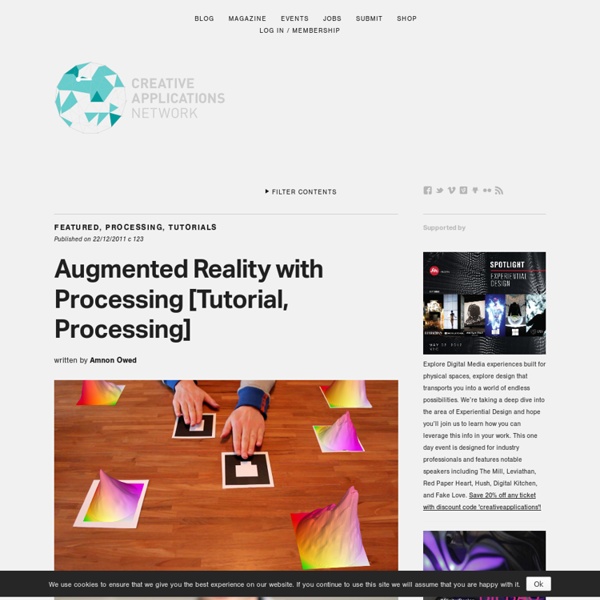
Basé sur Processng, ce sont des exemples de programmes de réalité augmenté. by trackingnewtech May 14