Quotepad - free notepad that can save the text selected on the screen.
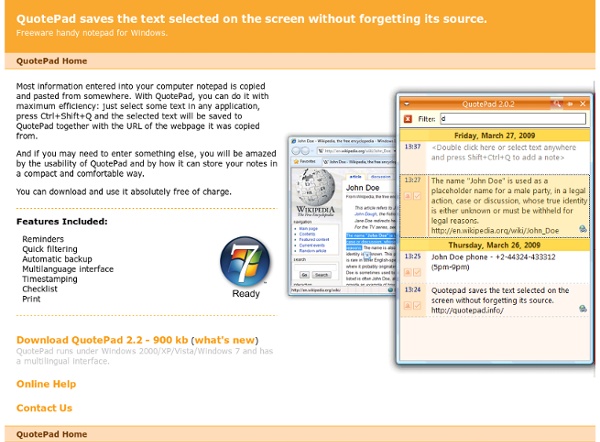
Most information entered into your computer notepad is copied and pasted from somewhere. With QuotePad, you can do it with maximum efficiency: just select some text in any application, press Ctrl+Shift+Q and the selected text will be saved to QuotePad together with the URL of the webpage it was copied from. And if you may need to enter something else, you will be amazed by the usability of QuotePad and by how it can store your notes in a compact and comfortable way. You can download and use it absolutely free of charge. Reminders Quick filtering Automatic backup Multilanguage interface Timestamping Checklist Print
http://quotepad.info/
Electronic Portfolios in the K-12 Classroom
The use of personal portfolios for assessment and presentation long has been a component of higher education. In fact, personal portfolios are a graduation requirement at many colleges and universities. Now, electronic portfolios have begun to enter the world of K-12 education as well. Learn what electronic portfolios are and discover how they can help you and benefit your students. Included: Guidelines for developing personal portfolios.
a free app that helps you remember
digitalstorytales
Creating Digital Tales in the Classroom - a learning module for teaching professionals. This learning module begins May 1st and ends May 31, 2011. 30 points/30 prof development hours. Module Overview:
Knotebooks - Anyone can contribute. Everyone can learn.
Hate PowerPoint? Here Are 5 Web-based Alternatives
Whether they're for clients, customers or colleagues, visual presentations are an unavoidable part of doing business. For years, Microsoft PowerPoint has been the standard bearer of slide presentation applications, but several Web-based alternatives have emerged. For the most part, the alternatives offer similar functionality to PowerPoint, sometimes more, sometimes less. One obvious advantage to Web-based presentations is that they're stored in the cloud, eliminating the potential for nightmare scenarios involving lost or corrupted thumb drives. Prezi If the traditional slide-by-slide-style presentation doesn't quite cut it for you, there's Prezi, which works a bit more like one giant virtual whiteboard containing your entire presentation.
Welcome to Posterous Spaces
5 Great Alternatives To Google Docs You Should Consider
More and more word processing is moving to the web these days. This has many advantages. The documents are accessible from anywhere, they’re open to collaboration and sharing, it’s easy to import and export, and it’s just a better way to do work in this constantly connected world. For a while, one of the most popular solutions has been Google Docs. It’s a great service, and one that has served me well over the months and years I’ve been using it.
Compiled List of The Top Online Presentation Tools and Apps Today
Presentations are essential in business, and if only we had online alternatives to Microsoft Powerpoint then everything would be so much more convenient. There’d be no need to work offline, save and copy from one disk to another, and download impossibly-sized attachments. All we’d ever need is an Internet connection and a browser. Guess what?
Download a Portable Prezi for presenting
A portable prezi is a non-editable, exported version of your prezi and works without Internet access or a Prezi account. Use it to present when you don't have access to the Internet or to send to conference organizers. Check out the video to learn how you can download a portable prezi. What can you do with a portable prezi?How to create a portable preziHow to use a portable prezi
Related:
Related:


Service de bloc-note en anglais. Se souvient de la source de la note. Logiciel à télécharger. by castorp Jan 4