

Techniques in responsive web design We’ve talked a lot about responsive design here on Webdesigner Depot, and shared a lot of valuable resources. Today we’re sharing another valuable resource: at the end of this article are details for getting a discount on Chris Converse’s responsive design course on MightyDeals. CSS3 media queries allow us to dynamically alter the design and layout of a web page in order to deliver an optimal user experience from a single set of HTML and CSS markup. The techniques in this article explain how we can leverage this powerful capability of CSS to also change imagery, alter the navigation on hand-held devices, and set up default CSS for compatibility older browsers. Creating different images When altering your design for different devices, consider creating multiple versions of your graphics. The example below shows the different sizing, and cropping choices, in addition to the varying amounts of compression that are applied to each set of images. Assign images to HTML elements .
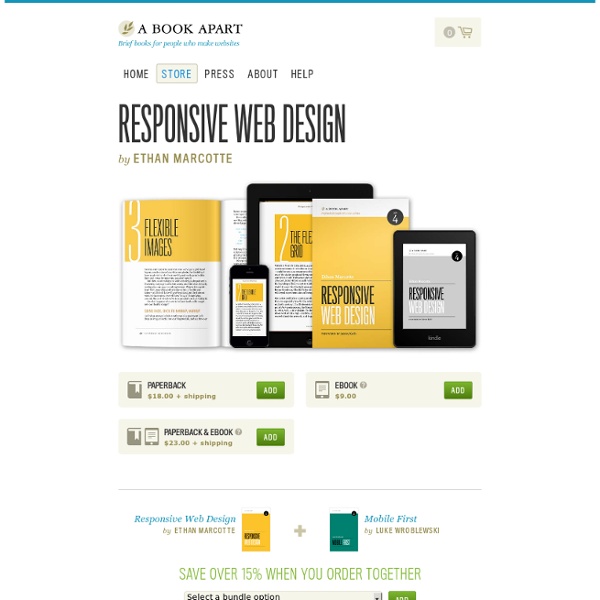
Responsive Web Design The English architect Christopher Wren once quipped that his chosen field “aims for Eternity,” and there’s something appealing about that formula: Unlike the web, which often feels like aiming for next week, architecture is a discipline very much defined by its permanence. Article Continues Below A building’s foundation defines its footprint, which defines its frame, which shapes the facade. Each phase of the architectural process is more immutable, more unchanging than the last. Working on the web, however, is a wholly different matter. But the landscape is shifting, perhaps more quickly than we might like. In recent years, I’ve been meeting with more companies that request “an iPhone website” as part of their project. A flexible foundation#section1 Let’s consider an example design. But no design, fixed or fluid, scales seamlessly beyond the context for which it was originally intended. Becoming responsive#section2 Recently, an emergent discipline called “ responsive architecture .
10 handy jQuery mobile tips and snippets to get you started As with any new technology, getting started is often the hardest part. With this frustration in mind, we have put together some of my handiest tips, tricks and code snippets related to the jQuery Mobile library. Because this is not a full-on primer for using the library, we will skip over some of the things that become rather obvious as you get started and instead get straight to the items that become rather frustrating or troublesome. Also be sure to let us know in the comments which snippets you found useful and of any others that you know of that can be useful. 1. A full basic page I find myself needing the full mark-up for a basic page over and over again. <! 2. When I got started using this awesome extension to jQuery, I immediately found myself wanting to modify things on the page before the mobile plug-in was triggered. As it turns out, the recommended solution is to simply put traditional jQuery calls before the reference that loads the mobile plug-in. 3. 4. For list items: 5. 6. 7.
Responsive Design for Dummies | Bronco - Search Optimisation & Web Design Agency At Bronco we work hard to keep up with the big changes in our industry and adopt those that are of benefit to our clients. Last year saw the rise of a new method of designing and building websites; this process has been named Responsive Web Design (RWD). While most active web designers have an understanding of what responsive web design is, it’s not something that is so well known outside our community. So for those outside the bubble here’s an explanation of the basics. But first some fun The best way to explain what responsive web design is, is to simply show you. This ability to flow and adjust to the width of a device or browser is what makes a website responsive. One website to rule them all Designing for the web is unlike any other design profession in that we have absolutely no clue about how a user is likely to view our work. The silver bullet? When this occurs then the old ways still provide the best solution. Can my website be made responsive? Is responsive design more costly?
50 jQuery Mobile Development Tips We have collected 50 jQuery mobile tips and tutorials, 10 mobile plugins, 10 mobile website demos, 10 free mobile themes, 10 new mobile frameworks, 10 mobile cheat sheets and more stuff to help you get that mobile website started and up and running in no time! Whats is jQuery Mobile? jQuery Mobile is a framework for web applications, mobile and mobile web sites in order to provide a unified user interface across multiple platforms like the iPhone mobile device, BlackBerry, Android and Windows Mobile. 1. A backbone mobile app running in Safari. Source 2. You might ask how to target devices in the CSS (based on screen size). Source 3. There are a few font-replacement methods available such as cufon, sIFR, FLIR, @font-face and Google Fonts API. Source 4. If you want to modify things on the page before the mobile plug-in was triggered, the recommended solution is to simply put traditional jQuery calls before the reference that loads the mobile plug-in. Source 5. 6. Source 7. Source 8. Source 9.
Devising a Strategy for Responsive Design By Jared M. Spool Originally published: Jan 29, 2013 Thanks to Marco Dini for translating this article to Italian. This year, it will be hard to find an organization that doesn’t prioritize making their web site responsive. The Core Tactics Almost everything you read about responsive web design starts with what I call the core tactics — the basic elements that make responsive sites be responsive. The first core tactic is discovering the breakpoints. A responsive design can have multiple breakpoints, say for a small-screen phone, then a large-screen phone, then a tablet, then a laptop/desktop. However, it’s better to look at what the content and navigation wants to be. The second core tactic is keeping page load times low. Smart placement of media queries and progressive enhancement can dramatically reduce the footprint of the CSS file on smaller, slower devices, which dramatically increases their usability. The third core tactic is image size optimization. What’s Getting Left Out? Jared M.
Raphaël—JavaScript Library Brett Jankord – You Keep Using That Word, I Do Not Think It Means What You Think It Means I like to stay on top of cutting edge web design and development practices. I have a few keyword searches on Twitter I like to check daily for new articles on this and that, though one trend that really has caught my attention recently is seeing more and more authors writing about techniques like mobile first, adaptive web design, and RESS and many others terms with what seems to be a misconception of these terms. From articles talking about mobile first with no mention of Luke Wroblewski to articles explaining adaptive web design as RESS. By no means I am all knowing of this terminology either, though I thought I could help clear some confusion by sharing insight to the origins of where some of these new terms came from. Progressive Enhancement Progressive enhancement is a strategy for web design that emphasizes accessibility, semantic HTML markup, and external stylesheet and scripting technologies. fault tolerance. Responsive Web Design Coined by Mobile-First Coined by