

Free CSS Template Code Generator - Maker for 3 Column Layout (tableless) This HTML - CSS template generator yields a three column layout without using any Tables. This HTML & CSS Style Sheet template generator outputs a full featured 3 column template. Resulting in an instant web page with a customized template that can be used to control the look n feel of an entire site. The resulting CSS web template is not just a static template because the visitor can modify setting until he/she is happy with the design. Therefore, the template generator serves as a full function HTML - CSS editor for the popular 3 column layout.
Content : The core idea of a website Content : The core idea of a website Posted by Daniel on Monday, September 20, 2010 · 18 Comments Nowadays it is hard, and I am afraid that it is almost impossible to find any fields of activity having no connection with the Internet. But what was the initial purpose of the world wide network? It was very simple…to realize a very transparent and plain network and facilitate the exchange of pieces of information between scientists from CERN and others all over the world. I am not a conservator but all people almost forget the initial purpose.
Eric Meyer: CSS CSS Work Books by Eric Including Smashing CSS, CSS: The Definitive Guide, Third Edition, CSS Pocket Reference, and Cascading Style Sheets 2.0 Programmer’s Reference, among several others. Articles by Eric Local copies of CSS articles, as well as other writing I've done. CSS Layout Generator About the CSS Layout Generator The CSS Layout Generator was first released by Tony Aslett in October 2003, since then over 871,000 layouts have been generated. Updated in November 2010, HTML5 doctype can now be selected and a simple HTML5 template with appropriate tags will be created. Other HTML and XHTML doctypes are still available. The generator helps you create the structure of your website template using valid HTML and CSS. You can create a fluid or fixed width floated column layout, with up to 3 columns and with header and footer.
15 sites web developers and designers should know - CatsWhoCode.com Creating a good website isn't an easy task, but there's a few tools that can definitely make your developer or designer life easier. In this article, I have compiled 15 extremely useful website that any web developer or web designer should have bookmarked. ColorCombos When designing a website, one of the firsts (and most important) steps of the process is to choose a color scheme. Color Combos allow you to browse thousand of different colors combinations for getting inspired for your upcomming design. Color schemes can be browsed by colors.Visit colorcombos.com The Float Model Problem Float model? What's that? Okay, here is a simple test concerning how static elements interact with floats. According to the W3C specifications, when a floated element is directly followed by a static element (one that is normally flowed), then first, the float will be displayed against the left edge of the containing element (in this case the 'body' element), and then the static element will also display against that same edge, and at the same vertical height as the float.
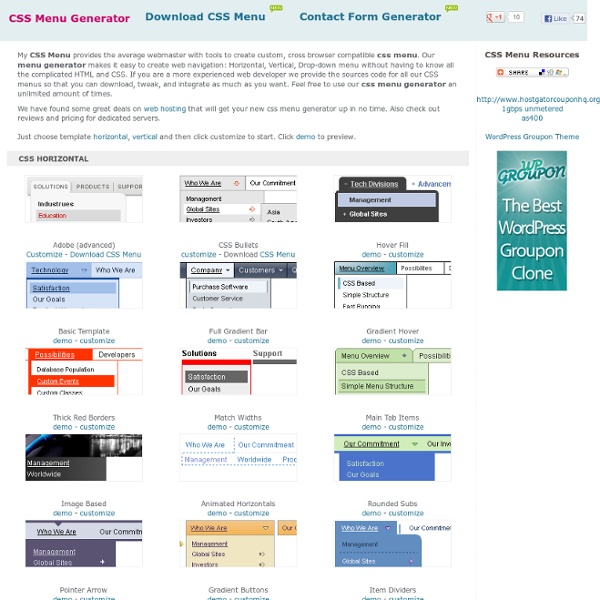
CSS Menu Generator HTML Tools » CSS Menu Generator Our CSS Menu Generator will generate both the CSS and the HTML code required to produce a text-based yet appealing set of navigation buttons. As text links are fast becoming preferred over images where search engine optimization is needed, a CSS menu can give the affectiveness of text links with a better look than standard text links. For an example of a CSS menu, look at our navigation on the left. We currently have 3 different styles of menu available to generate, so for this first step, please choose the style you prefer by clicking on the appropriate radio button below then clicking the 'Proceed' button. Disclaimer: By using any of the free webmaster tools on this site you agree that it is you who has sole responsibility and liability for any errors that may occur to your website or web server as a result.
Most Practical CSS Cheat Sheet Yet - Pxleyes.com Blog There’s an abundance of CSS cheat sheets on the web, but most of them gloss over the properties designers use in day-to-day work, preferring instead the kitchen-sink approach of showing all properties. This cheat sheet was designed with a more practical philosophy, so that designers who need a quick description of a property don’t need to open a browser. Included are the following sections: selectors, the box model, positioning, text and fonts, borders and lists, and a bit of miscellany that comes in handy every once in a while. The cheat sheet comes in landscape and portrait form and is designed to be printed on an A4 (standard) sheet of paper. You can post it on your wall, tape it to your desk, or put it in your pocket for those rare moments when you need to know how the box model works in casual conversation.
HTML and CSS Table Border Style Wizard Compatibility Notes If you are using Internet Explorer 6, you should be able to use this wizard with only minor limitations. This page does not work with Opera 8 or IE 5 on Mac. Internet Explorer 6 does not support the border-spacing CSS2 table property. It also does not support any Netscape-specific CSS properties that are prefixed with -moz, and has limited support for the cursor property. This means you will not see all the effects in this wizard unless you use a browser like Firefox. Snazzy Hover Effects Using CSS With all these CSS3 effects and tutorials popping up every day that show all the new and wonderful things we can make happen, we sometimes forget about poor little old CSS2.1 and the great potential it still has. With very good browser support, we can do lots of cool things that we know will work in all major browsers. In this tutorial, I will be going over creating flexible advanced hover techniques using CSS2.1 properties. Here is a live demonstration of the effect we will be creating. Advanced hover states are quite simple When I first started learning CSS, the :hover pseudo-element was no more than a way to remove the underline on a text link.