Alain M. Lafon - Pentadactyl
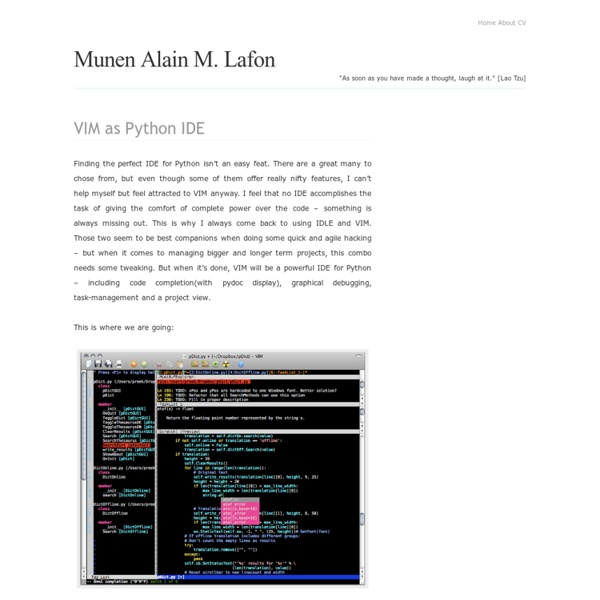
Finding the perfect IDE for Python isn’t an easy feat. There are a great many to chose from, but even though some of them offer really nifty features, I can’t help myself but feel attracted to VIM anyway. I feel that no IDE accomplishes the task of giving the comfort of complete power over the code – something is always missing out. This is where we are going: So, these are my thoughts on a VIM setup for coding (Python). Modern GUI VIM implementations like GVIM or MacVIM give the user the opportunity to organize their open files in tabs. Being able to neatly work on multiple files, the user still misses the potential his favourite IDE gives him in visualizing classes, functions and variables. A lot of coders have the habit of using TODO or FIXME statements in their code. In these times, the programmer knows his or her programming language more or less by interactively finding out what it can do. Probably the most wanted feature(besides code completion) is debugging graphically. .
Start - Continue omnicompletion for python modules - Vim Tips Wiki - Pentadactyl
I was using the Python omni-completion feature in Vim, and I noticed that when you complete a module name, it inserts the module name, followed by a dot (presumably because you would then want to access something inside the module). This is helpful, except that it breaks common omnicompletion keybindings, such as imap <silent><buffer> . .<C-X><C-O> In order to get completions for this module, one would have to either manually type <C-X><C-O> to run the completion function again, or delete and then re-insert the period. Here is a stopgap solution. imap <silent><expr><buffer><CR> pumvisible() ? How do you enabled omnicompletion for modules, does it work for external modules too? Is there a version of vim that doesn't have the "feature" that you mentioned?
Related:
Related:
