
39 Sites For Using iPads in the Classroom. Pages Friday, October 7, 2011 39 Sites For Using iPads in the Classroom How Much Did Steve Jobs Change the World?
You might be reading this on your iPhone, iPad or computer, but whether or not you have a Macintosh or a PC, Steve Jobs is responsible for so much of the technology we are using today. Did you know that Windows computers copied the drop-down window interface from Apple computers? MasteryScan Turns Your iPad Into a Grading Machine. iPad As.... iPads have exploded throughout schools and classrooms.
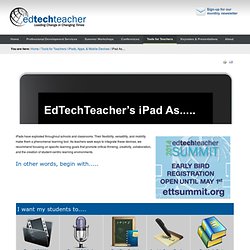
Their flexibility, versatility, and mobility make them a phenomenal learning tool. As teachers seek ways to integrate these devices, we recommend focusing on specific learning goals that promote critical-thinking, creativity, collaboration, and the creation of student-centric learning environments. App Lists. 60 Educational Apps in 60 Minutes by Clint Stephens on Prezi. iMovie Trailers - RNPS iPad Trial. Education - Resources - Teachers and Administrators. Learning App for Kids.
Top 10 Apps for Physical Education Teachers. Physical education involves more than playing games all period long.
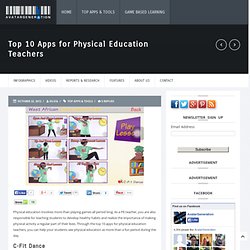
As a PE teacher, you are also responsible for teaching students to develop healthy habits and realize the importance of making physical activity a regular part of their lives. 5 Must-Have iOS Apps For Writers. For students, essays are a necessary evil of the experience of getting an education. For teachers, helping students write their essays can be time consuming, and once the students go home, they may lack the support they have in your classroom. It doesn’t mean they have to go it alone, though, when there is electronic help available. Check out these top 5 Apple applications for essay writing to make getting organizing and presenting your thoughts in a coherent manner a much easier process. 1. Essay Writing Workstation The Essay Writing Workstation allows students to work on two essays at once in an easy-to-follow e-book format.
If you need to review instructions for revising your essay, simply go to the QuickView Instructions part of the app. All of your text is automatically saved, even if you get a call or exit the app. A great feature of this app is that it allows you to go online and search the Web without having to leave the app first. 2. 3. 4. - 20 Web 2.0 Sites Not Requiring Student Email. 1000 Recommended Apps Sorted by Subject Area. Using cel.ly in the classroom or other ways. I am new to the idea of allowing kids to use cell phones in school.
I agree with it 100% if the purpose is valid and I have an administrator who has also indicated it is a good idea if it is monitored and used effectively in the classroom, but the question remains- how can it be used effectively? I attended a webinar recently on the website simplek12 and I learned som ideas about using phones in class- one website mentioned was cel.ly. I immediately established an account and created a cell for my school library. I decided what have I got to lose? It may be an additional way to inform student patrons about programs, contests and hot new releases. I am going to use it in my class to do quick starts and exit slips. There are so many concerns regarding teachers and student connecting via text and social media. I am certain that I can use this program with success in my class. If you are in a district where technology is open and cell use is permitted, take a look at cel.ly.
7 Tech Tools for Collaboration. Remember when collaborating with your colleagues was limited to early morning meetings or an epically long professional day?
Now technology has given us the power to connect on our own time, in dynamic new ways and with teacher friends from around the world. Here are some of our favorite tools for learning from one another, sharing best practices and growing as an educator along the way. 1. Twitter: If Facebook is for connecting with the friends you have in real life, Twitter is for connecting with the friends you wish you had. 450 Free Online Courses from Top Universities. Advertisment Take online courses from the world’s top universities for free.
Below, you will find 1,700 free online courses from universities like Yale, MIT, Harvard, Oxford and more. Our site also features collections of Online Certificate Programs and Online Degree & Mini-Degree Programs. Note: This page includes a lot of Massive Open Online Courses (MOOCs). If you want to enroll in a free version of a MOOC, please select the “Full Course, No Certificate” (edX) or “Audit” (Coursera) option. Learn 40 Languages for Free: Spanish, English, Chinese & More.
How to learn languages for free?
This collection features lessons in 48 languages, including Spanish, French, English, Mandarin, Italian, Russian and more. Download audio lessons to your computer or mp3 player and you’re good to go. Amharic Foreign Service Institute Basic Amharic – Audio – TextbookLessons with dialogues, drills, exercises, and narratives will teach you the basics of this language spoken in Ethiopia. Includes samples of speech, explanations of basic language structures, and a variety of practical exercises. Diigo. A Nice Guide to iPad App Evaluation. 50 Best iPad Apps for STEM Education. iPad/iPod Resources. The Top 10 Apple iPod Touch Apps for English and Language Arts Teachers. Apps in Education. iPad Recommended Educational App Lists. - Special Needs Apps for Kids (SNApps4Kids.com)
Educreations. - Top 10 Sites for Educational Apps. 5 iPad Apps Every Teacher Should Have - HOME - Edgalaxy: Where Education and Technology Meet. Proof in Study: Math App Improves Test Scores (And Engagement) Digital Tools Teaching Strategies Motion Math The first iPad was released in April 2010, and since then, its potential as a learning device has been explored by educators, app developers, and the exploding ed-tech industry.
These days, it’s not uncommon to read about school districts handing out iPads as textbook replacements. Skeptics, though, don’t believe the hype. From a New York Times article in January: “There is very little evidence that kids learn more, faster or better by using these machines,” said Larry Cuban, a professor emeritus of education at Stanford University, who believes that the money would be better spent to recruit, train and retain teachers. - Manipulative Math Apps for the iPad to meet the Common Core Standards. 0 Comments May 16, 2012 By: Vicki Windman May 16 Written by: 5/16/2012 3:10 AM.
High School iPad Apps. Create and publish your own wikis and blogs.
Use these web services to communicate and collaborate with your friends and coworkers. It's easy to edit this page and create new wikis. To edit this page, click the Log In (lock) button, log in as a wiki administrator and click the Edit (pencil) button. To create a new wiki, log in, then click the Add (+) button and choose New Wiki.
Content previously available at this address is temporarily available at. Elementary School iPad Apps. Create and publish your own wikis and blogs.
Use these web services to communicate and collaborate with your friends and coworkers. It's easy to edit this page and create new wikis. To edit this page, click the Log In (lock) button, log in as a wiki administrator and click the Edit (pencil) button. To create a new wiki, log in, then click the Add (+) button and choose New Wiki. Content previously available at this address is temporarily available at. Middle School iPad Apps. An App for Teachers to Create Educational Portfolios of Student Work with an iPhone, iPad, or Android Smartphone. - My Ten Most Used Apps to Become Fluent on the iPad.
0 Comments March 25, 2012 By: Silvia Rosenthal Tolisano Mar 25 Written by: 3/25/2012 7:13 AM ShareThis It is no secret, that I enjoy my iPad tremendously. Fluency on the iPad, like language fluency, does not necessarily come natural to most people. iPad Lessons. 60in60 - home. Reflection App Brings iOS Device Mirroring to the Mac. It’s not very often that I get extremely excited about an app. Then again, it’s not very often that an app like Reflection is ever released.
As TUAW reports, Reflection is a brand new app that allows you to do something that many have been waiting a matter of years for – mirroring your iPhone or iPad’s screen on your Mac. Reflection lets you view your iPhone 4S or iPad 2′s screen in real time with no prior set up – just launch the app, select your Mac from your iOS device’s AirPlay menu, and you’re streaming. It’s an extremely fast and extremely simple solution.
But why would anybody want to mirror their iOS device on their Mac? - Top 10 Apps for Digital Storytelling. 10 educational iPad apps recommended by Explore Knowledge Academy - Tuesday, Feb. 21. iTunes/App Store Word Wizard Word Wizard is a spelling application for the iPad that allows students to hear sounds of letters and words using an interactive alphabet. - Free apps to find more free apps. New App Tells Teachers When Students Are Confused. - Apps for Common Core Math Standards, Grades 9-12. - Apps for Common Core Math Standards, Grades 6-8. 100 iPhone Apps for Kids. Anyone without children has a pretty difficult time understanding how a person decides to hand their $200 cell phone to a three year old, but the truth is iPhone’s can be an incredibly rich learning and entertainment tool for children.
The directness of the touch screen interface means that children can easily figure out a number of different apps with very little instruction. If your kids love your iPhone as much or more than you do, you’ll definitely want to take a look at the huge list below of great apps for kids of all ages. The Must-Have App Review Rubric. 80 Apps to Learn a New Language. You’ve been telling yourself for years that you’ll learn a new language or at least dust off those high school Spanish skills.
- Apps for Core Literature Standards, grades 6-12. 0 Comments November 17, 2011 By: Vicki Windman Nov 17. - Apps for K-5 core language standards.