
Cartoon_ipad_ready_for_working_by_hand_full.png 710 × 1 280 bildepunkter. Procreate - Creativity, has no bounds. Procreate & Paper: The Engines Mean Everything. Sketchbook Pro.

Brushes. Penultimate. Noteshelf. These are only a handful of some of the most popular apps available on the iPad today. Some may have even considered them your only worthy options for illustrating and note taking on a tablet. While the aforementioned creativity apps are, in fact, excellent options for anyone looking to use the iPad as a digital note/sketchbook, a couple of apps have since crashed the party and are causing a lot of ruckus – they are Procreate and Paper by FiftyThree. Leaders of the Pack Before I get into the differences between Procreate and Paper by FiftyThree (which we will refer to as simply ‘Paper’ from here on out), I’d like to go over what they both do exceedingly well. Paper's gorgeous Journal selection screen. Where Paper and Procreate leave competition in the dust is found in both their inking engines. Procreate 1.6 now features art stacks for better organization! When it comes to user interface, neither app ever feels like it gets in your way.
Autodesk Sketchbook Pro: Powerful, Digital Drawing. The iPad, it’s not a device for content creation, is it?

Ask many a tech pundit that question, and they’ll say, “No, it isn’t.” But, there’s a flaw in the opinion you’re receiving. You’re asking a writer if they can use the iPad to write professionally. That’s a little more specific a context than just “content” in general. Of course the writer’s answer will be “No”. SketchBook Ink. - SketchBook Ink. Autodesk® SketchBook® Ink is an intuitive pen & ink drawing app Built on a new resolution independent engine, SketchBook Ink lets you create beautiful line work and export high resolution images directly from your iPad.

*Recommended for 2nd and 3rd generation iPad. Features: ✓ Introductory Tour Guide to help get you started ✓Full Screen work space with support for any device orientation ✓ Retina Display on 3rd Gen iPad ✓Multi-Touch Interface: • Two finger pan & zoom navigation ✓Preset Ink-styles: • 7 different presets each with different line weight and behaviors • 2 eraser types ✓Colors • Color Editor & Color Picker • Tap-hold customizable Color palette ✓Import a background image from the Photo Library as a reference ✓Export options • Save up to 12.6 MP PNG images to Photo Library or e-mail. • Save up to 101.5 MP PNG images to iTunes File Sharing or Dropbox • Option to export as transparent PNG ✓Gallery: • Store work-in-progress ✓Stay Current: • Link to SketchBook News Blog.
iPad as the Teacher's Pet [Infographic] Update: iPad as the Teacher's Pet was updated to Version 2.0 Click to see the new version!
![iPad as the Teacher's Pet [Infographic]](http://cdn.pearltrees.com/s/pic/th/ipad-as-the-teacher-s-pet-55161183)
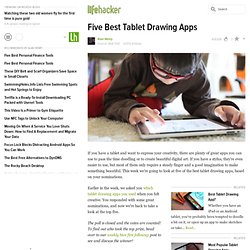
Hey, teacher! The 10 Best iPhone and iPad Apps for Art Teachers 2010 by TheTeachingPalette.com. iPhone/iPad Apps for Art Teachers. Five Best Tablet Drawing Apps. It seems to impress passers buy when you edit video with your fingers in iMovie on the iPad.
It still impresses people when I edit photos on an iPad. I'm not so much out to impress people with what I'm doing, but what the end result may be. Though I do agree that it was skewed away from windows tablets. There are plenty of Android options up there, too. Not just Apple. these were user submitted and voted choices. next time speak up louder during the initial submissions and you'll see your preference listed here. oh, and the windows tablet digitizers are NOT more accurate then the cintiq, not even close. Art and Artistry iPad Apps.
If you've always wanted to be an artist, you can find iPad apps that let you do just that.
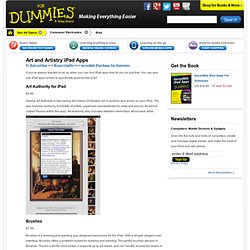
You can also use iPad apps simply to appreciate good works of art. Art Authority for iPad Having Art Authority is like having the history of Western art in pictures and words on your iPad. The app includes works by hundreds of artists, organized alphabetically by artist and also by art period (called Rooms within the app). Art Authority also includes detailed information about each artist. Brushes. 10 Stunning Examples of iPad Art. Updated App List: iPad Apps For Artists. 35 Great iPad Apps for Designers, Geeks and Creative Individuals - Creative Can Creative Can.
Because of its mobility and large array of useful apps available, iPad has become very popular these days, and this trend is not likely to end anytime soon.
With the capability that almost rivals desktops, iPads, have also become the gadget of choice of designers while on the go. 35 Great iPad Apps for Designers, Geeks and Creative Individuals - Creative Can Creative Can. Choosing an iPad app for your artwork. Download David Hockney’s playful drawings for the iPhone and iPad. Apple iPad art: paintings created using Brushes, ArtStudio and Sketchbook Pro apps. David Hockney's iPad Art. Like a lot of New Yorkers, I only go to museums when I am travelling.

It's been a year since I went to The Met, MOMA, or the Museum of Natural History, but last weekend I spent 48 hours in Toronto and had to swing by the ROM (Royal Ontario Museum) to see David Hockney's Fresh Flowers exhibit. It was a work trip, you see, because the 74-year-old artist made these works exclusively on the iPhone and iPad. The images are beautiful. But, more importantly, they also offer a great example of how consumer electronics and a cheap app can alter not only the creative process, but also how art is distributed. The Fresh Flowers exhibit includes more than 100 iPhone drawings and 100 iPad drawings. David Hockney started drawing on his iPhone in 2008, and he graduated to the iPad when it was released in 2010. Go to the ROM website and you can download "free" copies of select Hockney drawings. Even so, I found the exhibit quite inspiring. Check out David Hockey drawing at the Louisiana cafe.
iPad Tips And Tricks. Seven Hidden Features of the iPad Camera Connection Kit. Many people wouldn’t take a second look at the $29 iPad Camera Connection Kit because they could simply transfer photos and videos from their computer via iTunes.
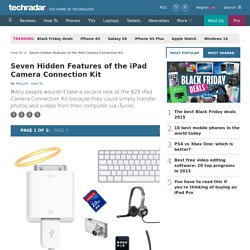
But, this little unsuspecting accessory has hidden powers, with which comes great responsibility. Not really, but there are a few things that the Dock Connector to USB dongle does that aren’t advertised. The things it can connect to could save you some money, and add features, too! So read ahead to find out the seven hidden features Apple doesn’t want you to know the Camera Kit can do. Create your own E-Book for your iPad. Create your own E-Book for your iPad. iPad Lessons. iPad Scavenger Hunt. 1st Grade Math - K-5 Technology Integration.
What’s Cooking in your iClassroom? While educators know that math is all around us, sometimes students have a difficult time grasping its impact on our every day activities.

Though the apps listed below may not inherently scream proportions, rate, sequences, and percentages, they very easily lend themselves to providing creative and engaging connections to real world problem-solving activities. How to Load and Open ePub & PDF eBooks On Your iPad. Ipadschools - home. iOSteacher. iPads in Education. 39 Sites For Using iPads in the Classroom. Pages - Menu This Blog Linked From Here Sites to Follow Friday, October 7, 2011 39 Sites For Using iPads in the Classroom How Much Did Steve Jobs Change the World? 55 Beautiful Apple iPad Wallpapers - Noupe Design Blog.
May 31 2010 This is the age of iPhones, iPods and iPads, people simply love to have these amazing inventions of information technology. Apple iPhones have created a state of euphoria among its users with its amazing features and iPad is another product from Apple team that will let you browse internet, watch video, listen music, read books with just a finger touch. 10 Excellent iPad Applications for Teachers. With the iPad2 on the launching pad, it’s a great time to share this list of useful iPad apps for teachers from guest writer Paula Dierkens.
There’s no doubt that the iPad is an excellent device, and if you own this gadget, it makes sense to pick up the applications best suited to your lifestyle and profession. iPads in Schools.
Getting started.