
Www.rsync.net/resources/howto/windows_rsync.html. Installing cwRsync cwRsync is a free distribution of the rsync utility that is optimized for quick and easy installation in Microsoft Windows.

You can download cwRsync here, however we recommend checking for the newest version here. Be sure to look underneath the "cwRsync" project. Once you have downloaded this installation file, run it. You should select the defaults the installer gives you, including the default installation path of: C:\Program Files\cwRsync We STRONGLY recommend installing the program in the default location.
Setting up your public/private keypair You need to create, and upload, an SSH public key so that your rsync backups can occur without your being prompted for a password. It is VERY IMPORTANT that the user who creates the key is the SAME user as the one who runs the automated backup. Click the start button, and choose "run". In this command prompt, type: cd "c:\program files\cwrsync\bin" and hit enter.
Ssh-keygen -t rsa -N '' and hit enter. Choosing What To Back Up. Rsyncd.conf. 26 Jan 2014 rsyncd.conf - configuration file for rsync in daemon mode rsyncd.conf The rsyncd.conf file is the runtime configuration file for rsync when run as an rsync daemon.

The rsyncd.conf file controls authentication, access, logging and available modules. The file consists of modules and parameters. The file is line-based -- that is, each newline-terminated line represents either a comment, a module name or a parameter. Only the first equals sign in a parameter is significant. Any line beginning with a hash (#) is ignored, as are lines containing only whitespace.
Any line ending in a \ is "continued" on the next line in the customary UNIX fashion. The values following the equals sign in parameters are all either a string (no quotes needed) or a boolean, which may be given as yes/no, 0/1 or true/false. The rsync daemon is launched by specifying the --daemon option to rsync. You can launch it either via inetd, as a stand-alone daemon, or from an rsync client via a remote shell.
Motd file uid. Centos 5 rsync server setup. HOWTO: Setup a rsync server on Centos 5 These instructions assume that you have root access and are operating as the root user.

If you only have sudo access, just add sudo to the beginning of most of the commands. The standard port for rsync which is 873 is assumed too. Install xinetd and rsync packages 1.$ yum -y install xinetd rsync Make sure xinetd is running on levels 3, 4 and 5 1.$ chkconfig --level 345 xinetd on Modify rsync xinetd configuration, and change disable = yes to disable = no 1.$ vi /etc/xinetd.d/rsync Create rsync secrets file for passwords with format of username:password. Using Rsync and SSH. Using Rsync and SSH Keys, Validating, and Automation This document covers using cron, ssh, and rsync to backup files over a local network or the Internet.
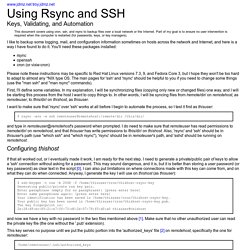
Part of my goal is to ensure no user intervention is required when the computer is restarted (for passwords, keys, or key managers). I like to backup some logging, mail, and configuration information sometimes on hosts across the network and Internet, and here is a way I have found to do it. You'll need these packages installed: rsyncopensshcron (or vixie-cron) Please note these instructions may be specific to Red Hat Linux versions 7.3, 9, and Fedora Core 3, but I hope they won't be too hard to adapt to almost any *NIX type OS.
First, I'll define some variables. I want to make sure that 'rsync' over 'ssh' works at all before I begin to automate the process, so I test it first as thisuser: $ rsync -avz -e ssh remoteuser@remotehost:/remote/dir /this/dir/ and type in remoteuser@remotehost's password when prompted. Configuring thishost #!