
Wi-Fi has completely transformed the way humans connect to the internet. From homes and offices to airports and coffee shops, wireless internet is everywhere today. But have you ever stopped and wondered exactly how wi-fi works behind the scenes? What actually happens when you connect your phone or laptop to a wireless network? In this powerful guide, we will break down everything in simple, easy-to-understand language so that anyone, beginner or expert, can finally understand the technology they use every single day
Before we dive deep into how wi-fi works, let us first understand what it actually is. Wi-Fi is a wireless networking technology that allows devices like smartphones, laptops, tablets, and smart TVs to connect to the internet without any physical cables. The term Wi-Fi stands for Wireless Fidelity, and it is based on the IEEE 802.11 standard, a set of technical rules that define how wireless communication happens between devices.
Wi-Fi does not just mean "internet." Many people confuse wi-fi with the internet itself, but they are two different things. The internet is the massive global network of servers and data. Wi-Fi is simply the wireless method you use to access it locally through a modem and router. If you want to understand what is wi-fi explained in full detail, think of it as the wireless bridge between your device and the internet.
Understanding how wi-fi works becomes much clearer when you know where it came from. The foundation of Wi-Fi technology was laid in the early 1990s. In 1991, a team of Dutch researchers at NCR Corporation, working with AT&T, developed one of the earliest forms of wireless LAN technology. This was originally designed for cashier systems, not home use.
In 1997, the IEEE officially released the first 802.11 standard, which allowed wireless data transfer at speeds of just 2 Mbps. Then in 1999, the Wi-Fi Alliance was formed, and the brand name "Wi-Fi" was officially introduced to the world. That same year, 802.11b was released, pushing speeds up to 11 Mbps and making home wireless networking a real possibility for everyday people. If you are curious about the deeper story, you can read wi-fi history: 1997 to today for the full timeline.
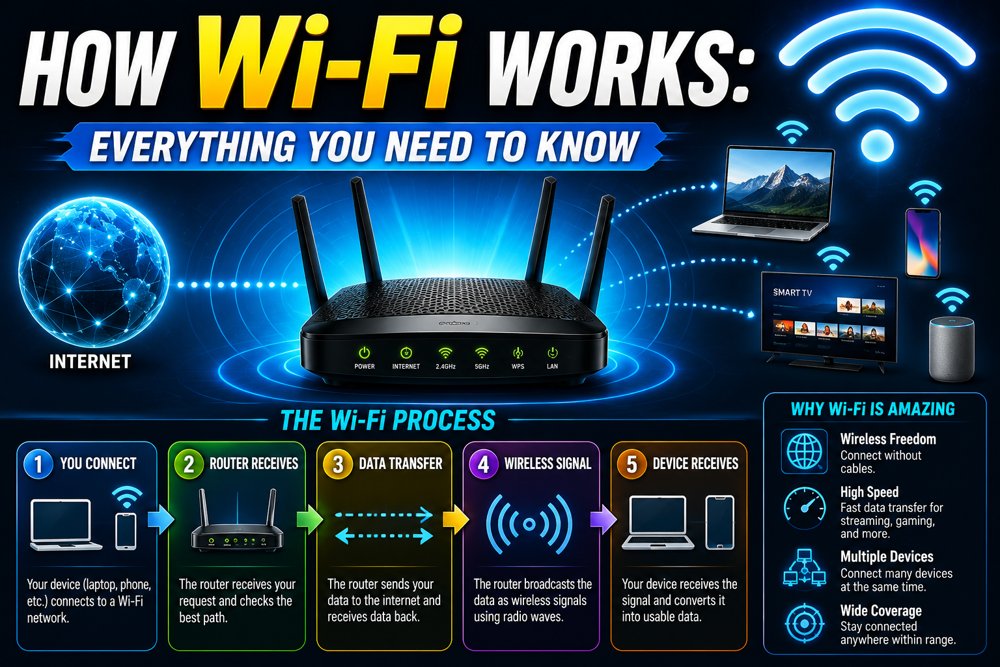
Now let us get into the real heart of the matter. How wi-fi works is based on radio frequencies. Just like your FM radio receives invisible signals through the air, Wi-Fi transmits and receives data using radio waves. Here is the step-by-step process of what happens every time you load a webpage wirelessly:
Step 1: Your device sends a request When you type a website address, your device converts that request into binary data (0s and 1s).
Step 2: Data is converted into radio waves Your device's wireless adapter converts the binary data into radio frequency signals, typically at 2.4 GHz and 5 GHz or the newer 6 GHz band.
Step 3: The router receives the signal Your wireless router picks up these radio wave signals through its antennas.
Step 4: Router connects to the internet The router passes your request through the modem and out to your internet service provider (ISP) via an ethernet cable or fiber connection.
Step 5: Data comes back wirelessly The response from the internet travels back the same way, and your device receives it as radio waves, decodes them, and displays the result on your screen.
This entire process happens in milliseconds. That is how wi-fi works at its most fundamental level.
The secret ingredient of how wi-fi works is radio waves. These are a form of electromagnetic radiation, just like visible light, but at a much lower frequency that the human eye cannot see. Wi-Fi uses specific radio frequency ranges to send and receive data packets wirelessly.
Radio waves travel through the air at the speed of light. When your router broadcasts a Wi-Fi signal, it is essentially sending millions of tiny data packets through the air every second. Each data packet contains a small piece of the information you requested, along with address information so your device knows how to reassemble everything correctly. Bandwidth and throughput determine how much data can travel at once, while latency and ping measure how fast the round trip takes.
One of the most important parts of understanding how wi-fi works is knowing about frequency bands. Wi-Fi operates on different frequencies, and each one has its own strengths and weaknesses. For a deeper breakdown, check out wi-fi frequencies explained on our dedicated guide.
2.4 GHz Band This is the older and more common frequency. It travels farther and passes through walls more easily but is slower and more prone to signal interference from microwaves, baby monitors, and neighboring routers.
5 GHz Band This frequency is faster and less congested but has a shorter range. It is ideal for activities like video streaming and online gaming where speed matters more than distance.
6 GHz Band Introduced with Wi-Fi 6E, the 6 GHz band offers the fastest speeds and least interference but the shortest range. It is best for close-range, high-performance use cases.
Here is a simple comparison table:
BandSpeedRangeInterference
2.4 GHzModerateLongHigh
5 GHzFastMediumLow
6 GHzVery FastShortVery Low
Knowing how wi-fi works also means understanding the hardware involved. A typical home wireless network has the following key components:
Modem The modem connects your home to your internet service provider. It converts the signal from your ISP into a format your home network can use.
Router The router takes the internet connection from the modem and distributes it wirelessly to all your devices. It acts as the traffic controller of your local area network (LAN).
Access Point In larger homes or offices, an access point extends the Wi-Fi coverage area beyond what a single router can cover.
Network Adapter Every device that connects to Wi-Fi has a built-in wireless network adapter that sends and receives radio frequency signals.
Here is a simple code example showing how a device gets assigned an IP address automatically through DHCP when it joins a Wi-Fi network:
Device joins Wi-Fi network ↓ Device sends DHCP Discover broadcast ↓ Router (DHCP Server) receives request ↓ Router sends DHCP Offer (available IP address) ↓ Device sends DHCP Request (accepts the IP) ↓ Router sends DHCP Acknowledgment ↓ Device is now assigned IP: e.g. 192.168.1.105 ↓ Device can now access the internet
How wi-fi works has improved dramatically over the years thanks to evolving 802.11 standards. Each new generation brought faster speeds, better range, and improved efficiency. For a complete breakdown, read our guide on wi-fi standards explained.
StandardWi-Fi NameMax SpeedYear
802.11bWi-Fi 111 Mbps1999
802.11aWi-Fi 254 Mbps1999
802.11gWi-Fi 354 Mbps2003
802.11nWi-Fi 4600 Mbps2009
802.11acWi-Fi 53.5 Gbps2013
802.11axWi-Fi 6/6E9.6 Gbps2019
802.11beWi-Fi 746 Gbps2024
A critical part of how wi-fi works is security. When your data travels through the air as radio waves, it is technically possible for others nearby to intercept it. This is why wireless network security protocols were developed.
WEP (Wired Equivalent Privacy) The original security protocol introduced in 1997. It is now considered completely broken and unsafe.
WPA (Wi-Fi Protected Access) Introduced in 2003 as an improvement over WEP. It was better but still had vulnerabilities.
WPA2 Released in 2004, WPA2 became the standard for over a decade. It uses AES encryption wpa2 wpa3 and is still widely used today.
WPA3 The latest and most secure protocol, introduced in 2018. It protects against brute force attacks and provides stronger encryption for public Wi-Fi networks.
Here is a simple code example showing how WPA2 authentication works when you connect to a secured network:
Device wants to connect to Wi-Fi ↓ Device sends Authentication Request to Router ↓ Router sends Challenge (random data) ↓ Device encrypts Challenge using Wi-Fi Password (PSK) ↓ Device sends Encrypted Response back to Router ↓ Router decrypts and verifies the response ↓ If correct → Connection Approved If wrong → Connection Rejected ↓ 4-Way Handshake begins to generate session keys ↓ Secure encrypted connection established
For a full deep dive, check out wi-fi security explained to learn how to keep your network truly safe.
Even when you understand how wi-fi works perfectly, real-world problems still happen. Here are the most common reasons your wireless internet feels sluggish:
While understanding how wi-fi works is important, it is also worth knowing when NOT to use it. Ethernet, the wired alternative, still has clear advantages in certain situations. Check out wi-fi vs ethernet compared for the full breakdown.
FeatureWi-FiEthernet
SpeedVery FastFastest
LatencyHigherLower
ReliabilityGoodExcellent
ConvenienceHighLow
Best ForMobile devicesGaming, streaming
For everyday browsing, Wi-Fi is perfectly fine. But for gaming, video calls, or transferring large files, a direct ethernet cable connection will always win on latency and ping.
Yes, both Wi-Fi (on the 2.4 GHz band) and microwave ovens operate at similar radio frequencies, which is why microwaves can sometimes cause signal interference with your wireless network.
A standard home router can cover roughly 30 to 50 meters indoors. Outdoors, in open space, the range can extend up to 100 meters or more depending on the router model and antenna strength.
Wi-Fi uses non-ionizing radio waves at very low power levels. All major health organizations including the WHO have stated there is no proven health risk from normal Wi-Fi usage.
Wi-Fi is the wireless technology that connects your devices to a local router. The internet is the global network of servers. Wi-Fi is just one way to access the internet, the same way ethernet cable is another way.
Yes. Wi-Fi creates a local area network (LAN) between devices. You can share files, print documents, and communicate between devices on the same network even without an active internet connection.
At night, more people in your neighborhood are online, which increases congestion on shared ISP infrastructure and sometimes on overlapping Wi-Fi channels, which reduces your effective megabits per second (Mbps).
Now you have a truly powerful understanding of how wi-fi works. From the invisible radio waves carrying your data through the air, to the modem and router that bridge your home to the global internet, every piece plays a critical role. Wi-Fi is not magic, it is brilliant engineering built on decades of research, standardization, and innovation. Whether you are troubleshooting a slow connection, upgrading your router, or simply satisfying your curiosity, knowing how wi-fi works puts you in control of your wireless world. As Wi-Fi 7 rolls out and Wi-Fi 8 approaches on the horizon, the future of wireless technology has never looked more exciting.