
Dr. Steven Smith
Instructional Designer/Technology Strategist
The Super Book of Web Tools for Educators. Seven Degrees of Connectedness... the Infographic. While I haven't had time to respond to all the comments I received on the framework I posted yesterday, I did engage in a short conversation with Sylvia Tolisano about turning the Seven Degrees of Connectness into an infographic.
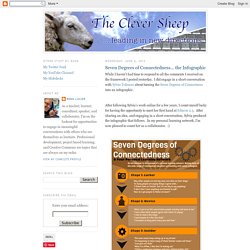
After following Sylvia's work online for a few years, I count myself lucky for having the opportunity to meet her first hand at Educon 2.3. After sharing an idea, and engaging in a short conversation, Sylvia produced the infographic that follows. In my personal learning network, I'm now pleased to count her as a collaborator. :) Flipped Classroom. How flipping works for you Save time; stop repeating yourself Record re-usable video lessons, so you don't have to do it again next year.

It's easy to make minor updates to perfect lessons over time once the initial recording is done. Let students take control of their learning Not all students learn at the same pace. Spend more time with students Build stronger student-teacher relationships, and promote higher level thinking. Other teachers are doing it, you can too Stacey Roshan found that the traditional classroom model wasn't cutting it for her AP students, so she flipped her class. Watch Stacey's Story Crystal Kirch started using videos as instructional tools in her class but soon realized the real value of flipping lectures was being able to spend more face-to-face time with students. Read Crystal's Story Tools You Can Use. Five Best Practices for the Flipped Classroom. Ok, I'll be honest.
I get very nervous when I hear education reformists and politicians tout how "incredible" the flipped-classroom model, or how it will "solve" many of the problems of education. It doesn't solve anything. It is a great first step in reframing the role of the teacher in the classroom. It fosters the "guide on the side" mentality and role, rather than that of the "sage of the stage. " It helps move a classroom culture towards student construction of knowledge rather than the teacher having to tell the knowledge to students. It also creates the opportunity for differentiated roles to meet the needs of students through a variety of instructional activities. 1) Need to Know How are you creating a need to know the content that is recorded? 2) Engaging Models One of the best way to create the "need to know" is to use a pedagogical model that demands this. 3) Technology What technology do you have to support the flipped classroom?
4) Reflection 5) Time and Place. iPads in Education - Apple's Configurator Overview. A week ago I spent 5 hours at one of our local schools playing with Apple's new tool for managing iPads - Apple Configurator.
I have to say that it was time well spent - I can see this being a viable tool for school districts struggling with managing large numbers of iOS devices. Some of the pros & cons (as some people might see them) to using this: Some tidbits I'll share that hopefully will save others headache I experienced: An iOS device can only be displayed in one of the Apple programs at a time; if it isn't displaying here, make sure you have iTunes & the iPhone Configuration Tool shut down.To use the Supervise mode, you have to setup up AND mark your "template" device as supervised from the beginning. 58 Interesting Ways* to use an iPad in the Classroom.ppt.