
A Few Rules for Making Homemade Infographics. Like many other fans of infographics, we were excited about today's launch of Visual.ly, a site that helps normal folk create infographics.
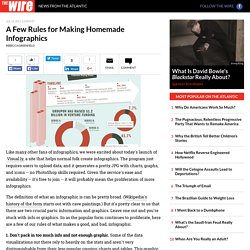
The program just requires users to upload data, and it generates a pretty JPG with charts, graphs, and icons -- no PhotoShop skills required. Given the service's ease and availability -- it's free to join -- it will probably mean the proliferation of more infographics. The definition of what an infographic is can be pretty broad. (Wikipedia's history of the form starts out with cave paintings.) But it's pretty clear to us that there are two crucial parts: information and graphics. 1. 2.
On this Mac vs. 10 Commonly Misunderstood Words. My friends and I are self-professed grammar geeks.

Upon hearing Alanis Morissette’s 90s hit “Ironic” on the radio, a worn out discussion usually breaks out: is she using the word “ironic” correctly? Yes, you can roll your eyes now. But, seriously, “It’s like ten thousand spoons when all you need is a knife” is not really ironic, is it? (And I know that this discussion is more worn out than your favorite gym shorts…) Today’s infographic supports my argument, but it also schools me against using “literally” as an emphatic “really,” and reminds me that politely chuckling does not a bemused person make. Share This Infographic Get Free Infographics Delivered to your Inbox. Are We Wired For Mobile Learning? Because of the proliferation of new technologies, the younger generation today is outgrowing traditional forms of education – remember pencils, chalkboards, textbooks and graphing calculators?

Whether we are in the car, on the train, at work, or in a classroom, mobile technology in particular is giving us the ability to learn on-the-go. See the infographic below to learn why we are wired for mobile learning, and how we can use mobile technologies to educate ourselves. Note to teachers, bloggers and all those interested: Want to use this infographic in your class or share it on your blog? No problem! The following embed code is yours to copy and paste.
Embed this image on your site. Blooms Taxonomy with Apps. 50 really useful iPad 2 tips and tricks. An absolute gem of an article by John Brandon and Graham Barlow from MacLife on 30th March over at TechRadar.

This is going to become my iPad manual from here on in. Customised iPads for all iPad 2 tips and original iPad tips - get 'em here! With great new features like two video cameras, a faster processor and a thinner design, the iPad 2 is the world's best tablet device. iPad 2 review It's also fully capable of running the latest version of Apple's iOS operating system and great apps like iMovie and GarageBand. 1. iOS now supports folders. 2. Double-clicking the Home button shows you all the apps that are running on your iPad in a bar along the bottom of the screen. 3. The internet got mightily upset when Orientation Lock was replaced with Mute on the iPad during the last iOS update. 4.
If you're carrying around sensitive data, you can now enable a feature that'll erase all the data on the device if someone inputs the incorrect passcode 10 times. 5.
Getting started.