
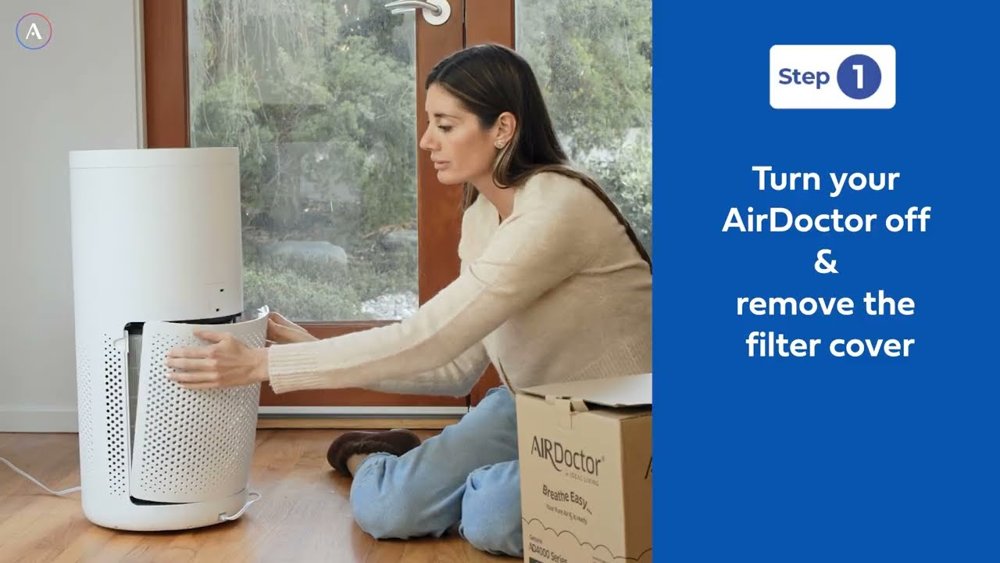
Watch the video here: https://www.youtube.com/watch?v=nQ2IsNQQHl8
To keep an air purifier working properly, you need to change filters periodically. AirDoctor 4000 Series air purifiers are meant to aid in removing dust, allergens, smoke, and other dangerous substances that might impact the quality of your indoor air. In this home air purifier tutorial on filter replacement, we will show you the quickest way to change the filter and reset the filter indication.
The AirDoctor 4000 brand of air purifier utilizes UltraHEPA Plus Premium Carbon/VOC filters to assist in removing tiny airborne particles and eradicating smells and VOCs. You should replace the filter for the AirDoctor 4000 if the previous filter is no longer working correctly. As filters gather all the dust, pollen, pet hair, and other particles over time, replacing them as necessary can help the purifier work correctly. It is usually useful to check the filter indication now and then.
To start the procedure of removing the old filter, first make sure that the AirDoctor 4000 machine is switched off. Lift the top of the filter cover away from the unit and turn it away from the unit. Unlock the filter plate. You need to shift the orange filter lock lever to the right side. Now, using the tabs on the top and bottom sides of the old filter, raise and pull the old filter out. This is a really straightforward process with AirDoctor.
Remove the old filter and install the new replacement filter in its place, ensuring that it is well-positioned. Move the orange lever to the left to lock the filter plate in place. Finally, replace the filter cover by positioning the bottom against the unit and snapping it back into place. Knowing how to change AirDoctor filters is a major component of effective installation.
The final step is resetting the filter indication. Switch on the purifier and find the AirDoctor replace filter button on the control panel. Press the button and hold it for about three seconds to erase the last replacement notice. This will reset the filter light notifications on the AirDoctor and should make the machine recognize the filter replacement. Make sure the cover is tight before you start the purifier.
Changing the AirDoctor 4000 filter is a straightforward task that will help ensure the device works as intended. Proper removal and replacement, use of a compatible replacement filter, and resetting of the indication following replacement all go a long.