
Bust out your own graphcut based image segmentation with OpenCV [w/ code] This is a tutorial on using Graph-Cuts and Gaussian-Mixture-Models for image segmentation with OpenCV in C++ environment.
![Bust out your own graphcut based image segmentation with OpenCV [w/ code]](http://cdn.pearltrees.com/s/pic/th/segmentation-technical-45720372)
Been wokring on my masters thesis for a while now, and the path of my work came across image segmentation. Naturally I became interested in Max-Flow Graph Cuts algorithms, being the "hottest fish in the fish-market" right now if the fish market was the image segmentation scene. So I went looking for a CPP implementation of graphcut, only to find out that OpenCV already implemented it in v2.0 as part of their GrabCut impl. But I wanted to explore a bit, so I found this implementation by Olga Vexler, which is build upon Kolmogorov's framework for max-flow algorithms. Contours - 3 : Extraction. Hi, This is our third article on contours and direct continuation of Contours 1 : Getting Started and Contours - 2 : Brotherhood.

Hope you have read and understood it well before reading this. In this article, we won't be using any new function from OpenCV, instead we use the methods from previous article to extract useful data of a contour or an object. You will be using some of these routines in your codes often. So we can get into the topic now. What are these features actually ? How can I speed Up my Android-openCV application.
OpenCV – Bounding Box & Skew Angle. In a previous article I presented how to compute the skew angle of a digitized text document by using the Probabilistic Hough Transform.

In this article we will present another method in order to calculate this angle , this method is less acurate than the previous one but our goal is rather to introduce two new OpenCV techniques: image scan with an iterator and computing the minimum bounding box of a set of points. Bounding Box The minimum bounding box of a set of 2D points set is the smallest rectangle (i.e. with smallest area) that contains all the points of the set. Given an image representing a text, like this one: The points of our 2D set are all the white pixels forming the different letters. Preprocessing Our text is small but we have a large number of points, indeed the resolution of our image is large, we have many pixels per letter.
Xin Li of WVU. Reproducible Research in Computational Science “It doesn't matter how beautiful your theory is, it doesn't matter how smart you are.

If it doesn't agree with experiment, it's wrong” - Richard Feynman "As a method for finding things out, science lives by its disdain for authority and its reliance on experimentation. " - Chris Quigg Welcome to this site about reproducible research in computational science (including signal processing, computer vision, machine learning and neural computation). This site is intended to share the source codes of the latest advances in various technical fields to the best of my knowledge.
Google Scholar is great but if most papers in computational sciences could be accessed along with their source codes (not just the citation number), the world for scientific researchers will be even better. Python - Robust Hand Detection via Computer Vision. Histogram Comparison — OpenCV v2.4.3 documentation. Goal In this tutorial you will learn how to: Use the function compareHist to get a numerical parameter that express how well two histograms match with each other.Use different metrics to compare histograms Theory To compare two histograms ( and ), first we have to choose a metric () to express how well both histograms match.OpenCV implements the function compareHist to perform a comparison.
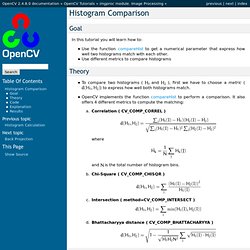
It also offers 4 different metrics to compute the matching:Correlation ( CV_COMP_CORREL ) whereand is the total number of histogram bins.Chi-Square ( CV_COMP_CHISQR ) Intersection ( method=CV_COMP_INTERSECT )Bhattacharyya distance ( CV_COMP_BHATTACHARYYA ) Code What does this program do? Explanation Results We use as input the following images: where the first one is the base (to be compared to the others), the other 2 are the test images. For the Correlation and Intersection methods, the higher the metric, the more accurate the match. Help and Feedback You did not find what you were looking for? C - Tracking objects using histogram data in OpenCV. How do I track motion using OpenCV in Python. Connected-component labeling. Connected-component labeling is used in computer vision to detect connected regions in binary digital images, although color images and data with higher dimensionality can also be processed.[1][2] When integrated into an image recognition system or human-computer interaction interface, connected component labeling can operate on a variety of information.[3][4] Blob extraction is generally performed on the resulting binary image from a thresholding step.

Blobs may be counted, filtered, and tracked. Blob extraction is related to but distinct from blob detection. Overview[edit] Connected Components Using OpenCV. In computer vision and image processing we use many ideas of other areas of computer science to solve our challenges.

The problem I'll talk about is the following: given a monochromatic image I want to obtain the groups of foreground pixels that are isolated by a white region. The name given to these groups is connected component. OpenCV C++/Obj-C: Connect nearby contours. Tutorial: OpenCV haartraining (Rapid Object Detection With A Cascade of Boosted Classifiers Based on Haar-like Features) Creating a haar cascade classifier aka haar training. In the previous posts, I used haar cascade xml files for the detection of face, eyes etc.., In this post, I am going to show you, how to create your own haar cascade classifier xml files.

It took me a total of 16 hours to do it. Hope you can do it even sooner, following this post Note : The below is only for linux opencv users. If you are a windows user, use this link For most of the dough, that is going to come, you will need these executable linux files. Before I start, remember two important definetions Positive images : These images contain the object to be detected Negative images : Absolutely except that image, anything can be present It's better to explain, with an example. First of all, I took the photographs of three of my pens, along with some background, the pics looked like the one below. Tutorial: OpenCV haartraining (Rapid Object Detection With A Cascade of Boosted Classifiers Based on Haar-like Features) - Naotoshi Seo. Tutorial: OpenCV haartraining (Rapid Object Detection With A Cascade of Boosted Classifiers Based on Haar-like Features) Objective The OpenCV library provides us a greatly interesting demonstration for a face detection.
Furthermore, it provides us programs (or functions) that they used to train classifiers for their face detection system, called HaarTraining, so that we can create our own object classifiers using these functions. It is interesting. However, I could not follow how OpenCV developers performed the haartraining for their face detection system exactly because they did not provide us several information such as what images and parameters they used for training.
My working environment is Visual Studio + cygwin on Windows XP, or on Linux. FYI: I recommend you to work haartrainig with something different concurrently because you have to wait so many days during training (it would possibly take one week). ObjectDetection.