
Create a Grungy CMYK Pattern in Adobe Illustrator CS6. It's hard to get a grungy look in vector because it's such a clean medium to work with.

However, by playing with Image Trace and Art Brushes, you can achieve that messy edge. In today's tutorial, I'm going to show you how to create a quick, grungy CMYK pattern in Adobe Illustrator CS6 using the new Image Trace feature and Pattern tools. Resources I'm going to be using a stock image from Photodune for this tutorial and I've opted for the "Small" size. The larger the stock image the more details Image Trace will pick up on. Step 1. How to Make a Seamless Ornamental Pattern in Photoshop. Resources, Tutorials February 16, 2011 Today we are going to show you how to create your own seamless ornamental pattern in Photoshop using some of the shapes that already come with Adobe Photoshop.

This tutorial works best for those who are familiar with the basics of Photoshop. Step 1. Vector Freebie & Micro Tutorial: Seamless Swirls. Hey it’s a Monday morning freebie! This one took a little extra time to make, so I really hope you enjoy it. It is (mostly) seamless, so you can drop it into your swatches panel and fill any shape with it. I say mostly because it went through a series of transformations – one of which was an export to photoshop (for some wacom-esque highlighting) followed by a hi-res auto trace in Illustrator. So, some edges are slightly off, but the overall seamless effect is there. Go ahead and download it, but stick around for some behind the scene paparazzi shots of how it was made.
Intricate Patterns in Illustrator. Skate Deck with a Cool Skull Pattern. This post was originally published in 2009 The tips and techniques explained may be outdated.

Trendy Seamless Pattern in Illustrator. The great thing about seamless repeating patterns is that once created, they can be used as a base for all kinds of awesome designs.

Skateboard decks, custom apparel, package designs and website backgrounds are just some of the uses for the good old pattern swatch. Follow this tutorial to build a vector based repeating pattern of your own, featuring trendy graphics of skulls, stars, lightning bolts and other cool pop imagery. The pattern we’ll be creating has a mono colour scheme of grey, white and black and features a bunch of cool graphics. Speech bubbles, skulls, crossbones, stars, drips, sprays and lightning bolts all help to add that urban/punk pop feel. View the full size pattern design Open up Adobe Illustrator. Use the Type tool to add some form of typographic symbol. Next we’ll start on a simple skull graphic. Draw two ovals to form the eyes, rotating each one slightly. Select the black skull shape and go to Object > Path > Offset Path. Bright Vector Snowboard Design in Illustrator. Follow this Adobe Illustrator tutorial to create a cool snowboard illustration.

We’ll build up the design with an array of bright shapes, trendy lines and patterns to produce a bright and funky vector composition. The final design will then be mocked up on a handy snowboard deck template to show off the design in all its glory. View large scale snowboard design A typical snowboard deck comes in at 64x12inches, but with the design being created in vector format we can easily scale this to 32x6inches to ease the strain on our processors. Create a new Illustrator document at the appropriate dimensions and select CMYK for the Color Mode. Abstract Radial Pattern Design. Whenever I’m stuck for tutorial ideas I always seem to be able to fall back on my typical ‘Chris Spooner’ style of cool abstract patterns people seem to enjoy.
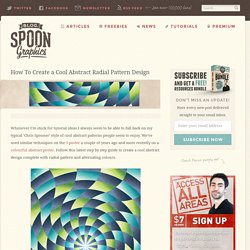
We’ve used similar techniques on the 3 poster a couple of years ago and more recently on a colourful abstract poster. Follow this latest step by step guide to create a cool abstract design complete with radial pattern and alternating colours. The design we’ll be creating this time makes use of a radial pattern that draws in the viewer to the centre. Alternating colours give the design a cool and funky feel and textures add a touch of authenticity to the artwork. Create a new document in Adobe Illustrator at the dimensions of your preference and draw a rectangle across the whole artboard. Toggle on Smart Guides (CMD+U) and draw a small circle from the centre of the rectangle. Retro Triangular Pattern Design. Follow this step by step Illustrator tutorial to create the popular retro style pattern design made up of lots of colourful squares and triangles.
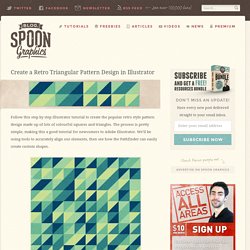
The process is pretty simple, making this a good tutorial for newcomers to Adobe Illustrator. We’ll be using tools to accurately align our elements, then see how the Pathfinder can easily create custom shapes. The pattern we’ll be creating is this cool retro inspired somewhat mosaic like design. The mix of squares and triangles along with the limited colour palette attracts the eye with cool illusions. Patterned Vector Skateboard Design. There’s something about designing for unusual applications such as skateboard decks that really makes the design process much more fun. Maybe it’s the unique canvas size that makes things a little more challenging, or just the cool feeling you get when you see it mocked up as a complete deck.