
Custom Data Annotations With MVC: How to Check Multiple Properties at One Time. Ok so maybe you read this post and you’re thinking to yourself, “I wonder if Diet Dr.
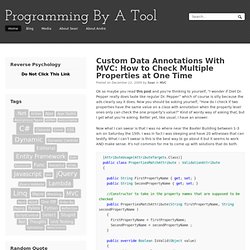
Pepper really does taste like regular Dr. Pepper” which of course is silly because the ads clearly say it does. Now you should be asking yourself, “How do I check if two properties have the same value on a class with annotation when the property level ones only can check the one property’s value?” Kind of wordy way of asking that, but I get what you’re asking. Better yet, like usual, I have an answer. Now what I can swear is that I was no where near the Baxter Building between 1-3 am on Saturday the 15th. And then the use: [PropertiesMatchAttribute("Password", "ConfirmPassword", ErrorMessage = "Match the passwords, dumb--s. ")] public class UserCreateModel { public String ConfirmPassword{ get; set; } public String Password { get; set; } } Wasn’t so hard was it? Custom Data Annotation Validator Part II: Client Code. The validator we looked at in the last post only supports server side validation.
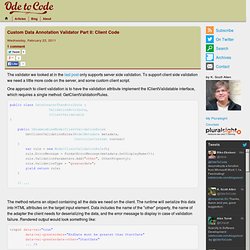
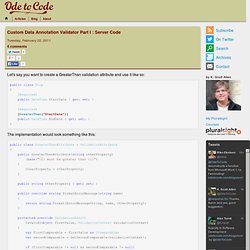
To support client side validation we need a little more code on the server, and some custom client script. One approach to client validation is to have the validation attribute implement the IClientValidatable interface, which requires a single method: GetClientValidationRules. public class DateGreaterThanAttribute : ValidationAttribute, IClientValidatable { public IEnumerable<ModelClientValidationRule> GetClientValidationRules(ModelMetadata metadata, ControllerContext context) { var rule = new ModelClientValidationRule(); rule.ErrorMessage = FormatErrorMessage(metadata.GetDisplayName()); rule.ValidationParameters.Add("other", OtherProperty); rule.ValidationType = "greaterdate"; yield return rule; } // ... The method returns an object containing all the data we need on the client. Custom Data Annotation Validator Part I : Server Code. Let's say you want to create a GreaterThan validation attribute and use it like so: public class Trip { [Required] public DateTime StartDate { get; set; } [Required] [GreaterThan("StartDate")] public DateTime EndDate { get; set; } } The implementation would look something like this: Notice the IsValid override available in .NET 4 adds a ValidationContext typed parameter, and this parameter makes it easier to look "outside the attribute" at the associated model type and model instance (validationContext.ObjectType.GetProperty(OtherProperty)).
The validation context does have a shortcoming when it comes to model metadata, however. The context brings along the DisplayName value for the current property, but there is nothing available to easily get to metadata for the rest of the model. When to use ViewBag, ViewData, or TempData in ASP.NET MVC 3 applications-Rachel Appel on Software Development. "When should I use a ViewBag vs.
ViewData vs. TempData objects? " -- a frequent question in online forums, during presentations, and at events. There are enough similarities and differences between these objects that warrant a closer look to see exactly how you can use each of these objects while developing MVC applications. All three objects are available as properties of both the view and controller. Php - jQuery: how to get "value" of file upload input field. Uploading files in ASP.NET MVC « Todd On .NET. If you’ve tried creating a form that includes a file upload, you might have run into a problem of having a null value for the posted file in your controller’s action method.
Take the following (Razor) view that accepts a string and a file upload as an example: Now, assume the following action method on your controller class: When we run this code we’ll find that the fileUpload variable that’s passed into our controller method is null even though the someString value is populated as expected. Why? One of the subtle things that we have to remember (and which I have forgotten on several occasions) with file upload forms is that we have to change enctype attribute of the form tag to “multipart/form-data” (incidentally, the default value is “application/x-www-form-urlencoded”).
It turns out that there’s an overloaded version of the BeginForm method that will allow us to do exactly what we need. See the last value we’re passing to the BeginForm method call? How-To: Remote Validation in ASP.NET MVC3. ASP.NET MVC3 has been a major boon to my productivity as a web developer since I started using it at the beginning of November – the new Razor view engine has been attracting most of the attention with this iteration of MVC, but one extremely sexy feature has gone unnoticed thus far: Remote validation.
Remote validation was one of the new features added in the November Release Candidate (RC) for MVC3 – I had a chance to demo it in front of the LA .NET User Group last night and it was a monster hit. Example: You’ve all seen remote validation before – ever see one of these when you’re signing up for a service like Twitter? Remote Validation with ASP.NET MVC 2. One validation feature that we didn’t quite have time for in MVC 2’s new client-side validation support is called “remote validation”.
Remote validation means we make a call back to our web site to ensure that a given value is valid. You might want this in cases where it’s not easy (or possible) to determine whether the value is valid on the client side, but you’d still like to give the user client-side feedback about the validity of the item. The canonical example is checking to see if a desired username is taken during your site registration process. This is an example remote validator that I modified from an example by Levi Broderick (who did the bulk of the JavaScript work for client-side validation).
This example was tested on MVC 2 RC, and assumes that you’re using the DataAnnotations validation system (the default). In order to make this work, we will need to perform a couple of one-time steps:
Links FileUpload. Creating a MVC 3 Application with Razor and Unobtrusive JavaScript. Exercise 4: Creating a View. Exercise 1: Creating a Home Page View Using Razor Syntax. ASP.NET MVC 3 Razor. Description ASP.NET MVC 3 introduces the new view engine Razor, which was conceived to simplify the current syntax used in ASP.NET web pages.
In this lab you will learn how to create Razor views inside an MVC solution. In the beginning of this Lab you will first get familiar with Razor syntax and its features: general rules, code blocks, inline HTML and layout pages. Once you have learned the basics, in Exercise 2 you will add Razor views in the MVC Music Store solution to provide the same functionality you have in ASP.NET views, but with a clearer and reduced code. At the end of this lab, in Exercise 3, you will learn how to create and consume third party Razor Helpers. Overview. MVC 3: Layouts with Razor. Two weeks ago we shipped the ASP.NET MVC 3 Beta Release.
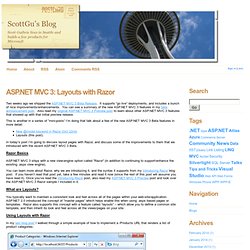
It supports “go live” deployments, and includes a bunch of nice improvements/enhancements. Introducing “Razor” – a new view engine for ASP.NET. One of the things my team has been working on has been a new view engine option for ASP.NET.
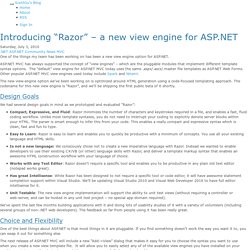
ASP.NET MVC has always supported the concept of “view engines” – which are the pluggable modules that implement different template syntax options. The “default” view engine for ASP.NET MVC today uses the same .aspx/.ascx/.master file templates as ASP.NET Web Forms. Other popular ASP.NET MVC view engines used today include Spark and NHaml. MVC 3. (includes April 2011 Tools Update) ASP.NET MVC 3 is a framework for building scalable, standards-based web applications using well-established design patterns and the power of ASP.NET and the .NET Framework.
It installs side-by-side with ASP.NET MVC 2, so get started using it today! Install MVC3 Free or download the installer here Top Features Integrated Scaffolding system extensible via NuGet HTML 5 enabled project templates Expressive Views including the new Razor View Engine Powerful hooks with Dependency Injection and Global Action Filters Rich JavaScript support with unobtrusive JavaScript, jQuery Validation, and JSON binding Read the full feature list below Top Links.