
Six spring cleaning tips for all the tech in your life. Spring has sprung, and while your neglected garage might be beckoning, the tech you use in your daily life could also use a little cleaning love.

Over the last week, our How To superheroes put together spring cleaning guides for all the tech in your life. From clearing up space on your hard drive to sprucing up your Android or iPhone, we've got you covered. Build the Mac Pro That You Wish Apple Released. Understanding RAM Timings. Best Computer Speakers Under 50 dollars in 2012. If you are in the mood for a different brand and aesthetic design, the BassPULSE Hi-Fidelity System by GOgroove which will work for MP3, Mac, PC, and home-theater will likely appeal to you.

How to: Setup SSD boot drive with secondary Hard disc optimization. OCN Thread of the month - June 2011 "AppData" folder can get huge, and because this is one of the most active folders this is the best folder to move to ensure less random use of the SSD to help it extends its life. quantum tunneling is the achilles heel of SSD technology and why it has a expiration date based on hours used. in other words you can only punch so many holes in silicone. so, moving the "AppData" folder would be the biggest optimization a user can do with Windows on a SSD.
Im pretty sure we all knew how to right click on the none hidden folders in the "users" folder far before this guide was ever produced, so please stay on topic. The entire "Users" folder CANNOT be moved with a right click in properties, and that includes the "AppData" (temp internet folder, etc). Raspberry Pi Should Achieve "2X The iPhone 4S Performance" The Raspberry PI will supposedly outperform the new iPhone 4S across a range of content.
In an interview with Digital Foundry, Raspberry Pi executive director Eben Upton claims that the little $25/$35 credit card-sized PC will crank out twice the performance of the iPhone 4S "across a range of content. " He even trashes Tegra while comparing his home-grown GPU core to Nvidia's mobile solution. Introduction to Computer Science and Programming - Download free content from MIT.
Parts. Tom's Hardware: Hardware News, Tests and Reviews. Guide to Building. A great many of the folks who land on Tom's Hardware are already deeply passionate about technology and PC hardware.
But we know that others are looking to learn more. We're an inclusive bunch. So if you've never built your own PC, fear not. Our editorial team does it all of the time, and we're happy to walk you through the steps, starting with picking the right parts. There's a good chance that, even if you haven't gotten your hands dirty inside of a case, you still have a basic knowledge of the components that go inside.
Traditional cases follow the size categories below. Full towers were traditionally tall enough to hold two power supplies, though many had a second hard drive rack where you might expect to find the top power supply. Component Overview : Best Of Tom’s Hardware: Beginner’s Guide To Motherboard Selection. Vast PCB real estate allows motherboard manufacturers to pack many features onto a full-ATX motherboard, resulting in a bevy of associated components to consider: Retained from our 2006 article, this Socket 775 motherboard still represents the layout of typical high-end products, allowing anyone who’s unfamiliar with onboard components to use it as a guide.
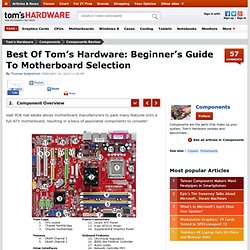
Layout features and details depend on the motherboard’s target market, price point, and a few underlying technologies. Main power comes to the above example through a 24-pin extended ATX (EPS) power connector (12), with the CPU core powered separately via an eight-pin CPU power (EPS12v/ATX12v) connector (13). Another input common on motherboards with dual interfaces for graphics (10) is a standard four-pin Molex receptacle (14), which offers additional power to the PCI Express (PCIe) x16 slots (10). A three-phase voltage regulator (15) is easily identified by three distinct groups of components that work in parallel. [Guide] Air Cooling Questions Answered Here! (Updated 8/16/10) Cooling. What better way to wrap up a scorching summer than with a last word on cooling?
We explain the most important rules for creating ideal airflow, address the potential effectiveness of side fans, and discuss the finer points of graphics card cooling. At least in Europe, the summer wasn't really all that warm (Ed.: Yeah, try living in Bakersfield, CA). But for a PC owner or do-it-yourself builder, the issues of waste heat, cooling, and ambient temperature are always worth thinking about. Balanced Gaming PC. Who's Who In Power Supplies: Brands, Labels, And OEMs : Manufacturers, Designers, And Labels. Did you think all power supplies were manufactured by the brand selling them?

We show you what makes a good PSU and reveal who actually builds PSUs. You can actually find lots of quality, instead of just scrap metal, behind some of the budget labels. Monitor buying guide.