
"Enter Parameter Value" dialog box appears when you run a query, a form, or a report. When you try to run a query, a form, or a report, the Enter Parameter Value dialog box may appear unexpectedly. This behavior occurs when a field, a criteria, an expression, or a control in a query, a form, or a report references a name that Access cannot find.
For example, a name could be misspelled or a field may not be available within that scope. To resolve this behavior, rename the reference to a valid field name. If you do not know where the reference is located, run the Database Documenter for the object listed in the Enter Parameter Value dialog box, and then output the information to a text file. Using parameters with queries and reports - Access. By Sal Ricciardi Queries and reports provide the means by which we ask questions and get answers from a database.

In this article, learn how to use parameters to add flexibility to your queries and reports, and how to supply parameters through a custom-designed form. We provide a downloadable database with examples. Question: How do I create a query that lets me alter a criteria value without having to modify my query design every time? You should use parameters with your query. Over time, you'll often find yourself asking the same questions, and therefore running many of the same queries repeatedly. Update data by using a query - Access. This article describes how to create and run an update query.
You use an update query when you have to update or change existing data in a set of records. You cannot use an update query to add new records to a database, or to delete entire records from a database. To add new records to a database you use an append query, and to delete whole records from a database you use a delete query. For more information, see the See Also section. Microsoft Access 2010 Desktop Databases. Microsoft Access 2010 - Lesson 30: Enhancing Queries. To control how the values would display in the query, start a query in Design View or open a query in Design View.

In the bottom section of the window, in the box of the field name, type the expression. For example, if you have a column named Gender and that display the genders as Male or as Female but you want to display only M or F respectively, you can use the Left() function in an expression as Left(Gender, 1): In the same way, you can use any of the functions we have seen so far. Examples of DAO and ADO Recordsets (Poynor - MIS 333k)
These examples provide DAO programmers with a brief reference to ADO syntax.
You are the correct audience for this page if you are using ASP recordset programming. The recordset interface is referred to as ActiveX Data Objects (ADO). It requires a different syntax than DAO, but your experience with DAO will transfer nicely, and it has a much more powerful and consistent toolkit for accessing today's variety of PC and mainframe database formats on the Web. Say thanks for the Recordset Syntax. Visit our e-bookproject site. Because they are organized into functional topics and kept very short, none of the examples can stand alone. Example Data (tblPeople) SQL UNION ALL. SQL > SQL Avanzado > Union All El propósito del Comando SQL UNION ALL es también combinar los resultados de dos consultas juntas.
La diferencia entre UNION ALL y UNION es que, mientras UNION sólo selecciona valores distintos, UNION ALL selecciona todos los valores. Examples of query criteria - Access. When you want to limit the results of a query based on the values in a field, you use query criteria.
A query criterion is an expression that Access compares to query field values to determine whether to include the record that contains each value. For example, = "Chicago" is an expression that Access can compare to values in a text field in a query. If the value for that field in a given record is "Chicago", Access includes the record in the query results. This topic lists several examples of query criteria. It assumes that you are familiar with designing simple select queries. Ejemplos de expresiones - Access. Este artículo incluye ejemplos de expresiones.
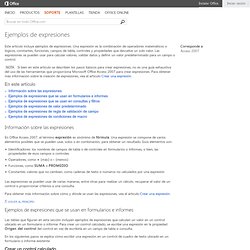
Una expresión es la combinación de operadores matemáticos o lógicos, constantes, funciones, campos de tabla, controles y propiedades que devuelve un solo valor. Las expresiones se pueden usar para calcular valores, validar datos y definir un valor predeterminado para un campo o control. Nota Si bien en este artículo se describen los pasos básicos para crear expresiones, no es una guía exhaustiva del uso de las herramientas que proporciona Microsoft Office Access 2007 para crear expresiones. Para obtener más información sobre la creación de expresiones, vea el artículo Crear una expresión. En este artículo Información sobre las expresiones. Microsoft Access Database Development. MS Access Topics. Crystal's Access Basics.
The accuracy and thoroughness of this document would not have been possible without lots of help.
In addition to those listed in the introductory comments, I wish to give a BIG thank you to my fellow Microsoft MVP, Tom Wickerath. Tom, your never-ending patience, great technical knowledge, and true friendship are blessings in my life ... words cannot express my gratitude ... I also wish to give a special thanks to Allen Browne for hosting this document on his fantastic website that has brightened many a dark corner. In the 15 or so years that I have been using and teaching Access, this document is the result of what I feel is most important to know.
Allen Browne's Database and Training. A program is trying to send e-mail on your behalf. Stop this message with ClickYes. Do you get this annoying message when you're launching your email merge, address book search, email notification program or a smartphone synchronization tool?
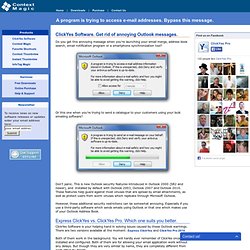
Or this one when you're trying to send a catalogue to your customers using your bulk emailing software? Don't panic. This is new Outlook security features introduced in Outlook 2000 (SR2 and newer), and installed by default with Outlook 2003, Outlook 2007 and Outlook 2010. These features help guard against most viruses that are spread by email attachments, as well as protect users from worm viruses which replicate through Microsoft Outlook. However, these additional security restrictions can be somewhat annoying. Express ClickYes vs. ClickYes Software is your helping hand in solving issues caused by these Outlook warnings. Both of them work in the background. The table below answers the questions asked most frequently.
Search criteria. Microsoft Access Tips for Serious Users Provided by Allen Browne, June 2006, updated March 2007.
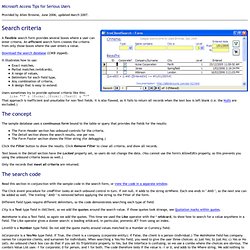
A flexible search form provides several boxes where a user can enter criteria. An efficient search form creates the criteria from only those boxes where the user enters a value. Download the search database (23KB zipped). Microsoft Access SQL: Union Queries (Part 2) Let’s say we have two tables and you want to create a basic Union Query between them. Our two tables are tbl_CountryClubs and tbl_CountryClubsAlt. The tables have the same fields and field names, so your Union Query will look as follows: SELECT * FROM tbl_CountryClubs UNION SELECT * FROM tbl_CountryClubsAlt; That’s it.
After typing this into the SQL view of the query, click to view the datasheet and you’ll see the records merged together even though they come from different tables. Figure 1. Convert your Access 2007 application from design to runtime mode by changing its extension. Having your Access application run in runtime mode prevents users from modifying or deleting objects from the application, providing users with access only to the objects you wish. Mary Ann Richardson shows you how to lock down your database and keep it safe.
When you're ready to move your Access application from development to production, you need to ensure that it runs in Access runtime mode when opened. Access runtime mode prevents users from modifying or deleting objects from the application; users have access only to the objects you make available to them in the Startup form. After specifying your Startup, you simply need to change the Access 2007 database filename extension to put it in runtime mode. For example, to put the Employee.accdb database in runtime mode, follow these steps: Help with docVariables and fields: deleting, checking for and adding variables. [Archive] When I try to add/create a docVariable I sometimes get a 'Variable name already exists' error; when I try to delete a docVariable I sometimes get a 'requested member of the collection does not exist' error.
I'm having trouble figuring out how to search through the docVariables and add or delete a variable if necessary. What I want to do is create a word document where the first line of the text file is inserted into the word document as the first docVariable and the second line of text is inserted as the second docVariable, etc. where I may have a min. of 2 lines (docVariables) or a max. of 100 lines (docVariables). I want to start off with a blank document that initially has no docVariables. Private Function CreateReport() 'initialize variables, etc.
Do While wi <= 10 If wDataTable(wi) = "" Then wData = "No Data Exists" Else wData = wDataTable(wi) End If. How do I... Dynamically fill Microsoft Word fields using Access data? This blog post is also available in PDF form as a TechRepublic download. The download includes a sample Access database and Word form.
Each Microsoft Office application specializes in a specific job. Word lets you create and edit documents and Excel analyzes your data. Copy SQL statement from query to VBA. Microsoft Access Tips for Serious Users Provided by Allen Browne. Created: March 2007. Last Updated: November 2008. Rather than typing complex query statements into VBA code, developers often mock up a query graphically, switch it to SQL View, copy, and paste into VBA. If you've done it, you know how messy it is sorting out the quotes, and the line endings. Curso gratis Microsoft Access 2007. Unidad 9. Las consultas de referencias cruzadas. Para arrancar el asistente para consultas de referencias cruzadas tenemos que hacer clic en el botón Asistente para Consultas que se encuentra en la pestaña Crear: Elegir la opción Asist. consultas de tabla ref.cruzadas del cuadro de diálogo que aparecerá:
Referencias Cruzadas en SQL. Qué son las referencias cruzadas, cómo se construyen y para qué se utilizan. Una consulta de referencias cruzadas es aquella que nos permite visualizar los datos en filas y en columnas, estilo tabla, por ejemplo: Si tenemos una tabla de productos y otra tabla de pedidos, podemos visualizar en total de productos pedidos por año para un artículo determinado, tal y como se visualiza en la tabla anterior. La sintaxis para este tipo de consulta es la siguiente: TRANSFORM función agregada instrucción select PIVOT campo pivot [IN (valor1[, valor2[, ...]])]