
Test.DVI - typesetting-script.pdf. Fonts - \mathscr (LaTeX or XeLaTeX) TeX Frequently Asked Questions. BibDesk Help: D. Character Conversion. What is character conversion?

BibDesk automatically converts many accented characters into their TeXequivalents when it writes a BibTeX file. For instance, a u with umlaut is converted to {\"u} when your file is saved, but presented as-is in theinterface. There are some limitations on this process; conversion only works when a {\ sequence is encountered, as in the above example, and it only works if BibDesk has the conversion stored in its internal dictionary. Accented characters and TeX The following table was taken from The Not So Short Introduction to LaTeX2e> (Oetiker et al., 1999). Many of the accents listed in this table can be applied to characters other than o, as well. Note: for BibTeX, it is also necessary to enclose the accent sequence in braces (see the TeX FAQ). How to use Bibtex as a reference library for Latex. Having all your references in a BibTeX-file (*.bib) is more convenient for reusage than typing or copy the whole list of references everytime you are writing a new book, report or article.

Therefore, it is worth to learn how to use BibTeX from the beginning, it will save you a lot of time… BibTeX offers a whole list of entry fields, entry types and different bibliography styles.Entry fields (standard): Entry fields (non-standard): affiliation: The authors affiliation.abstract: An abstract of the work.contents: A Table of Contentscopyright: Copyright information.ISBN: The International Standard Book Number.ISSN: The International Standard Serial Number. Used to identify a journal.keywords: Key words used for searching or possibly for annotation.language: The language the document is in.location: A location associated with the entry, such as the city in which a conference took place.LCCN: The Library of Congress Call Number.mrnumber: The Mathematical Reviews number.
Fonts - \mathscr (LaTeX or XeLaTeX) Test.DVI - typesetting-script.pdf. Compiling - How can I compile different .tex file on click on typeset in TeXShop? (MacTeX 2011) How to direct TeXShop to all all .aux files, also in subfolders, such that they can be trashed? Ramón's TeXShop Tools. Using BibTeX to Create a Bibliography. Using BibTeX to Create Your Bibliography Using BibTex Here's what to do after you have entered your sources in JabRef, EndNote, Bookends or BibDesk: For TeXShop Save your bibliography as a .bib file in the same folder as your thesis document.
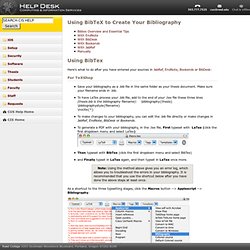
Make sure your filename ends in .bib.To have LaTex process your .bib file, add to the end of your .tex file these three lines (thesis.bib is the bibliography filename): \bibliography{thesis}\bibliographystyle{filename}\nocite{*}To make changes to your bibliography, you can edit the .bib file directly or make changes in JabRef, EndNote, BibDesk or Bookends.To generate a PDF with your bibliography, in the .tex file, First typeset with LaTex (click the first dropdown menu and select LaTex) Then typeset with BibTex (click the first dropdown menu and select BibTex)and Finally typset in LaTex again, and then typset in LaTex once more. Note: Using the method above gives you an error log, which allows you to troubleshoot the errors in your bibliography.
LaTex and TexShop on a Mac, Department of Politics, NYU. Phase Portrait: natbib-compatible BibTeX style (BST) file for Springer LNCS publications. UPDATE: Additionally, if you prefer "References" instead of "Bibliography", you have to re-define the \bibname macro in your document (e.g., just after you include natbib).

Just add a \rewewcommand\bibname{\refname} or a \renewcommand\bibname{References} and you should be up and running with your desired bibliography name. For some reason, the folks over at Springer do not like to make their BibTeX style (BST) files natbib compatible. Nevertheless, I've done my best, and I've made the the natbib-compatible result splncsnat.bst available for download.
Clipart. Poster. Research tips - A LaTeX template for a CV. A LaTeX template for a CV Every researcher needs a Curriculum Vitae (Latin for “course of life”) or CV.

You will need it for job applications, for annual performance appraisal, and just for keeping track of your publications. A CV typically contains lists of achievements including qualifications, publications, presentations, awards, plus teaching experience. I’ve created a LaTeX style for a CV to make it easy to produce something that looks good and is easy to maintain. You will need an up-to-date implementation of LaTeX because I’m using the wonderful biblatex package (more on that in another post) which has only just become available as part of MikTeX and TeXLive. The preamble of your CV should look something like this: Include your name in the \name command.The \info command contains information to go in the header box on the first page.
Handouts. Conference Rank. Collected Advice on Research and Writing. Writing a thesis with LaTeX - mori.pdf.