
Emoticons for Facebook comments. 19 handy Google tricks that you weren’t aware of. After covering everything that Google Search has to offer, you can easily forge that search only forms one small part of the Google behemoth.
With so many different features and clients available, it’s very easy to use the basic features for each and leave it at that. However, if you delve a little deeper, there are many tricks hidden away that will help improve your experience. To help you out, here are a number of tips and tricks that you can use for four of Google’s more popular features: Gmail, Maps, Google Drive and Google News.
Gmail Use Filtered Search Gmail’s search bar is very handy for finding that message you got months ago, but most people don’t realise how easy it is to access advanced search. Activate Starring Feature Sometimes you will come across important messages, but the only way you can mark them is with the yellow tab or star icon. Cut Down Text In Email Replies Keyboard Shortcuts Like all Google features, there are keyboard shortcuts that you can take advantage of.
5 Photography Tips for Beginners. A Post By: Dale Wilson The road is for the journey, the real excitement lies in the ditches.

Acquiring good pictures is a very relative term. I have viewed images from seasoned and well respected photographers that have left me scratching my brow and asking “why is that image so important and stellar that it sends the art critics ga-ga? On the other hand I have viewed the work of amatuers that were sublime and left me in awe. Such is photography as an art medium. Oftentimes magazines and articles on the web overlook the photographer who has acquired their first camera. Below are five tricks for beginners that I have been teaching for quite some time. Tip 1: Control the Amount of Light Coming from your Flash Many flashes on entry level point and shoot cameras “over-flash” the subject, and often there is little the photographer can do.
Many photographers find the most pleasing flash balance to be between one and two f/stops of fill light. Overcast days are perfect for photographing water. Sample Size Calculator - Confidence Level, Confidence Interval, Sample Size, Population Size, Relevant Population - Creative Research Systems. This Sample Size Calculator is presented as a public service of Creative Research Systems survey software.
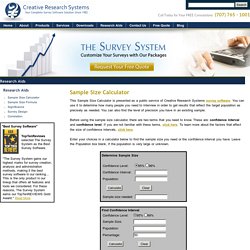
You can use it to determine how many people you need to interview in order to get results that reflect the target population as precisely as needed. You can also find the level of precision you have in an existing sample. Before using the sample size calculator, there are two terms that you need to know. These are: confidence interval and confidence level. If you are not familiar with these terms, click here. Enter your choices in a calculator below to find the sample size you need or the confidence interval you have.