
Setting Up Your Webcam, Lights, and Audio for Remote Work, Podcasting, Videos, and Streaming. I've started live streaming and publishing videos on my YouTube Channel again recently and it made me realize just how much work I've put into getting a good hardware setup—not just for the streams, but also just as someone who works remote and sits on video calls every day.
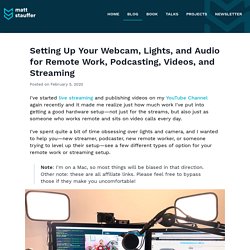
I've spent quite a bit of time obsessing over lights and camera, and I wanted to help you—new streamer, podcaster, new remote worker, or someone trying to level up their setup—see a few different types of option for your remote work or streaming setup. Note: I'm on a Mac, so most things will be biased in that direction. Other note: these are all affiliate links. Please feel free to bypass those if they make you uncomfortable! What's here? First, I'll cover each section, starting from the cheapest options for each: Then, I'll tell you my setup, and a few suggested full setups at various price points.
Only you really know what level of clarity you want from each piece of your setup. Podcasters need much nicer mics. Webcams. Videos Without Clutter. Open Broadcaster Software. MixBit. A Great Tool to Highlight and Share Specific Parts of Videos. March 16 , 2017 Vibby is a very good tool that you can use to highlight and share specific parts of videos.
Viewers will only see the cropped portion you sent and not the entire video. This is especially useful to use with students. Instead of sharing the whole video you can highlight the parts you want them to see and send them over in the form of vibs. Vibby supports a wide variety of video hosting platforms including YouTube, Vimeo, Twitch, Facebook, Mobcrush and any publicly hosted HTML5 video format. INSPIRATIONS - Learn about film. Telling your story: using film language - Learn about film. Making a film - Learn about film. How do you make a movie that people will want to watch?
The secret is to plan it, keep it short, and keep it simple. Don’t be impatient: follow your plan and take the time to get things right. Follow these ‘rules’ to help make your first film a success. 1 Build your skills. Once you’ve got your equipment, learn how to use it and find out what it can do. 2 Watch other people’s films. Quentin Tarantino famously said “People ask me if I went to film school. 3 Get organised. Follow an organised filmmaking process. 4 Keep it short and simple. Have you got a strong idea? Keep it short: most beginners’ films could be improved by halving their length. 5 Shoot separate shots. Video Backgrounds and Free Motion Backgrounds. MoocNote - Take notes on videos. Moovly. Beginner's Guide. Crumbles. Maker Studio - STEM Curriculum Resources by Dr. Wesley Fryer.
8 Steps to Creating Accessible Video. Photo: drinksmachine Video is great.
It can help you get your message across quickly, entertainingly, and provide a bit of character. Visitors are often more likely to watch a short video than they are to read a wall of text. What’s more, recent statistics show that video makes up approximately 65% of all search results, so it’s definitely an area you need to be thinking about! Google really likes video, but it likes accessible video even more. The theory is that video takes longer to produce than web content and therefore is ranked higher by Google. Photo: Fred Benenson Videos that include captions means that double the number of people will finish watching your video (from 40% up to 80%) – and remember your search ranking is directly related to how long people spend on your site. LiveClicker found that pages with transcripts earned 16% more revenue than pages that just had video-only content. People who are blind can hear the audio, but not see what is happening.
Video Publishing by Robin Good. ACCESS: YouTube. Moviemaker. Make digital movies online. Formerly Dfilm. Home. Creates amazing videos from your photos.
Old Video PRO. Movie Looks HD. Slowmo for iPhone 3GS, iPhone 4, iPhone 4S, iPhone 5, iPod touch (4th generation), iPod touch (5th generation), iPad 2 Wi-Fi, iPad 2 Wi-Fi + 3G, iPad (3rd generation), iPad Wi-Fi + 4G, iPad (4th generation), iPad Wi-Fi + Cellular (4th generation), iPad mi. TiltShift Video - Miniature effect for movies and photos for iPhone 3GS, iPhone 4, iPhone 4S, iPhone 5, iPod touch (3rd generation), iPod touch (4th generation), iPod touch (5th generation) and iPad on the iTunes App Store. Time Lapse Camera HD for iPhone 3GS, iPhone 4, iPhone 4S, iPhone 5, iPod touch (4th generation), iPod touch (5th generation), iPad 2 Wi-Fi, iPad 2 Wi-Fi + 3G, iPad (3rd generation), iPad Wi-Fi + 4G, iPad (4th generation), iPad Wi-Fi + Cellular (4th genera. Education Video Slideshows. Source Filmmaker. 9 Great Animation and Video Creation Tools Integrated with YouTube for Teachers. You might have wondered how those beautiful animated videos you see on YouTube are made.
Sometimes you think people use expensive software ( well some do especially advertising companies ) but most of them are created using simple and free tools but with so much of creativity. Today I am introducing you to an awesome set of tools that are integrated into youTube and that will allow you to easily create videos without needing cameras or having to upload files or do any editing. They are very self explanatory and you can have a great video to share with your students in less than 10 minutes. If you use YouTube with your students then don't miss These Educational YouTube Tools. check them out they are also great. 8 Free and simple tools to create video tutorials for Teachers. Memplai.com - Collaborate. Create. View and Share.