
Get started coding C# in ASP.NET. To truly tap into the power of ASP.NET, you must dig below the surface and realize that everything--everything--is an object.

This simple walkthrough illustrates basics of Namespace, class, and some of the platform's other powerful features. Many Web developers embraced Microsoft's Active Server Page (ASP) technology and have used it widely to build Web applications. Now ASP.NET is here to provide a new generation of dynamic Web sites.
ASP.NET, available through the .NET SDK, provides an object-oriented method for creating and interacting with Web pages. Those of us familiar with ASP will find a lot of similarities in ASP.NET, but those likenesses are primarily on the surface. To really excel with ASP.NET and the rest of .NET, it is important to remember that everything is an object--everything. In the first article in this series, we discussed how to set up a .NET server. Let's dissect this code line by line. <%@ Page Language="C#"> <% if (Request.QueryString["submit"] !
Remote Access and Remote Desktop Software for Your Computer. Google. Joopz - Web Texting. Web Hosting, Domain Name Registration! - Affordable Web Hosting and Domain Name Search. Pointers Usage in C++: Beginners to Advanced. Download source - 6.39 Kb Contents General Introduction Chapter 1.

Introduction: Objective, Target Audience and Article Revisions Part 1: Introduction to Pointers in C++ Part 2: Dynamic Memory Allocation and Linkage with Arrays Part 3: Function Pointers and Deciphering (Long) Pointer Declarations General Introduction Chapter 1: Introduction: Objective, Target Audience and Article Revisions C++ is a programming language that includes features of both low-level and high-level programming languages. The article is targeted at beginners and intermediate users of C++. I have made two major changes since the previous version of the article. Please send your suggestions on improving the article and making necessary corrections at varunhome@gmail.com.
Part 1: Introduction to Pointers in C++ Chapter 2: The & and * Operators A pointer is a variable which stores the address of another variable. How much storage space does a pointer consume? Chapter 3: Pointers: First Example Chapter 4: Arrays of Pointers. Ryan Batters. HP Linux Imaging and Printing. Step 2: Run the Automatic Installer Running the installer requires that you open a command shell to enter commands.
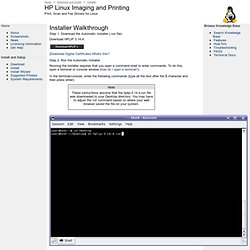
To do this, open a terminal or console window (how do I open a terminal?). In the terminal/console, enter the following commands (type all the text after the $ character and then press enter): Note These instructions assume that the hplip-3.14.4.run file was downloaded to your Desktop directory. Step 4: Verify your Linux Distribution Ensure the installer detected the correct Linux distribution. Step 5: Enter Your root/Superuser User Password Step 6: Read the Installation Notes Depending on your Linux distribution some steps may need to be completed before going further with the HPLIP install. Step 7: Detect Any Missing Dependencies The installer will now detect what dependencies your system will need to install before installing HPLIP. Step 8: Download and Install Any Missing Dependencies If your system is missing any dependencies they are now downloaded and installed. Step 9: '. Khan Academy.
FunnyStuff. Pearltrees videos. Getting started.