

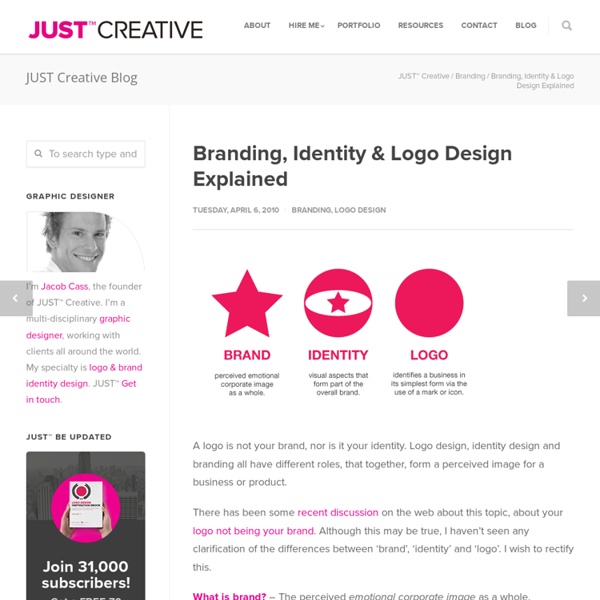
logo color psychology wheel Free Brand Guidelines Template | Free Logo Template for Brand Identity I decided recently to update my own template for a Brand Identity Guidelines template that is sent to clients upon completion of a project. This basically lists the ‘rules’ of consistency, so the client knows how to use their new files correctly and successfully. Simple guidelines, tips, what not to do, colour and typefaces are all essentially packaged into one PDF that they can refer to later, or pass on to another designer. A few months back Graham Smith (imjustcreative) did something nice and released a free brand guidelines template to the design community and I thought it only fair to do the same – his can be found here by the way. Living in Adobe Illustrator for my logo design services, it’s comfortable and therefore logical for my template to be illustrator-based. InDesign, I believe, would be the recommended software for page layout, but that’s an unnecessary hassle and I don’t have the same experience with it that I have with Illustrator / Photoshop.
Branding Eye CSS Positioning 101 If you’re a front end developer or a designer who likes to code, CSS-based layouts are at the very core of your work. In what might be a refresher for some, or even an “a-ha!” for others, let’s look at the CSS position property to see how we can use it to create standards-compliant, table-free CSS layouts. Article Continues Below CSS positioning is often misunderstood. The CSS specification offers us five position properties: static, relative, absolute, fixed, and inherit. Get with the flow#section1 First, let’s take a step back to recognize the world we’re working in. Boxes in the normal flow belong to a formatting context, which may be block or inline, but not both simultaneously. Think of a “box,” as described by the spec as a wooden block—not unlike the ones you played with as a young whippersnapper. Static and relative—nothing new here#section2 The static and relative position properties behave like your childhood blocks—they stack as you would expect. Example D shows our new markup.
How to choose a colour scheme for your logo design | Branding The human mind is highly responsive to visual stimuli, and colour is one of the major defining factors in that response. On both a conscious and subconscious level, colours convey meaning – not only in the natural world but also within the artifice of our culture. Graphic designers need to harness the power of colour psychology to bring resonance to their designs – and in no field is this more important than that of logo design. The use of colour can bring multiple layers of meaning, from primitive responses based on millions of years of evolved instinct to the complex associations we make based on learned assumptions. What different colours mean Every colour, including black and white, has implications for logo design. In general terms, bright and bold colours are attention-grabbing but can appear brash. Red implies passion, energy, danger or aggression; warmth and heat. Purple speaks to us of royalty and luxury. Single or multiple colours? Think globally Words: Martin Christie
Free Templates: Free Business Card Templates - Free Brochure Templates - Free Flyer Templates Free Branding kit #1 Craft Creative Consultancy This set is perfect for any service industry. Whether it be a catering company or a law firm, this package will convey class and creativity. Free Branding kit #2 Plan Creative Group If you are looking for a fresh and organic logo mark and color palette then this package is the perfect answer. Free Branding kit #3 Yummi Bubble Tea As unique as your brand, YUMI will get your diner or smoothie shop noticed! Professional Design Each Inkd design template is professional, elegant, flexible, and visually appealing. Fully Customizable You get an editable design file. Save Money, Save Time Have a limited budget or a short timeline? Free Design Templates Free brochures, newsletters, flyers and more.
Winning Customers -- The Pinterest Way! In just a couple of years, Pinterest has established itself as the third largest social networking website, behind Facebook and Twitter (and ahead of the likes of Google+). For a website that is still in relative infancy, such a record is definitely commendable. The question that now arises is, can we harness Pinterest’s popularity to promote our online ventures? In other words, just as we employ Twitter and Facebook to create an online identity of our businesses, will it be possible to make use of Pinterest and reach our customers and clients using it? Of course, we can! What makes Pinterest so popular? The popularity of Pinterest can be attributed to: Catering for people’s need and desire to learn, acquire and share things of interest. Ok, so how does Pinterest work? The basic mechanism is simple: I like something, I share or ‘pin’ it, my friends with similar interests pick it up and re-share or ‘repin’ it, and the spiral continues! Alright, so how do I harness the power of Pinterest?
What is Vertical Align? CSS has a property called vertical align. It can be a bit confusing when you first learn about it, so I thought we could go through it's use a little bit. The basic usage is like this: Notice in this usage case, it is being applied to the img element. Images are naturally inline elements, meaning they sit right inline with text if they are able to. But what does "sit inline" mean exactly? The valid values are: baseline, sub, super, top, text-top, middle, bottom, text-bottom, length, or a value in percentage. The confusion, in my opinion, sets in when people try to use vertical-align on block level elements and get no results. Baseline The default value of vertical-align (if you declare nothing), is baseline. Middle Perhaps the most common use for vertical-align is setting it to 'middle' on icon-size images. The browser does the best job it can centering the pixel height of the text with the pixel height of the image: Text-bottom Text-top Top & Bottom Sub & Super Vertical Align on Table Cells
Plagiarism website shames logo thieves | Logo design Logo design can be a tricky state of affairs, with some of the most iconic brands providing more than just inspiration for up-and-coming companies. If you've ever spotted a logo that you think you've seen before - you probably have. Website Logo Thief aims to showcase the plagiarism that happens in the logo design world. By naming and shaming the companies that copy the designs of others, it's alarming to see just how easy it is to simply plagiarise with the click of a button. The curated cases include a comparison between the copied and the original logo design, with the resemblance to the original design clearly shown. [via You the Designer] Like this? Create a perfect mood board with these pro tips The ultimate guide to logo design Our favourite web fonts - and they don't cost a penny Have you spotted a logo thief?
44 Corporate Identities plus How To Create Your Own Using Photoshop Mar 19 2013 Corporate Design (CD) as a subset of the wider Corporate Identity determines how a company will be perceived in the public eye. Its logo or elements from it make up the outward appearance. Any means of communication, be it business cards or stationery and any means of advertising, such as flyers, brochure and of course digital representations in the form of a website or – growing more and more popular – apps derives from it. Designing a Corporate Design is always enthralling, but to call it a challenge, you need more. HÉROES – Encuentro nacional de jóvenes Designer: Valeria Ruiz-Schulze © Valeria Ruiz-Schulze The Hair Tailor Designer: Pete Gardner © Pete Gardner Chá Literário — Visual Identity Designer: Tiago Campea © Tiago Campea Crows’ Nest Designer: Pavel Emelyanov, Eskimo © Pavel Emelyanov, Eskimo Truit Idenity Design Designer: Nikolay Boyanov © Nikolay Boyanov Sandwich or Salad Designer: Masif © Masif Glasswear Industries Identity Designer: Nina Georgieva © Nina Georgieva © Dora Klimczyk
So You Got the Meeting. Now What? I landed my first sales appointment entirely by accident. A co-worker was designing a logo and business card for his girlfriend’s cousin’s company and hooked me up to talk with him about building a website. (After all, I knew more about designing websites than my friend—I’d already designed two.) Business-wise, I did more things wrong than I did right. Things like no contract, no money down, building the site with no content, then waiting months for content before getting a dime. Instead, I felt more like Alice wandering in Wonderland: “Would you tell me, please, which way I ought to go from here?” So if like me, you’ve grown weary of “walking long enough” only to lose control during client meetings, here’s the path from handshake, to close, to finalized sale. 1. This is not the time to post a desperate “Help! Besides knowing what to charge, you’ll also want to find out a bit about the company, its products and services. 2. 3. Those are the first three steps of your journey. Image credit
Learn CSS Positioning in Ten Steps: position static relative absolute float 1. position:static The default positioning for all elements is position:static, which means the element is not positioned and occurs where it normally would in the document. Normally you wouldn't specify this unless you needed to override a positioning that had been previously set. 2. position:relative If you specify position:relative, then you can use top or bottom, and left or right to move the element relative to where it would normally occur in the document. Let's move div-1 down 20 pixels, and to the left 40 pixels: Notice the space where div-1 normally would have been if we had not moved it: now it is an empty space. It appears that position:relative is not very useful, but it will perform an important task later in this tutorial. 3. position:absolute When you specify position:absolute, the element is removed from the document and placed exactly where you tell it to go. Let's move div-1a to the top right of the page: What I really want is to position div-1a relative to div-1. Footnotes 10.