

Build an App With WordPress - The compulsory todo list Matt Mullenweg’s State Of The Word was very insightful into what was to come of WordPress in 2012. One thing he mentioned would be big, is be WordPress powering apps. With that in mind, there aren’t many posts around that teach you how to make an app. I thought I’d start with the compulsory “How to make a to-do list app using WordPress!” It even works across all platforms- that’s right. There is a Demo page (username: user, password: notes) where you can see and play with what we’ll be creating. A bit of Theory Many web app frameworks these days use MVC or MVVM structure. WordPress is a good starting point because it provides a plethora of APIs for us to leverage. The approach we’re going to take is simple. To bring you up to speed The focus of this tutorial isn’t to show you how to design an app, but to build it with AJAX. The starter theme I’ve put together for you is just a skeleton without any functionality. Data flow in a single page web app Let’s examine the diagram from just above.
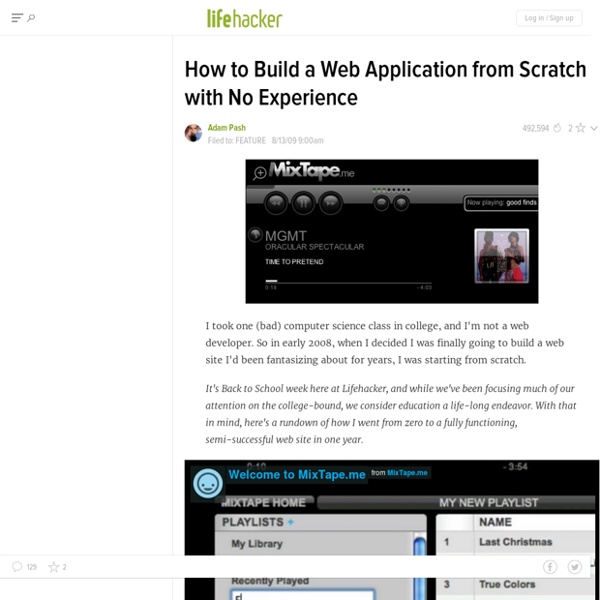
Creating a Web App from Scratch - Part 1 of 8: Basic Idea and Design Today we begin Part 1 of an 8-Part series on building a web application from absolute scratch to a complete product. I am going to kick things off by introducing the idea, and then I will be handling the design, UI, and general front-end stuff. We are going to be going back and forth from here over to my friend Jason Lengstorf's site Copter Labs. Jason will be handling the back-end stuff like application planning and database stuff. It's Easy, Right? What we're going to create is a "list app". First of all, it needs to work and it needs to work well. Through this whole 8-part series, we are going to create an app that hopefully does all these things pretty well. The Big Idea This "list app" is going to be called Colored Lists. Sketch It Out No need to get fancy right away. Looks like a list to me. Early UI Planning Click-to-editDrag and dropTwo-click deleteAutomatic saving (after any action) All this stuff basically adds up to a whole bunch of AJAX. The Screens "Features" Moving On Share On
A guide to using WordPress to build SaaS Web Apps like Hello Bar Yes, you read that title right: WordPress as a SaaS (Software As A Service) application platform. But wait… WordPress is a blogging platform right – what’s this about building applications? Well, as it turns out, you can do a whole lot more with WordPress than you may think. The Plugin Community is Your Friend One of the most powerful things about WordPress is the community around it. Managing Your Users As with any SaaS application, the first thing we needed was a way to manage our users. With s2Member installed, we had a turn-key solution to subscription management, payment processing, brute force login security, as well as diverse page access restrictions for multiple user tiers and capabilities. s2Member is a fremium plugin with a very capable free offering and a paid Premium plugin to complement its features. Securing Your Site WordPress is the perfect system for a publicly accessible website, but it requires a little customization to lock it down for use as an application platform.
25 Things You Should Know About Plot Previous iterations of the “25 Things” series: 25 Things Every Writer Should Know 25 Things You Should Know About Storytelling 25 Things You Should Know About Character And now… 1. A plot is the sequence of narrative events as witnessed by the audience. 2. Some folks will ask, incorrectly, “What’s the plot?” 3. A plot functions like a skeleton: it is both structural and supportive. 4. The biggest plot crime of them all is a plot that doesn’t make a lick of goddamn sense. 5. The simplest motherfucker of a plot is this: things get worse until they get better. 6. Fiction is driven by characters in conflict, or, put differently, the flame of fiction grows brighter through friction. 7. Of course, the essence of the essential conflict — the one below all that Wo/Man versus stuff — is a character’s wants versus a character’s fears. 8. A plot grows within the story you’re telling. 9. 10. Plot offers the promise of Chekov and his gun, of Hitchcock and his bomb under the table. 11. 12. 13. 13. 14.
Building Web Applications with WordPress I’ve talked quite a bit about my thoughts on using WordPress for web application development. Specifically, I’ve shared: During the State of the Word 2012, Matt discussed the past, present, and future of WordPress which included WordPress being an “app engine” of sorts. Some time ago, I stumbled across an article by Matthew Eppelsheimer in which he discusses his team using WordPress as just that. Specifically, he says: The WordPress platform essentially manages content and authentication for us, gives us frameworks to build custom UI and our own functionality, and offers extra features in the form of plugins developed by a large community. Interesting, isn’t it? Obviously, I’ve been a fan of treating WordPress as such for some time, but I’ve never really shared how I’ve viewed various features and parts of the API for actually building applications. First off, I want to state that I’m not at all dogmatic about these opinions. Clean API User Management Model-View-Controller Models Views
Warbeats > Home How to Allow Users to Submit Posts to Your WordPress Site Have you ever seen sites that allow users to submit posts or other type of content? Do you want to have user-submitted content on your site? In this article, we will show you how to allow your users to submit posts to your WordPress site without creating a user account. Allowing Registered Users to Submit Posts WordPress comes with built in user roles and capabilities which allows you to run a multi-author WordPress site. Users can now register on your WordPress website. Users can now register and login to your website and use the WordPress admin area to submit their posts and content. Now if you don’t want to require user registration, then keep on reading. Allow Users to Submit Posts Without Registering Many website owners do not like to complicate things by allowing users to access the WordPress admin area. First thing you need to do is install and activate User Submitted Posts plugin. On the settings page, under the options you can configure exactly what you want users to add.
Let's Make a Web App: Nodepad Welcome to part 1 of Let’s Make a Web App, a new tutorial series about building a web app with Node. This series will walk you through building a web app with Node, covering all the major areas you’ll need to face when building your own applications. The app we’re going to build is a web notepad called Nodepad. Not particularly original, but well-defined and easy to understand. Selecting Frameworks and Tools Modern web applications depend on several components: Storage: Relational database, NoSQL Storage library: simple, ORM Web server Package manager Server-side framework Client-side framework Testing libraries Version control Ultimately, the choice is down to context. In this case my criteria for selection will be based on feedback we’ve had about what our readers are interested in, and my own areas of expertise. Server-Side Building web apps with Node typically involves a framework of some kind. An example of a popular Rails-like framework is Geddy. Not all frameworks are MVC, though. Next
in1.com - Single Page App with Twitter Bootstrap and Node.js