

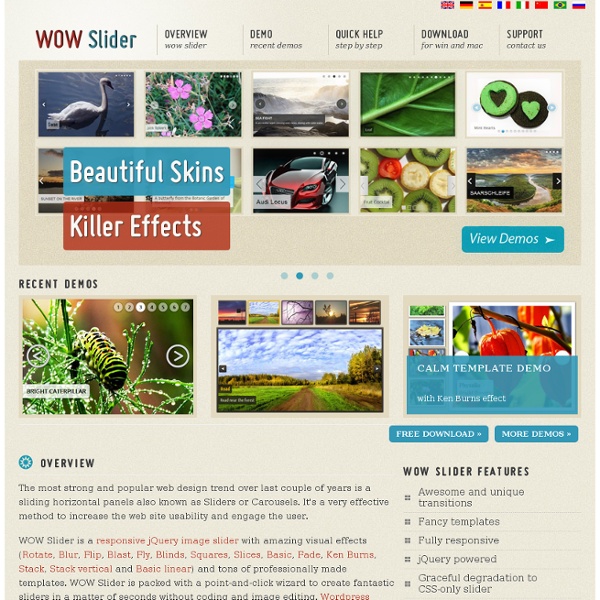
Top 30 Javascript Slideshows, Sliders and Carousels | Vivalogo Resources In this article we'd like to present a list of over 30 hand-picked Javascript Slideshows, Sliders and Carousels. It`s probably the web`s most comprehensive list of these resources. Take a lookNote: listed in no particular order. jquery.popeye Demo Popeye generates an inline image gallery from an unordered list of images. Cincopa Demo Cincopa is the ultimate sales boosting plugin for CMS based sites (wp, Joomla,etc). BarackSlideshow Demo A slideshow as the one seen on Barack Obama's website, based on Mootools. A jQuery plugin for controlling a list of items in horizontal or vertical order. noobSlideDemo Based on Mootools. SpaceGalleryDemo A jQuery plugin. Agile CarouselDemo A jQuery plugin that allows you to easily create a custom carousel. Simple Controls Gallery Demo A jQuery plugin that rotates and displays an image by fading it into view over the previous one, with navigation controls that pop up when the mouse rolls over the Gallery. Animated JavaScript SlideshowDemo Easy POP Show uGalleryDemo
You Publish Graphic Design Tutorials : Graphic Design Software Directory & Portal for Graphics Tips : Desktop Publishing Resources & Graphic Design Links [2200+ Sold!] DESTROYING "Banner Blindness", One Warrior at A Time! Any Niche, Anywhere! I also got stuck in an endless loop on the OTO. I'm using Firefox. Buyers, if you can't get out of the OTO, don't worry. Just log in to JVZoo and the download will be there waiting. I was an early buyer, received only the plugin and was slightly disappointed there were no instructions. But that all evaporated when I uploaded the plugin and activated it. Two things I think you should look out for that tripped me up. 1. 2. Re: 2. So far I'm having fun with this plugin, perhaps too much fun. I'll have to settle down and use it wisely to get the full reward. Use it sparingly and it will serve you well.
Demo | jQuery.popeye 2.0 | an inline lightbox alternative x Note: To see the full potential of CSS3 styling (shadows, gradients, rounded corners, alpha transparency), please view this page in a modern webkit or mozilla browser (Firefox 3.5+, Safari 4, Opera 10.50, Chrome 4). Other browsers will degrade gracefully. Except for IE6, though, which I didn't bother to include. Feel free to come up with your own solution ;-) Example 1 The first popeye-box uses the standard options: it floats to the left and opens to the right, its navigation and caption show on mouseover. By placing the navigation inside the stage area (where the image is displayed), we can get it to hover above the image. No need to read this, just dummy text ;-) Vivamus ut nisi id libero interdum pretium. View HTML code used in this example Example 2 The navigation stays fixed to the right of the image. There is no enlarge button, but a click on the image enlaregs and shrinks it nevertheless. Lorem ipsum dolor sit amet, consectetuer adipiscing elit. View HTML code used in this example
Social Marker I am working hard on a new website called eptiv.com which is basically a news aggregator, a place where you can find the latest headlines from trusted news sources around the web. On eptiv.com you have the opportunity to share opinions and discuss all the latest news which are of interest to you. Please help by registering on the website (for free) and commenting on all the news stories that you find interesting. Feedback and suggestions are very welcome! Latest blog post Our final Tweet For those of you who have tried bookmarking in the past half hour, you may have noticed that all your efforts were taking you to Twitter . What is SocialMarker.com? Social bookmarking is a powerful tool in promoting a website. Why SocialMarker.com? It can help you spread a link on 17 of the best social bookmarking sites in under 15 minutes! It helps you get a lot of backlinks. Requirements Social Marker runs smoothly on all major web browsers, but we recommend downloading and using Firefox. How to use it
Minimalist Web Design: When Less is More As designers, we all know that a minimalist design can achieve beautiful results. Still, many designers have trouble creating one; either they have a hard time making a page with so few elements look good or the final result just doesn’t look “complete.” There are many articles on the Web about minimalism and this article aims to help you achieve a minimalist design that is beautiful but not bare. To top it off, we’ll present a small showcase of minimalist designs, so that you can analyze why some designs work and others don’t. What Is Minimalist Design? Minimalist design has been described as design at its most basic, stripped of superfluous elements, colors, shapes and textures. Its purpose is to make the content stand out and be the focal point. The design movement began in Switzerland and was then applied to a variety of media: graphic design, architecture, music, literature, painting and, more recently, web design. We’ll go over the basic principles of minimalist design. Less Is More 1.
SpeakPipe - listen to your customers