5 Ways to Add Interactive Elements to Your Videos
Over the last few days I've featured a couple of free tools for adding interactive elements to your videos. In the last year I've reviewed a few other services and methods for doing the same thing. This is a round-up of the ways that you can add interactive elements to your videos. The first four tools could be used by students to create a series of choose your own adventure videos. YouTube has annotation tools built right into the editor that you can use when you upload your own content to the site. The Mad Video is a new service for creating interactive videos. Embed Plus is a handy tool for editing and annotating videos that you find on YouTube. wireWax is a new service that takes the concept of YouTube annotations and makes it much better. Blubbr is a neat quiz creation service that you can use to create video-based quizzes.
CamStudio - Free Screen Recording Software
YouTube embedding and SEO on WordPress and more
Flipped Classroom Tools/Video Resources - Fargo North Library & Technology
Educreations is a recordable interactive whiteboard that captures your voice and handwriting to produce amazing video lessons that you can share online. Students and colleagues can replay your lessons in any web browser, or from within our app on their iPads. You can use an iPad or an internet browser to record the lessons. This is for very basic lessons using the whitebooard or images, Camtasia Camtasia is a software program that allows you to create videos, including recording on-screen activity, import media, create interactive content, and share your videos. There is a free trial version you can request downloaded on your computer to try it out.
TeacherTube Official Blog TeacherTube Official Blog
TeacherTube
2 outils pour créer des scénarios interactifs de vos vidéos en ligne |
Le premier outil Adventr : Après inscription gratuite, veuillez patienter car liste d'attente, moi j'ai attendu 48h pour mon code, patience… Il suffit de glisser-déposer vos clips pour créer votre scénario, construire vos vidéos avec votre storyboard. Vous pouvez interagir et choisir votre propre cheminement, établir un storyboard avant. Vous pouvez créer des interactions avec image ou texte. (voir exemple ci-dessous) Un exemple d'utilisation, après avoir créer toutes les vidéos de deux histoires imaginaires, glisser-déposer vos vidéos et établir une ou plusieurs suites possible à votre histoire. Peut être utiliser dans toutes les disciplines, tous niveaux, votre imagination est à vous… Bonne création !… Le site Web : Leçon de piano interactive : Une fois votre travail effectué, vous allez pouvoir l’enregistrer (il faudra être identifié à Mozilla, la création du compte s’effectue très rapidement, il suffit d’une adresse mail et d’un mot de passe).
Wideo, WeVideo, and Magisto - Three Good Tools for Creating Videos Online
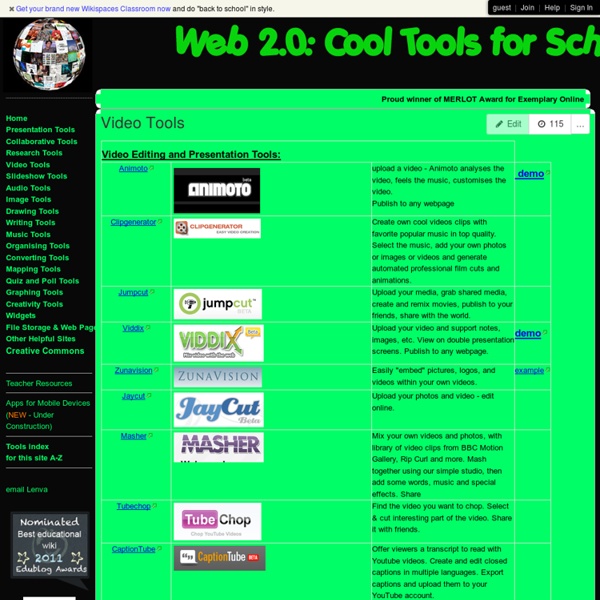
This morning I received an email from a reader who was looking for a video creation tool that offers project themes like those that you can find in iMovie. Here are three nice online video creation tools that I frequently recommend to teachers. All three of these tools have themes and or templates that you can apply to your videos. Magisto is a video creation tool that allows you to quickly drag videos and images from your desktop and or Google Drive account to your Magisto account. From the videos you upload, Magisto will select the best portions to remix and blend with images. Wideo is a neat video creation service that allows anyone to create animated videos and Common Craft-style videos online through a simple drag-and-drop process. WeVideo is an online video creation tool that I have written about extensively over the last few years.
A Handful of Ways to Display YouTube Videos Without "Related" Content
Advertisements and "related" videos in the right hand side of a YouTube page can contain some content that you don't want to accidentally project when showing a video to students. Here are some ways to project YouTube videos in your classroom without showing YouTube's sidebar content. Watchkin is a service that allows you to watch and project YouTube videos without seeing the related sidebar content typically seen on YouTube.com. View Pure is a simple little tool that strips way all of the distractions of related videos, comments, and promoted videos. Quietube is a handy little browser extension that removes all the clutter from YouTube allowing you to view only your selected video. SafeShare.tv makes it possible to view YouTube videos without displaying the related videos and associated comments. Embedding YouTube videos into Google Slides, a blog post, or wiki page will also allow you to show videos without displaying the sidebar content that is typically found on a YouTube page.


I definitely need to keep tabs on this resource. Video editing is a wonderful craft. by williamellerbe Sep 27