
QR Code Stencil Generator and QR Hobo Codes. Yep, it’s a QR code stencil generator!
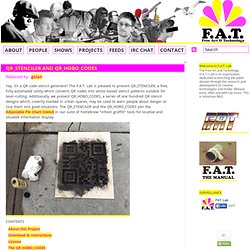
The F.A.T. Lab is pleased to present QR_STENCILER, a free, fully-automated utility which converts QR codes into vector-based stencil patterns suitable for laser-cutting. Additionally, we present QR_HOBO_CODES, a series of one hundred QR stencil designs which, covertly marked in urban spaces, may be used to warn people about danger or clue them into good situations. The QR_STENCILER and the QR_HOBO_CODES join the Adjustable Pie Chart Stencil in our suite of homebrew "infoviz graffiti" tools for locative and situated information display. ABOUT THIS PROJECTQR codes are a form of two-dimensional barcode which are widely used to convey URLs and other short texts through camera-based smartphones. Closeup of a QR code lasercut in 1/8"-thick fiberboard.
Workshop Processing septembre 2011( Niveau découverte ) Scrbtle. Scrbtle is a generative drawing tool that consists of a scripting language with a simple set of commands and predefined variables.

The idea behind it is to create nice graphics and to learn how to code in a playful way. Feel free to join the flickr group and share your images and code. If you have any feature requests or want to report a bug (there are a lot) please get in touch. Scrbtle is being developed by Henner Wöhler and still in alpha stage. The source code will be released as soon as the beta stage is reached. Scriptographer.org - News. Processing - Présentation de l’environnement. Programmation Processing - Présentation de l’environnement Nous avons conçu un éditeur simple et utilisable pour écrire et exécuter des programmes.

L’environnement Processing (Integrated Development Environment ou IDE) dispose d’un éditeur de texte et d’une fenêtre pour visualiser les programmes. Quand on clique sur le bouton « RUN » le programme est compilé, la fenêtre de visualisation s’ouvre et le logiciel s’exécute à l’intérieur. Processing (fr) Conçu par des artistes, pour des artistes, Processing est un des principaux environnements de création utilisant le code informatique pour générer des œuvres multimédias sur ordinateur.
L'attrait de ce logiciel réside dans sa simplicité d'utilisation et dans la diversité de ses applications : image, son, applications sur Internet et sur téléphones mobiles, conception d'objets électroniques interactifs.
KetchupAddict. Blog: Real-time server visualization with canvas and processing. Monitor anywhere With Rackspace Cloud Monitoring, you can monitor your websites—whether they're hosted on the Rackspace public cloud, Rackspace dedicated servers, servers in your data centers, or even servers in other providers' data centers.

Send alerts to your laptop or smartphone to stay on top of your entire infrastructure, including websites, ports, protocols, and more. And use graphs to quickly analyze your server activity and identify trends, outliers, and patterns. Server Monitoring Monitor your servers, no matter where they're hosted Learn More Customize Using our API or Cloud Control Panel, you can set up alerts to notify you when a service is down. Scale automatically Cloud Monitoring automatically scales to match the size of your infrastructure. Auto upgrade No installation. Control alerts Monitor services from multiple locations. Processing (fr) PostSpectacular: start. Advanced Tree Generator.
Processing with Lyndon Daniels. Codes - GENERATIVE GESTALTUNG. 2016-03-15RT @bndktgrs: 幸せなコーディング!
Launched: Our #GenerativeDesign book has also a 🇯🇵 website now! 👍 [Link] Cheers @BugNews! @Proce… 2016-03-05RT @bndktgrs: Our #GenerativeDesign book made it to 🇯🇵 #Japan! Drawing with particles. Ressources Processing et tutoriels en ligne. This is onformative a studio for generative design. Processing Paris 2011. The programming playground. 2D Transformations. This tutorial is for Processing version 1.1+.

If you see any errors or have comments, please let us know. Download the files from this tutorial. Processing has built-in functions that make it easy for you to have objects in a sketch move, spin, and grow or shrink. This tutorial will introduce you to the translate, rotate, and scale functions so that you can use them in your sketches. Translation: Moving the Grid As you know, your Processing window works like a piece of graph paper. If you want to move the rectangle 60 units right and 80 units down, you can just change the coordinates by adding to the x and y starting point: rect(20 + 60, 20 + 80, 40, 40) and the rectangle will appear in a different place. But there is a more interesting way to do it: move the graph paper instead.
Translation The important thing to notice in the preceding diagram is that, as far as the rectangle is concerned, it hasn’t moved at all. What’s the Advantage? Rotation Hey, what happened? Rotating the Correct Way. Hartmut Bohnacker's Homepage.