
Building a jQuery Image Scroller. In this tutorial, we're going to be building an image scroller, making use of jQuery's excellent animation features and generally having some fun with code.

Image scrollers are of course nothing new; versions of them come out all the time. Many of them however are user-initiated; meaning that in order for the currently displayed content to change, the visitor must click a button or perform some other action. This scroller will be different in that it will be completely autonomous and will begin scrolling once the page loads. The finished widget will be completely cross-browser and perform as expected in the latest versions of all of the most common browsers. We'll also build in some interaction by adding controls that allow the visitor to change the direction of the animation.
Getting Started Let's create the underlying HTML page first of all; in a new page in your text editor add the following code: Save this as imageScroller.html inside a new folder. Styling the Widget Changing Direction. Smooth Vertical or Horizontal Page Scrolling with jQuery. In this tutorial we will create a simple smooth scrolling effect with jQuery.
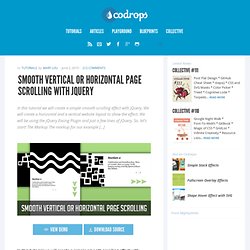
We will create a horizontal and a vertical website layout to show the effect. We will be using the jQuery Easing Plugin and just a few lines of jQuery. So, let’s start! The Markup The markup for our example […] View demoDownload source In this tutorial we will create a simple smooth scrolling effect with jQuery.
So, let’s start! The Markup The markup for our example page is going to be very plain. The HTML is going to be the same for both examples. The CSS Since we have two examples, we will start with the horizontal page style. The main idea is to make the sections very wide and 100% in height. We need to give the body a valid height, because we want to be able to define the height 100% to the section. The style for the vertical page layout is going to look as follows: Nothing special here, just that we give a big height to the sections.
Let’s add the JavaScript. FleXcroll: Cross Browser Custom ScrollBar. A Cross Browser* and Standards Compliant Custom ScrollBar Script by Hesido featuring touch scroll for iPhone Safari updated on 05.06.2016; Switched to FastSpring for payment. updated on 03.02.2013; version 2.1.1, fleXcroll overhaul for click, touchmove and keyboard event handling with many bugfixes and new styling elements for easier customization of scrollbars. updated on 23.05.2010; version 2.0.0, fleXcroll major update for consistency and lots of backbone changes, including iPhone Safari support. older updates are discarded created on 09.08.2005 You sometimes need custom scrollbars to go with your design intensive web-page, and I have come up with a cross-browser javascript solution that let's you use (X)HTML without having to resort to Flash.
Features & Brief history of fleXcroll: Enhanced in 2.1.1 Better dynamic forms support. *There are a few situations where fleXcroll behaves differently. Top dolor sit amet, consectetuer adipiscing elit. Aenean ullamcorper leo a neque. Nunc sed arcu.