
Bullseye from 1,000 yards: Shooting the $17,000 Linux-powered rifle. My photographer, Steve, squints through a computerized scope squatting atop a big hunting rifle.

We're outdoors at a range just north of Austin, Texas, and the wind is blowing like crazy—enough so that we're having to dial in more and more wind adjustment on the rifle's computer. It’s good to be Batman. Super User. Warlord Sports. z72wW9g. Arizona Republicans Propose Bill That Would Not Allow Atheists To Graduate High School.
After protracted legal battle, System Shock 2 finally available. Few games conjure up the awe and reverence among PC gamers that System Shock 2 produces.

The sci-fi horror RPG, set onboard a crippled starship drifting far from home, is an unquestioned masterpiece. The game was originally released in 1999 by Looking Glass Studios, the same development crew responsible for the genre-defining sneaker FPS Thief, and though it broke no sales records, its exquisite tension-filled story and well-implemented RPG elements quickly earned it high accolades. Unfortunately, it has been almost impossible to legally acquire the game for a number of years.
UsingTheTerminal. "Under Linux there are GUIs (graphical user interfaces), where you can point and click and drag, and hopefully get work done without first reading lots of documentation.
The traditional Unix environment is a CLI (command line interface), where you type commands to tell the computer what to do. A Crash Course in Using the Mac Terminal. Almost everything can be done with the Terminal.
MIT creates LED that cools its surrounding environment. Source: Happy Via Researchers at MIT recently unveiled the LED which has an energy efficiency of over 200% A group of researchers in the US have unveiled an LED which emits more light energy than it consumes in electrical energy.
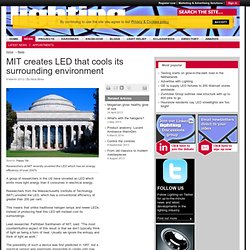
Researchers from the Massachusetts Institute of Technology (MIT) unveiled the LED, which has a conventional efficiency of greater than 200 per cent. This means that unlike traditional halogen lamps and newer LEDs, instead of producing heat this LED will instead cool its surroundings. Lead researcher, Parthiban Santhanam of MIT, said: “The most counterintuitive aspect of this result is that we don’t typically think of light as being a form of heat.
Dig Up System Information Using the Terminal. Troubleshooting, upgrading, or just curious?
Find out what’s in your system without opening the case. Using these Linux command line tools, you can get details about your hardware and distribution. I’ve tested these commands in Ubuntu 7.10, but they should all work in other Linux distributions. Unless noted otherwise, all of this software is included by default with Ubuntu.
Graphics card:glxinfo – details about OpenGL, the Xserver, and your graphics cardglxinfo | grep direct – do you have direct 3d rendering? Audio:lspci | grep Audio – audio controlleraplay --list-devices – more audio device information Software versions:cat /etc/issue – current distribution and versionapt-cache showpkg packagename – packagename’s version and dependenciesuname -r - Linux kernel versionuname -a – all kernel details. Valentine's tips: How to woo a scientist. Valentine's Day is typically a hard time for many, namely those who object to the commercialised nature and emphasis on public displays of affection, those who are presently single but would rather not be and find the whole ethos of the day offensive, or some combination of the two.

But there is a simple solution to both of these problems: date a scientist. Scientists are highly educated people with decent career prospects, but are also rarely associated with a fondness for romance and passion (or any other emotional state) so are likely to be apathetic towards Valentine's Day. Ergo, scientists are the ideal partners. Index of iSpace work. Anonine. CSS. An Absolute Beginner's Guide to the Terminal. Sitting discreetly in Utilities folder (nestled nearly unnoticed amid your applications) is one of the most powerful tools ever created for the Mac.

It is simple and elegant, yet can be intimidating (if not terrifying) and has the power to cure some of your computer’s most puzzling ills. It also possesses the fearsome ability to wreak unimaginable havoc on your system. We are talking, of course, about the Terminal, that magnificent gateway to the hidden underpinnings of the Mac OS. Mark K. Jowett, Ph.D. - Database Resources. Useful Links: Back to Useful Links Working with Databases: 1) Creating ERDs Using MySQL Workbench 2) Data Modeling Checklist 3) MySQL Data Types Quick Ref 4) SQL - Quick Reference 5) Forward Engineering Using MySQL Workbench SQL Statements (Uses Premiere database: bottom of page) Log in to *YOUR* database using MySQL Workbench, AND through SSH: Notes > MySQL Workbench and SSH Login Procedures: 1. Using MySQLWorkbench, AND 2. Using SSH Client (a. Windows, b. Overall database reports: Display user, timestamp, and MySQL version: select user(), now(), version(); Display your grants: show grants; Display the databases for which you have access: show databases; Upload table structures and data: ***First: BACKUP *ALL* existing tables!
Drop database if exists yourusername; create database if not exists yourusername; use username; source db/premiere.sql --or... \. db/premiere.sql.