
Home. Assignment workflow for iPad - Showbie. GoClass - Create and Deliver Lessons on iPads. Last week I wrote about NearPod which is an iPad application for creating and delivering quizzes to students.
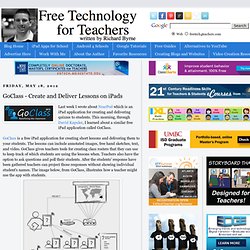
This morning, through David Kapuler, I learned about a similar free iPad application called GoClass. GoClass is a free iPad application for creating short lessons and delivering them to your students. The lessons can include annotated images, free hand sketches, text, and video. GoClass gives teachers tools for creating class rosters that they can use to keep track of which students are using the lessons when. Teachers also have the option to ask questions and poll their students. Easy Portfolio – Create Student Portfolios on Your iPad. Stampsy - Create Digital Media Content on an iPad. Fresh - Quipio. App_pdf-new.pdf. Creative APP-titude: iPad Multimedia Tools for Creativity.
Szoter - Annotate Pictures and Take Screenshots. Szoter is a free online tool for annotating images that are stored on your computer.
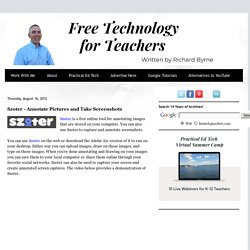
You can also use Szoter to capture and annotate screenshots. You can use Szoter on the web or download the Adobe Air version of it to run on your desktop. Either way you can upload images, draw on those images, and type on those images. GoClass Adds Useful Features for Teaching With iPads. Last month I shared a post about a free iPad app called GoClass that allows you to create and deliver learning activities to your students that are using iPads.
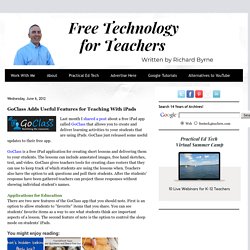
GoClass just released some useful updates to their free app. GoClass is a free iPad application for creating short lessons and delivering them to your students. The lessons can include annotated images, free hand sketches, text, and video. GoClass gives teachers tools for creating class rosters that they can use to keep track of which students are using the lessons when. Teachers also have the option to ask questions and poll their students. Applications for Education There are two new features of the GoClass app that you should note.
Annotate, Correct and Edit Documents on Your iPad. <div class="greet_block wpgb_cornered"><div class="greet_text"><div class="greet_image"><a href=" rel="nofollow"><img src=" alt="WP Greet Box icon"/></a></div>Hello there!
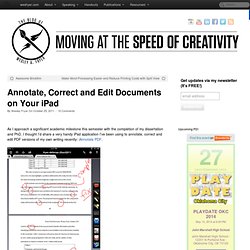
If you are new here, you might want to <a href=" rel="nofollow"><strong>subscribe to the RSS feed</strong></a> for updates on this topic. <div style="clear:both"></div></div></div> As I approach a significant academic milestone this semester with the completion of my dissertation and PhD, I thought I’d share a very handy iPad application I’ve been using to annotate, correct and edit PDF versions of my own writing recently: iAnnotate PDF. iAnnotate PDF is $10 on iTunes, but it’s worth every penny. Technology with Intention. English iPad Apps.
10 Excellent iPad Applications for Teachers. With the iPad2 on the launching pad, it’s a great time to share this list of useful iPad apps for teachers from guest writer Paula Dierkens.
There’s no doubt that the iPad is an excellent device, and if you own this gadget, it makes sense to pick up the applications best suited to your lifestyle and profession. So if you’re a teacher, here are ten great iPad apps that you must try out: [Note to readers of this article! I conducted a survey in March of 2012 to update this list of iPad apps that educators like to use in their professional roles, so it is based on actual teacher input. The results are available in this post. 1. 2. 3. 4. 5. 6. 7. 8. 9. 10. By-line: This guest post is contributed by Paula Dierkins, who writes on the topic of PhD Online Degree . As always, comments and questions are encouraged and welcomed. About Kelly Walsh. Explain Everything.
I love this app!
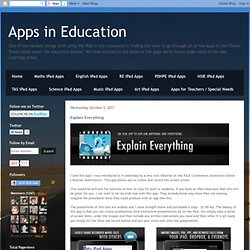
I was introduced to it yesterday by a very cool librarian at the ASLA Conference (Australian School Librarian Association). This app allows you to create and record live screen action. This would be brilliant for tutorials or how-to clips for staff or students. If you have an iPad classroom then this will be great for you. Use Air Sketch with Dropbox for Wireless iPad Presentations. Many times I find myself in a situation where I want to do a presentation with the ability to stay mobile and move around the room, but I don’t have access to install software on the computer.
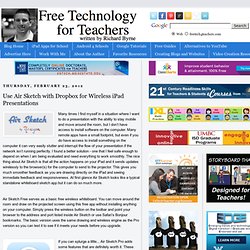
Many remote apps have a small footprint, but even if you do have access to install something on the computer it can very easily stutter and interrupt the flow of your presentation if the network isn’t running perfectly. I found a better solution - one that I feel safe enough to depend on when I am being evaluated and need everything to work smoothly. The nice thing about Air Sketch is that all the action happens on your iPad and it sends updates wirelessly to the browser(s) for the computer to send to the projector.