
- SLN13039 - Guest Passes in Flickr. Override table css stuff for a single table in one article. Kunena. Images Rotators. 2JCarousel 2JCarousel – it’s AJAX 3D images carousel, with wide range of customization options (attention!!!

Saint Swithun Stained Glass Window Saint Swithun Is Most Famous For His Association With The Weather. Stock Photo 58473106. Swithun. St Bartholomew from Prado. Santacroce St. Lawrence.JPG. Cross-Browser Inline-Block. Ah, inline-block, that elusive and oh so tempting display declaration that promises so much, yet delivers so little.
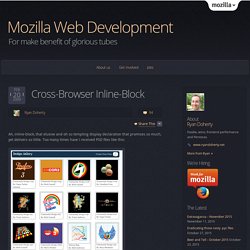
Too many times have I received PSD files like this: and begin to cry. Normally, this type of layout would be a cakewalk. Fixed width, fixed height, float:left and you’re done. Buuuuut, the design needs to work with variable amounts of content, which means if one of these blocks has more content than the others, it will break the layout: Because the first gallery item is taller than the rest, the 5th item is floated left against it instead of below it.
Edit fiddle. Html - How do I line up 3 divs on the same row. Tryit Editor v1.9. Add Custom CSS. Very handy tool in the box.

Works as expected. One flaw though: the minified css is put before the CSS of other modules and components, hence you cannot override their styles unless you use ! Downloads. Creating Custom Styles. The Styles list in the editor toolbar is automatically filled with class names from your tempate or editor stylesheet.

Using the Custom Styles widget in Editor Profiles, you can add to or replace these styles with other classes, or with more complex styles that apply a tag, class or css style. The Custom Styles widget is available when creating or editing Profiles. It is located in the Editor Parameters tab, in the Typography section, and is only available when the Editor Styles option is set to Add or Overwrite Selecting Add will add the custom styles you create to the Styles list. Selecting Overwrite will replace all the options in the Styles list with the new custom styles. Each Custom Style requires a Title and a Tag.
Title The Title acts as a description for the style and as a label for the style in the Styles list. Tag. CSS Selectors. Wrap Text Around Images. Placing a Slideshow in an Article. Category: 6 Multimedia In the previous articles, we reviewed how to add a Phoca Gallery slide show to the Home page of your website.

We did this by creating a slide show and then using the Phoca Gallery Module to place the slide show in a box near the top of the Home page. You can also create a new Phoca Gallery Module by going to Extensions, Module Manager and clicking on NEW. Tutorial CSS Joomla 2.5. Like Box. Amil's Website: Google Calendar: Repeating Events on Every 5th Sunday. The Trick Click on the first day of the series in Google Calendar and type 'My Event, fifth Sunday of every month, 12:30-3:00' in the "What:" field: Modify details as necessary.

The Story. Getting Started with Calendars and Categories. Categories After you install JEvents you should open the component in the backend and click on 'Manage Categories'.

As the name suggests categories are used to organise events into different types. Joomla Tutorial: How to create an RSS Feed in Joomla 2.5. Auto Subscription for Kunena. MyFlickr Example: Feed - Photoset - in-Web.pl. Joomla Template Gallery. How to Use Two or More Templates in Joomla? - Tips & How to - Joomla Templates and WordPress Themes - Gavick.com Blog. In Joomla 2.5 and Joomla 3.0, you can use more than one design template in your webpage.

This means that you can create a webpage with groups of subpages, or even individual subpages that have a unique style. Every Joomla webpage is based on a design template. A design template is a file that contains the styles in a presentation, including the type and size of bullets and fonts, position of modules, placeholder sizes and positions, background design and fill, color schemes and a responsive features. To understand Joomla templates, think of them as predefined layouts. You can easily imagine a template as a wrapper for your content. Using multiple Joomla templates.
How to Secure and Encrypt Your Web Browsing on Public Networks (with Hamachi and Privoxy) A VPN tool like Hamachi's good for games, which usually don't support proxies, but for web browsing encryption, a SSH tunnel with AES256 encryption and public key authentication is superior, not only in terms of security, but in portability and "less bulky" software.
In order to configure a VPN connection, you need Administrator privileges on Windows computers, plus you have to install software. With a SSH connection, all you need is a SOCKS server+SSH client blend (which does not require administrator privileges, though some applications need them for various reasons. Putty does not.), then point your web browsers proxy settings to localhost, and Voila! Publishing your documents, spreadsheets, presentations, and drawings - Drive Help. Publishing allows you to make your Google documents, spreadsheets, presentations, and drawings available to the whole world.

Once you publish your document, spreadsheet, presentation, or drawing to a webpage, you get a URL that you can share with anyone you choose. To publish any of your items, just follow these steps: Open the item you'd like to publish. From the File menu, select Publish to the Web.... Php - modify mod_mainmenu to get hover text on menu items. View topic - author name visible even when i choose "no" Author name visible even when i choose "no" IT TheChurch Premium Joomla 2.5 Template by IceTheme. JSN Vintage template - Try free joomla portfolio template. Embed Google Docs Viewer. The installation of this plugin was easy. I have not tested the other Google document formats - only presentations. The tool currently does not support Google presentations in it's current form. The developer has been super helpful in providing a work around / hot fix to this problem which I hope will appear in the next release which will follow soon.
I look forward to the next release and think that this plugin has considerable promise and potential. It is not quite there but I have not found other plug-ins that do what I wanted. I really look forward to the next release. Thanks and keep the updates coming Petteri. All. 3.0. template tutorial? What worked for me is I went through the Bootstrap documentation at , which was very easy to follow. The toughest part was simply starting. BoyScout - Free Joomla Template. Configuring Eclipse for joomla development. Install Java Eclipse is written in Java, so before you can install Eclipse, you need to make sure you have a recent version of Java running.
Note that many Linux distributions include third-party Java runtimes (or JVM's for "Java Virtual Machine"), some of which don't work with Eclipse. The safest thing is to make sure you are running the Sun JRE (Jave Runtime Environment). You can download the latest Java version at www.java.com. If you already have a recent version of the Sun JRE (for example, 1.5 or 1.6), you can skip this step. Another option for Mac OS X Snow Leopard users is to download the OS X packages from for Subversion after you've installed Subclipse. Download Eclipse. Religion & Spirituality. St. About IFTTT. Wunderlist for Windows, Mac OS X, Linux, Web, Blackberry, Chrome OS, iPhone, iPad, Android, Android Tablet, Windows Phone and tagged with plugin.
How to set up a safe and secure Web server. Is it worth hosting a website at home? Raspberry Pi Firewall and Intrusion Detection System. Raspberry Pi Apache & Joomla Web Server. This is a guide to help anyone wanting to install Joomla on a Raspberry Pi. Raspberry Joomla! LAMP Stack with Webmin on AWS Marketplace. Amazon Web Services, Cloud Computing: Compute, Storage, Database. Support - Global Configuration window broken - Joomla Questions. 40 Best Church Website Templates. Event Registration Form - Google Docs Templates. Use Google Calendar to help you manage your events. Fabrik. How to edit form responses - Google Docs Help. How to pre-populate forms via URL parameters - Google Docs Help. Edit form responses after you submit them in Google Spreadsheets.
How to convert Joomla 1.5 template to Joomla 2.5 template. Cub Scout. Feedburner RSS Email Subscription. Concrete5 Scout Template now for 5.5 as well!!! Concrete5 Scout Template now for 5.5 as well!!! Understanding Drupal. Organic groups. Modules Unraveled. Drupal Tutorial - How to use Drupal. Drupal 7 Essential Training. Drupal 7 Essential Training. Set up a Windows test server using XAMPP. Get a Free Drupal 7 Site Here. LiveJournal. Submit joomla article by email. Ottawa Joomla Design and Joomla Hosting - Submitting Joomla Content By Email. Feed 101 - FeedBurner Help. FeedGator. How to Import blogger Into a Joomla Website? RSS Feeds from Blogger to Joomla…and back. Order Form. Kuler. Googleprivacy's Channel. Privacy Center. Controlling who can view your blog - Blogger Help. Search. What is my blog ID number? - Blogger Help. Christian Hosting - Free Domain, Blog, CMS, Forum. Using Kickstart to extract your backup archive. Animation/Cartoons. Affordable Shared Hosting Accounts from NSDesign - Glasgow - Scotland.
Biblos.com: Search, Read, Study the Bible in Many Languages.
Parish Site Links. GCalendar. Affordable Christian Web Hosting and Free Christian Websites with OurChurch.Com. Current parish website.