
Pimp your code! The simple, hassle-free way to manage an online home inventory list. Moviegram. Breathe life into your emails. :MAP.TO, A URLs Shorten Service For Maps!! The Best HDTV Finder. DotEPUB — download any webpage as an e-book. URL Opener. Fount · Identify any web font you see. RainyMood.com: Rain makes everything better. How To Be Classy In Three Easy Steps. SleepTiming: Match your sleep cycle and wake up refreshed! Access all your online files. Dice Simulator - Random Dice - Dice History. Timerrr = Online Countdown Timer. Lyrics by song, album, or music artist - LyricWiki. Protect Yourself from Hackers - HackNotifier. Air dates, summaries and reviews. Inbox - hozefakb. Doc-To-Image Converter. QR Code Generator.
Play'em. Shorten your Google+ URL - plus.ly. Create your Google Plus profile logo/picture. PageZipper - Life's too short to spend clicking "Next" « PrintWhatYouLike.com. Ever read one of those top ten lists or photo galleries where every item is on a different page? Quick Screen Share. Flights from San Francisco. AES text encryptor. Online Notes Services. Link directly to specific quotes in web pages. To install the Citebite bookmarklet, drag this box to the links area of your browser *: * The Citebite Bookmarklet is supported for Firefox, Safari and Internet Explorer.

SocialCompare - Comparisons community. Flash graph editor/viewer component. Compare phones. Prism. MyEdu. Five Free Scientific Calculators. In my school we've occasionally had a problem with scientific graphing calculators growing legs and walking away for good.

I'm sure we're not the only school to have that problem. One possible solution to the problem of disappearing calculators is to have students use calculators on their laptops, netbooks, or tablets. Dabbleboard - Online whiteboard for drawing & team collaboration. TitanPad. Hacker Typer. SocialCompare - Comparisons community. Library. RSS Feed Search Engine. Hindi keyboard. Divvr - Unique Drawing Application. Diagramly - Draw Diagrams Online. THE HIGHLIGHTS.
Iaza: Free Online Image Conversion - Simple & Easy Converter (Images, Graphics, Avatars, Anime ...) PhotoCollect - Photo sharing made easy, privately or in groups. Flick and Share - Share your Flickr sets with your friends! Zest of life. How to Capture Dynamic Screenshots of Web Pages. Learn how to capture dynamic screenshots of web page in an automated manner.

Such screenshot images refresh automatically if the content, or the layout, of the underlying source website has changed. There are innumerous software programs and browser add-ons that let you capture screenshots of web pages with a click. You open some page in your browser, hit the capture button and the screenshot gets saved as a static image. Simple. There can however be instances when you may want to capture ‘dynamic’ screenshots of web pages – images that refresh automatically if the content, or the layout, of the underlying web page has changed. The short answer is this simple web form. Here’s a sample screenshot image that is 1024 pixels wide that is also ‘dynamic.’
You may be wondering why would anyone want such ‘dynamic’ screenshots? There are other potential uses as well. Behind the scenes – The Geeky part. Stolen Camera Finder - find your photos, find your camera. What's the Best? Stop Searching. Prezi - The zooming presentation editor. Upload - Dropdo. Online Video Rotator. The World Factbook. People from nearly every country share information with CIA, and new individuals contact us daily.

If you have information you think might interest CIA due to our foreign intelligence collection mission, there are many ways to reach us. If you know of an imminent threat to a location inside the U.S., immediately contact your local law enforcement or FBI Field Office. For threats outside the U.S., contact CIA or go to a U.S. Embassy or Consulate and ask for the information to be passed to a U.S. official.
Please know, CIA does not engage in law enforcement. In addition to the options below, individuals contact CIA in a variety of creative ways. If you feel it is safe, consider providing these details with your submission: Print friendly & PDF your blogs and websites. Print Friendly & PDF. Free Online PDF Converter, Batch Convert to PDF or Image, Doc Converter, PDF Printer. Bookmarklet « PrintWhatYouLike.com.
To Install: Include the editor in any page with a single click How it works: Click the PrintWhatYouLike button in your bookmarks toolbar The PrintWhatYouLike editor will appear around the page you're on.

When you are finished making changes, click the PrintWhatYouLike button again, and the editor will disappear. RDD.me Link Shortener. 100+ Google Tricks That Will Save You Time in School – Eternal Code. [via onlinecolleges.net] With classes, homework, and projects–not to mention your social life–time is truly at a premium for you, so why not latch onto the wide world that Google has to offer?

From super-effective search tricks to Google hacks specifically for education to tricks and tips for using Gmail, Google Docs, and Google Calendar, these tricks will surely save you some precious time. Search Tricks. Access Any Website Or Forum Without Registering. Visit any forum or website to find something useful and they will ask you to register.
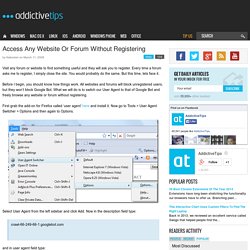
Every time a forum asks me to register, I simply close the site. You would probably do the same. But this time, lets face it. Before I begin, you should know how things work. All websites and forums will block unregistered users, but they won’t block Google Bot. First grab the add-on for Firefox called ‘user agent’ here and install it. Select User Agent from the left sidebar and click Add. Forums. Shortcut Arrow - Change, Remove, or Restore.
How to Change, Remove, or Restore the Shortcut Arrow Overlay Icon in Windows Information This tutorial will show you how to change, remove, or restore the default shortcut arrow overlay on all shortcut icons in Vista, Windows 7, and Windows 8.

You must be logged in as an administrator to be able to do the steps in this tutorial. Warning. CityPockets.