
5 Fun things To Do on School Computers - Pahgawks Animations. November 26th, 2010 I know it's been a while, but I'm reinstating my weekly blog post policy.
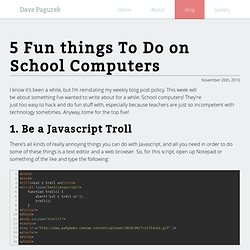
This week will be about something I've wanted to write about for a while: School computers! They're just too easy to hack and do fun stuff with, especially because teachers are just so incompetent with technology sometimes. Anyway, tome for the top five! 1. There's all kinds of really annoying things you can do with Javascript, and all you need in order to do some of these things is a text editor and a web browser. So what do you do with this code? So, what does this code do? 2. Yep, it's actually quite easy to do. Or if it's actionscript 3 write the following: Press Control-Enter when you're ready to crash your computer. 3. Want to be an administrator? Although, you have to replace USERNAME with whatever your username is. Note: This may or may not work if they have disabled the command prompt. Using Googles Full Capabilities. « XBOX, XBOX 360, PS2, PS3, PSP, & MORE! – Your source for the latest in console modding.
Well most of you use Google to probably look up porn.
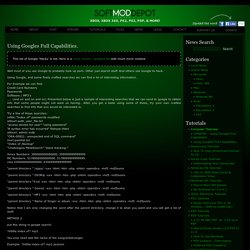
Other just search stuff. And others use Google to hack. Using Google, and some finely crafted searches we can find a lot of interesting information. For Example we can find: Credit Card Numbers Passwords Software / MP3′s …… (and on and on and on) Presented below is just a sample of interesting searches that we can send to google to obtain info that some people might not want us having.. After you get a taste using some of these, try your own crafted searches to find info that you would be interested in. Try a few of these searches: intitle:”Index of” passwords modified allinurl:auth_user_file.txt “access denied for user” “using password” “A syntax error has occurred” filetype:ihtml allinurl: admin mdb “ORA-00921: unexpected end of SQL command” inurl:passlist.txt “Index of /backup” “Chatologica MetaSearch” “stack tracking:” “parent directory ” /appz/ -xxx -html -htm -php -shtml -opendivx -md5 -md5sums put this string in google search: Default Password List - Submit.
Access Any Website Or Forum Without Registering. Visit any forum or website to find something useful and they will ask you to register.
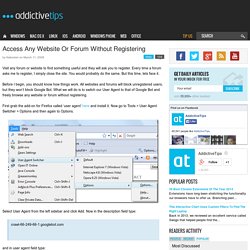
Every time a forum asks me to register, I simply close the site. You would probably do the same. But this time, lets face it. Before I begin, you should know how things work. All websites and forums will block unregistered users, but they won’t block Google Bot. First grab the add-on for Firefox called ‘user agent’ here and install it. Select User Agent from the left sidebar and click Add. Crawl-66-249-66-1.googlebot.com and in user agent field type: Googlebot/2.1 (+ as shown in the screenshot below. Select Google Bot as your User Script by going to Tools > User Agent Switcher. Now browse any website or forum without registering. Advertisement.